Dell Vostro 3530 15, Core i3-1305U, 8GB, 512GB SSD, Black
The Intel Core i3-1305U processor and 120Hz IPS display make this Dell Vostro 3530 a responsive choice for everyday business tasks, with a 512GB NVMe SSD for fast storage. Its 1.66kg weight and Windows 11 Pro offer portability and security features suited for remote work. Best for students and business professionals who need a reliable, budget-friendly laptop for spreadsheets, video calls, and document editing, not for gaming.

Sem preço atual de lojas


Resumo
The 30-Second Version
The Dell Vostro 3530 is a budget business laptop with a surprisingly smooth 120Hz display and Windows 11 Pro. Performance is limited by the Core i3 CPU, 8GB of RAM, and integrated graphics, so it's best for light office work. At 16,799 MXN, it's a fair deal for basic productivity, but not a machine for heavy multitasking or gaming.
Pros & Cons
Prós
- 120Hz IPS display at a budget price 85th
- Windows 11 Pro included 78th
- 512GB NVMe SSD feels responsive
- Ethernet port for reliable wired connections
- Lightweight at 1.66kg
Contras
- Core i3-1305U is underpowered for heavy multitasking
- 8GB RAM fills up fast
- Integrated graphics can't handle gaming
- 250 nits display is dim in bright rooms
- Only Wi-Fi 5, no Wi-Fi 6
O que dizem os donos
The Word on the Street
As provas
Performance
The Core i3-1305U has one performance core and four efficiency cores, which sounds fine until you realize most modern budget chips give you more headroom. In our database, this CPU ranks in the 13th percentile, which puts it near the bottom of the pack for traditional laptops. Day-to-day tasks like Word docs and Chrome tabs are fine, but throw a big Excel file or a Zoom call with screen sharing at it and you'll feel the ceiling. The 8GB of DDR4 RAM doesn't help. That's also 13th percentile, and Windows 11 Pro plus a few browser tabs will eat through it fast.
The integrated Intel UHD Graphics is the weakest link. At the 7th percentile, this thing is not built for anything beyond basic video playback and maybe some very old games. Don't expect to run anything modern at playable frame rates. The 512GB NVMe SSD is the one bright spot, landing right around the middle of the pack. Boot times and app launches will feel snappy, which helps mask the CPU and RAM limitations in short bursts.
Specifications
Full Specifications
Processor
| CPU | Intel Core i3 1305U |
| Cores | 5 |
| Frequency | 1.6 GHz |
Graphics
| GPU | Intel UHD Graphics |
| Type | Integrated |
Memory & Storage
| RAM | 8 GB |
| RAM Generation | DDR4 |
| Storage | 512 GB |
| Storage Type | NVMe SSD |
Display
| Size | 15.6" |
| Panel | IPS |
| Refresh Rate | 120 Hz |
| Brightness | 250 nits |
| Color Gamut | 45% NTSC |
Connectivity
| USB-C Ports | 1 |
| USB Ports | 2 |
| HDMI | HDMI 1.4 |
| Wi-Fi | Wi-Fi 5 |
| Bluetooth | Bluetooth wireless card |
| Ethernet | RJ-45 |
Physical
| Weight | 1.7 kg / 3.7 lbs |
| OS | Windows 11 Pro |
vs Competition
Stacked against something like the Lenovo Legion Pro 7i or the ASUS ROG Zephyrus G14, the Vostro 3530 isn't even playing the same sport. Those machines have discrete GPUs and high-refresh gaming panels, and they cost several times more. That's not a fair fight, but it does highlight what the Vostro is not. The HP ZBook Ultra G1a and Apple MacBook Pro M5 Max are in a completely different universe for performance and price.
A more realistic comparison is other budget business laptops in the same price range. The Vostro's 120Hz display is actually a differentiator here. Most budget machines ship with 60Hz panels, so the smoother scrolling is a genuine win. But the Wi-Fi 5 limitation stings. Many competitors at this price now include Wi-Fi 6 or 6E, and the Vostro's port selection is thin, ranking in the 36th percentile. One USB-C port that's data-only means no charging or display output through it, which feels like a missed opportunity.
| Spec | Dell Vostro 3530 15 | Apple MacBook Pro 14.2" M4 Max | ASUS ROG Zephyrus 14" GA403WW-G14.R95080 | Lenovo Legion Pro 7i Gen 10 16" | HP OMEN Transcend | Samsung Galaxy Book5 Pro 14" NP944XHA-KG3US |
|---|---|---|---|---|---|---|
| CPU | Intel Core i3 1305U | Apple M4 Max | AMD Ryzen AI 9 HX 370 | Intel Core Ultra 9 275HX | Intel Core Ultra 9 285H | Intel Core Ultra 7 258V |
| RAM (GB) | 8 | 64 | 32 | 32 | 32 | 32 |
| Storage (GB) | 512 | 4096 | 2048 | 1024 | 1024 | 1024 |
| Screen | 15.6" | 14.2" 3024x1964 | 14" 2880x1800 | 16" 2560x1600 | 14" 2880x1800 | 14" 2880x1800 |
| GPU | Intel UHD Graphics | Apple (40-Core) | NVIDIA GeForce RTX 5080 | NVIDIA GeForce RTX 5070 Ti | NVIDIA GeForce RTX 5070 | Intel Arc Graphics 140V |
| OS | Windows 11 Pro | macOS | Windows 11 Home | Windows 11 Home | Windows 11 Home | Windows 11 Pro |
| Weight (kg) | 1.7 | 1.6 | 1.6 | 2.7 | 1.6 | 1.2 |
| Battery (Wh) | - | 72 | - | 99 | 71 | 63 |
| Compare | Compare | Compare | Compare | Compare |
| Produto | CPU | GPU | RAM | Portas | Tela | Portabilidade | Armazenamento | Confiabilidade | Prova social | Affordability |
|---|---|---|---|---|---|---|---|---|---|---|
| Dell Vostro 3530 15 | 28.8 | 28.2 | 13.3 | 35.9 | 60.9 | 49.7 | 51 | 33.5 | 84.7 | 78.1 |
| Apple MacBook Pro 14.2" M4 Max Compare | 93.7 | 91.6 | 95.7 | 73.3 | 99.3 | 68.9 | 98.5 | 98.1 | 87.7 | 1.7 |
| ASUS ROG Zephyrus 14" GA403WW-G14.R95080 Compare | 91.3 | 98.4 | 90.9 | 89.3 | 96.5 | 73.6 | 89.8 | 60.4 | 98.4 | 5.6 |
| Lenovo Legion Pro 7i Gen 10 16" Compare | 97.3 | 96.7 | 89.1 | 97.2 | 95.7 | 9.5 | 79.4 | 81.8 | 99.9 | 5.4 |
| HP OMEN Transcend Compare | 90.2 | 93.6 | 89.8 | 89.3 | 96.5 | 72.3 | 65.3 | 33.5 | 97.3 | 8.4 |
| Samsung Galaxy Book5 Pro 14" NP944XHA-KG3US Compare | 65.9 | 69.8 | 79.6 | 83.2 | 91.6 | 89.4 | 79.4 | 81.8 | 98.4 | 20 |
Preço
Value & Pricing
At 16,799 MXN, the Vostro 3530 is priced like a budget business laptop, and that's exactly what it is. The affordability score sits in the 78th percentile, so you're not getting ripped off, but you're also not getting a steal. The Windows 11 Pro license adds real value for business buyers who need domain join and BitLocker. But if you can stretch your budget a bit, you'll find machines with 16GB of RAM and better CPUs that will age far more gracefully. For the price, it's a fair deal, not a great one.
Saiba mais
Overview
The Dell Vostro 3530 sits in that budget business laptop bracket, the kind of machine you grab when the IT budget is tight and nobody wants to think too hard about it. At 16,799 MXN, you're getting a 15.6 inch 120Hz IPS display, a 13th Gen Intel Core i3-1305U, 8GB of DDR4 RAM, and a 512GB NVMe SSD. It runs Windows 11 Pro, which is a nice touch for a machine at this price point. The whole package weighs 1.66kg, so it's not going to break your shoulder on the commute.
Is the Dell Vostro 3530 good for everyday office work? For spreadsheets, email, video calls, and browser tabs, it'll get the job done. The 120Hz panel makes scrolling feel smoother than you'd expect from a budget laptop, even if the 250 nits brightness and 45% NTSC color coverage mean you won't want to edit photos on it. And yes, it has an Ethernet port, which is still a small miracle in 2025.
But let's be honest about what this is. The Core i3-1305U is a 5-core chip that sits in the 13th percentile for CPUs in our database. The integrated Intel UHD Graphics lands at the 7th percentile for GPUs. This is not a performance machine. It's a get-through-the-workday machine, and for a lot of people, that's exactly enough.
Common Questions
Q: Is the Dell Vostro 3530 good for gaming?
No, the Vostro 3530 is not good for gaming. The integrated Intel UHD Graphics ranks in the 7th percentile in our database, so it can only handle very old or very simple games at low settings.
Q: Can the Dell Vostro 3530 handle multitasking?
Light multitasking like email, a few browser tabs, and a document or two is fine. But with 8GB of RAM and a Core i3-1305U, heavy multitasking with lots of open apps will cause slowdowns.
Q: Does the Dell Vostro 3530 have a backlit keyboard?
No, the Vostro 3530 comes with a non-backlit keyboard. If you often work in dim environments, that's something to keep in mind.
Q: Is the Dell Vostro 3530 good for students?
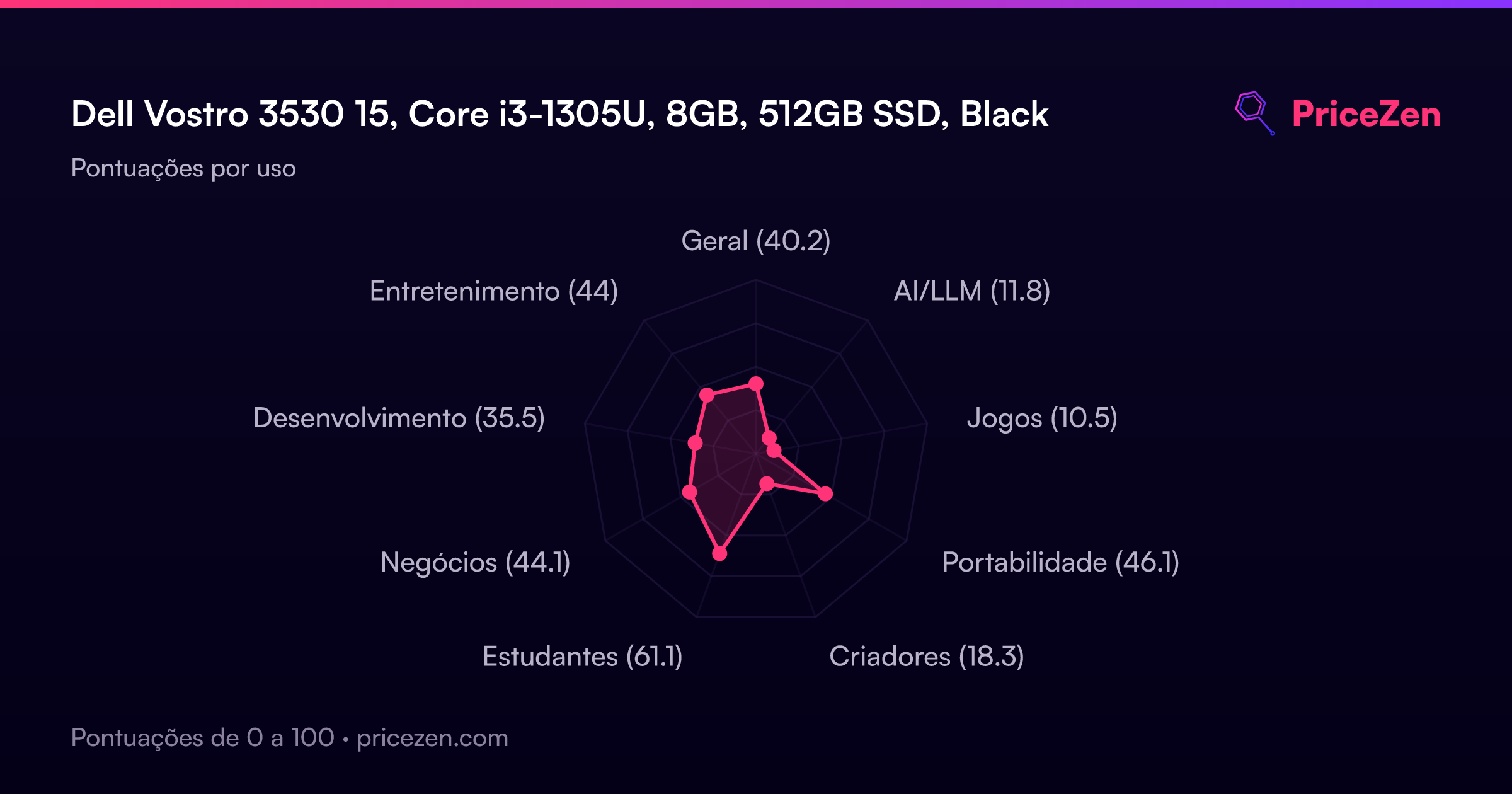
For basic student work like writing papers, research, and online classes, it's adequate. The student score in our database is 59.1 out of 100, so it's a passable but not outstanding choice for school.
Who Should Skip This
Skip the Vostro 3530 if you do any kind of creative work, gaming, or heavy multitasking. The integrated graphics and 8GB of RAM will hold you back, and the 45% NTSC display isn't accurate enough for photo or video editing. If you need more power, look at machines with 16GB of RAM and at least a Core i5 or Ryzen 5. And if you work outside or in bright offices often, the 250 nits screen will drive you nuts. This laptop is for desk-bound, plug-in, light-duty work, and not much else.
Verdict
Should you buy the Dell Vostro 3530? If you need a cheap Windows 11 Pro laptop for basic office work, email, and web browsing, and you value the 120Hz display and Ethernet port, it's a reasonable pick. The SSD keeps things feeling quick in short sessions, and the build is light enough to carry around without complaint.
But if you plan to run heavy spreadsheets, keep dozens of tabs open, or do anything beyond the absolute basics, the 8GB of RAM and Core i3 will frustrate you within a year. This is a machine for light workloads and tight budgets. Know what you're getting into, and it'll serve you fine. Expect more, and you'll be shopping again soon.
Usage Scores
- Geral40.2
- AI/LLM11.8
- Jogos10.5
- Portabilidade46.1
- Criadores18.3
- Estudantes61.9
- Negócios44.1
- Desenvolvimento35.5
- Entretenimento44