Microsoft Surface Pro 13" 11th Edition 2024, Core Ultra 7 266V, 16GB, 1TB SSD, Platinum
The Intel Core Ultra 7 266V chip with a 48 TOPS NPU drives local AI tasks on a sharp 2880x1920 OLED 120Hz display, all in a 0.87kg tablet. Its premium build and Wi-Fi 7 connectivity complement the versatile, detachable design that transitions smoothly between laptop and tablet modes. This device is best for mobile business professionals who need a Copilot+ PC for AI-assisted productivity and pen-based note-taking.

Sem preço atual de lojas


Resumo
The 30-Second Version
The Microsoft Surface Pro 11th Edition is an incredibly portable Windows tablet with a stunning OLED display, but it's held back by serious reliability issues. User reports of blue screens and glitchy tablet mode make it a risky buy at its premium price. It's a niche pick for business travelers who need pen support above all else, but most people will be happier with a traditional laptop.
Pros & Cons
Prós
- Stunning 13-inch OLED display with 120Hz refresh rate 97th
- Incredibly light and portable at 0.87kg 96th
- Intel Core Ultra 7 handles business apps with ease 82nd
- Wi-Fi 7 and Thunderbolt support for fast connectivity 70th
- Compatible with Surface Slim Pen for inking and drawing
Contras
- Multiple user reports of blue screen errors during setup
- Glitchy on-screen keyboard in tablet mode
- Abysmal gaming performance, even for light titles
- Battery life is limited by a small 39Wh capacity
- High price tag with no return policy from some retailers
O que dizem os donos
The Word on the Street
Como a opinião dos donos mudou ao longo do tempo
ExclusivoCom base em quando os clientes realmente escreveram suas avaliações - para ver se os elogios iniciais se mantiveram.
8 avaliações escritas, mai. de 2025 – jan. de 2026: 8 sem estrelas
Em todas as 17 notas das lojas: 4,5★. A maioria dos donos dá nota sem escrever avaliação. O gráfico conta as 8 avaliações escritas.
Cada ponto é uma avaliação escrita, no mês em que foi escrita. Satisfeitos = 4-5★, neutros = 3★, insatisfeitos = 1-2★.
As provas
Performance
The Intel Core Ultra 7 266V is a capable 8-core chip for productivity, landing in the 65th percentile for CPUs in this category. That's solid, middle-of-the-pack performance for business apps, multitasking, and everyday workflows. The integrated Intel Arc Graphics are fine for what they are, sitting at the 61st percentile, which means you can handle light photo editing and some casual games, but this is absolutely not a gaming machine. Our database scores it an 8.4 out of 100 for gaming, so don't expect to run anything demanding smoothly.
Where this thing really shines is portability. The compact score is in the 97th percentile, making it one of the absolute best on the market for travel. The 13-inch OLED display is also a highlight, with a 2880x1920 resolution and a 120Hz refresh rate that makes scrolling and inking feel fluid. The 600 nits of brightness is enough for most indoor settings, though you might squint a bit in direct sunlight. The 16GB of DDR5 RAM is about average for this class, and the 1TB SSD gives you plenty of room for files without being class-leading.
Specifications
Full Specifications
Processor
| CPU | Intel Core Ultra 7 266V |
| Cores | 8 |
| Frequency | 2.2 GHz |
| L3 Cache | 12 MB |
Graphics
| GPU | Intel Arc Graphics |
| Type | Integrated |
| VRAM Type | Shared |
Memory & Storage
| RAM | 16 GB |
| RAM Generation | LPDDR5X |
| Storage | 1 TB |
| Storage Type | SSD |
Display
| Size | 13" |
| Resolution | 2880x1920 |
| Panel | OLED |
| Refresh Rate | 120 Hz |
| Brightness | 600 nits |
Connectivity
| USB-C Ports | 2 |
| Thunderbolt | USB4 |
| Wi-Fi | Wi-Fi 7 |
| Bluetooth | Bluetooth 5.4 |
Physical
| Weight | 0.9 kg / 1.9 lbs |
| OS | Windows 11 Pro |
vs Competition
Stacked against the Apple MacBook Pro M4 Max, the Surface Pro 11 wins on pure tablet flexibility and weight, but loses badly on raw power and software stability. The MacBook's M4 Max chip is in a different universe for creative work, and macOS just doesn't have the same janky tablet-mode issues. If you need a touchscreen and pen input, the Surface is the obvious choice, but for everything else, the MacBook is a safer bet.
The ASUS ROG Zephyrus G14 is another strong alternative. It's heavier and thicker, but it packs a dedicated GPU that makes it a legitimate gaming and rendering machine, something the Surface can only dream of. The HP OMEN Transcend 14 offers a similar blend of portability and power with a dedicated GPU, often at a competitive price. If you're considering the Surface Pro for its business chops, the Lenovo Legion Pro 7i Gen 10 is a powerhouse that trades tablet mode for sheer desktop-replacement performance. The Surface Pro's main advantage remains its unique form factor, but you have to really need that detachable keyboard and pen support to pick it over these more well-rounded competitors.
| Spec | Microsoft Surface Pro 13" 11th Edition | Apple MacBook Pro 14.2" M4 Max | ASUS ROG Zephyrus 14" GA403WW-G14.R95080 | Lenovo Legion Pro 7i Gen 10 16" | HP OMEN Transcend | Samsung Galaxy Book5 Pro 14" NP944XHA-KG3US |
|---|---|---|---|---|---|---|
| CPU | Intel Core Ultra 7 266V | Apple M4 Max | AMD Ryzen AI 9 HX 370 | Intel Core Ultra 9 275HX | Intel Core Ultra 9 285H | Intel Core Ultra 7 258V |
| RAM (GB) | 16 | 64 | 32 | 32 | 32 | 32 |
| Storage (GB) | 1024 | 4096 | 2048 | 1024 | 1024 | 1024 |
| Screen | 13" 2880x1920 | 14.2" 3024x1964 | 14" 2880x1800 | 16" 2560x1600 | 14" 2880x1800 | 14" 2880x1800 |
| GPU | Intel Arc Graphics | Apple (40-Core) | NVIDIA GeForce RTX 5080 | NVIDIA GeForce RTX 5070 Ti | NVIDIA GeForce RTX 5070 | Intel Arc Graphics 140V |
| OS | Windows 11 Pro | macOS | Windows 11 Home | Windows 11 Home | Windows 11 Home | Windows 11 Pro |
| Weight (kg) | 0.9 | 1.6 | 1.6 | 2.7 | 1.6 | 1.2 |
| Battery (Wh) | - | 72 | - | 99 | 71 | 63 |
| Compare | Compare | Compare | Compare | Compare |
| Produto | CPU | GPU | RAM | Portas | Tela | Portabilidade | Armazenamento | User Sentiment | Confiabilidade | Prova social | Affordability |
|---|---|---|---|---|---|---|---|---|---|---|---|
| Microsoft Surface Pro 13" 11th Edition | 69.2 | 69.7 | 50 | 33.5 | 96.4 | 97.4 | 65.4 | 1 | 82 | 59 | 18.2 |
| Apple MacBook Pro 14.2" M4 Max Compare | 93.7 | 91.5 | 95.6 | 73.9 | 99.1 | 68.9 | 98.4 | 99.1 | 98.2 | 72.6 | 1.8 |
| ASUS ROG Zephyrus 14" GA403WW-G14.R95080 Compare | 91.2 | 98.3 | 90.8 | 89.5 | 96 | 73.6 | 89.7 | 99.1 | 60.6 | 95.6 | 6 |
| Lenovo Legion Pro 7i Gen 10 16" Compare | 97.2 | 96.7 | 89 | 97.3 | 95 | 9.5 | 79.3 | 90.8 | 82 | 99.7 | 5.8 |
| HP OMEN Transcend Compare | 90.1 | 93.5 | 89.7 | 89.5 | 96 | 72.2 | 65.4 | 81.4 | 33.7 | 93.1 | 8.9 |
| Samsung Galaxy Book5 Pro 14" NP944XHA-KG3US Compare | 65.9 | 69.7 | 79.5 | 83.5 | 90.4 | 89.4 | 79.3 | 0 | 82 | 95.6 | 21 |
Preço
Value & Pricing
Value is where the Surface Pro 11 gets complicated. The price range we're seeing across vendors is wild, from $1,950 all the way up to an absurd $633,543, so you'll want to shop carefully. At the lower end, you're paying a premium for that best-in-class portability and a gorgeous OLED screen. But for the same money, you could grab a more powerful traditional laptop like the ASUS ROG Zephyrus G14 or a MacBook Pro, both of which will run circles around this in raw performance and reliability. The real sting is the user feedback. When you're dropping two grand on a device, you shouldn't have to wrestle with blue screens out of the box. If you can find it at the $1,950 mark from a retailer with a solid return policy, it's a more palatable deal, but the high price is hard to justify given the reliability concerns.
Saiba mais
Overview
The Microsoft Surface Pro 11th Edition is Microsoft's big push into the AI PC era, and it's a head-turner for anyone who needs a truly portable Windows machine. This configuration packs an Intel Core Ultra 7 266V processor, 16GB of RAM, and a 1TB SSD behind a gorgeous 13-inch OLED touchscreen. It's built for business travelers and anyone who values a slim, 0.87kg tablet that can double as a laptop with the right keyboard. The display alone is a standout, hitting a 96th percentile ranking in our database for its category, which means it's one of the best screens you'll find on a device this thin.
But this Surface Pro is also a bit of a gamble. It's the first wave of Copilot+ PCs, and our data shows a real disconnect between the premium hardware and the real-world experience some owners are having. The user sentiment score is a rough 30 out of 100, dragged down by reports of blue screen errors during setup and glitchy tablet mode behavior. For a machine that can cost upwards of $1,950, that kind of out-of-box experience is a tough pill to swallow.
If you're shopping for a high-end Windows tablet that can slip into a briefcase and handle office work, creative tasks, and media consumption, the Surface Pro 11 checks a lot of boxes on paper. Just know that you're signing up for some early-adopter risk, especially given the mixed feedback on reliability.
Common Questions
Q: Is the Microsoft Surface Pro 11 good for gaming?
No, the Surface Pro 11 is not good for gaming. Its integrated Intel Arc Graphics and low gaming score of 8.4 out of 100 mean it struggles with anything beyond very light or older titles.
Q: Does the Surface Pro 11 have a good battery life?
Battery life is a weak point. The 39Wh battery is small for a device with a high-resolution 120Hz OLED screen, so you'll likely need to carry a charger for a full day of work.
Q: Can the Surface Pro 11 replace my laptop?
It can for basic productivity and business tasks, especially with the optional keyboard. But the tablet-mode glitches and limited performance mean it won't fully replace a traditional laptop for power users or anyone who needs rock-solid reliability.
Q: What is the return policy for the Surface Pro 11?
Return policies vary by retailer, and some customer feedback specifically warns that certain vendors do not accept returns on PCs. Always check the store's policy before buying, especially given the reported setup issues.
Who Should Skip This
Skip the Surface Pro 11 if you need a reliable, no-headaches machine for critical work. The reported blue screen errors and tablet-mode glitches make it a poor choice for anyone who can't afford downtime. Gamers should look elsewhere entirely, as the integrated graphics are a dead end for modern titles. If you don't need the detachable tablet form factor, a traditional clamshell like the ASUS ROG Zephyrus G14 or a MacBook Pro will give you far better performance and stability for the same money. Creative pros who need color accuracy will love the screen, but they should be wary of the Snapdragon compatibility issues some users have flagged with certain software, even on this Intel model.
Verdict
The Microsoft Surface Pro 11th Edition is a device of extremes. It has one of the best displays and most travel-friendly designs we've seen in a Windows tablet, and the Intel Core Ultra 7 chip is perfectly fine for business productivity. But the user experience is marred by serious reliability complaints that are impossible to ignore. Blue screen errors and tablet-mode glitches are not what you expect from a premium device, and they sour what should be a flagship experience.
Should you buy this? Only if you absolutely need a Windows tablet with pen support and are willing to roll the dice on stability. If you can live without the detachable form factor, there are more powerful and more reliable laptops available for the same price. If you do take the plunge, buy from a retailer with a generous return policy and be prepared for some potential setup headaches.
Usage Scores
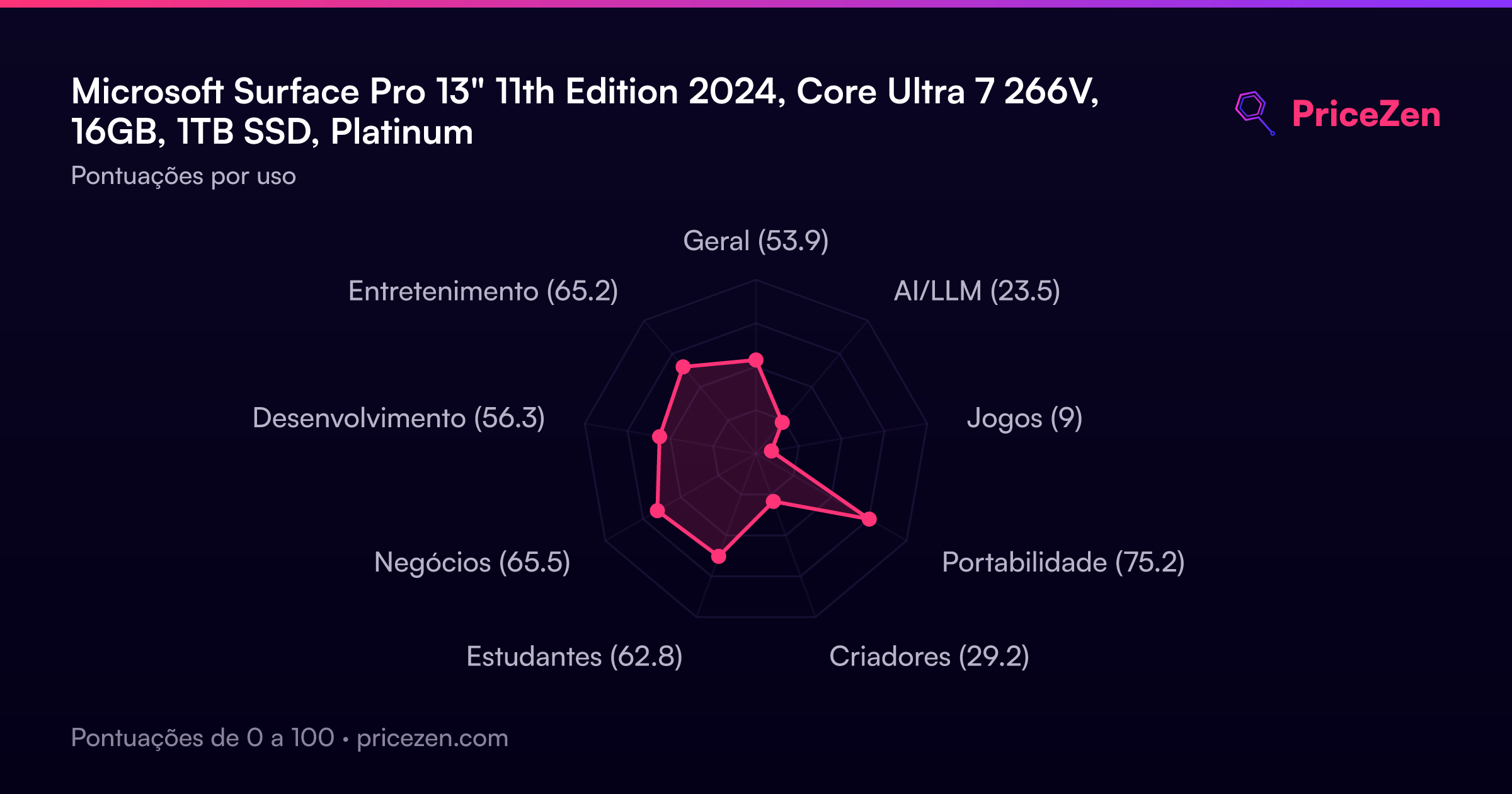
- Geral53.9
- AI/LLM23.5
- Jogos9
- Portabilidade75.2
- Criadores29.2
- Estudantes62.8
- Negócios65.5
- Desenvolvimento56.3
- Entretenimento65.2