Gigabyte GeForce RTX 5090D Gaming 32GB GDDR7 Black
The 21,760 CUDA cores and 2,550 MHz boost clock on the Blackwell GB202 chip deliver top-tier 4K gaming and AI performance, backed by 32GB of GDDR7 memory on a 512-bit bus. The triple-fan cooler and 3.5-slot design keep the 575W TDP in check, while DLSS 4 and ray tracing support future-proof the card. Best for AI researchers running LLM workloads and enthusiasts building a high-end 4K gaming rig with a 1000W PSU.

Sem preço atual de lojas
Resumo
The 30-Second Version
Gigabyte's RTX 5090D Gaming is a monster: 21,760 CUDA cores, 32GB of GDDR7 at 1,792 GB/s, and a 38,958 PassMark G3D benchmark score that puts raster and compute at the top of our rankings. It scores 94.2/100 for AI work and 90/100 for 4K gaming, with cooling among the best we track. The catch is CAD 12,000 at Newegg, a 575W TDP with a 1000W PSU requirement, and a 342mm, 3.5-slot footprint. Buy it for local AI or no-compromise 4K, skip it if you're gaming at 1440p.
Pros & Cons
Prós
- Top-of-the-charts raster and compute, with a 38,958 PassMark G3D benchmark score 99th
- 32GB GDDR7 on a 512-bit bus at 1,792 GB/s, ideal for large local AI models 99th
- Factory overclock to 2,550 MHz versus 2,407 MHz on the standard GAMING model 98th
- Thermal performance is one of the best on the market despite the 575W TDP 98th
- Three DisplayPort 2.1b outputs plus HDMI 2.1b on PCIe 5.0 x16
Contras
- Affordability sits in the bottom 2%, this is about as pricey as GPUs get
- 575W TDP and a 1000W PSU requirement put efficiency in the bottom quarter
- 342mm long and 3.5 slots thick, so plenty of cases simply won't fit it
- Ray tracing at 87.6/100 trails its own raster and compute rankings
- Only one listing in our price data, so there's no retailer competition to shop
As provas
Performance
The headline number is a PassMark G3D benchmark score of 38,958, which puts raster performance in the 99th percentile of every GPU we track. In plain terms: at 4K you're not shopping for settings anymore, you're deciding how far past your monitor's refresh rate you want to go. Compute ranks just as high, and that matters beyond games. The memory setup is the real story for anyone doing serious work: 32GB of GDDR7 running at 28 Gbps across a 512-bit bus gives you 1,792 GB/s of bandwidth. That combination of capacity and throughput is why the AI score hits 94.2/100. Large models that would otherwise spill into system RAM and crawl can stay resident on the card, and the bandwidth keeps token generation from feeling like dial-up.
Ray tracing scores 87.6/100, which is strong but a notch below the raw raster ranking, so heavy path-traced titles are where you'll lean on DLSS 4 rather than brute force alone. The trade-off for all of this is power and space. A 575W TDP puts efficiency in the bottom quarter of the category, and the 1000W PSU recommendation isn't a suggestion you should ignore, especially paired with a modern high-core-count CPU. Thermals rank among the best we track, so the triple-fan design is clearly doing its job, but 342mm of length and 3.5 slots means mid-tower cases and vertically mounted setups need a tape measure before checkout. And the single 16-pin connector means your cabling situation needs to be sorted, not improvised.
Specifications
Full Specifications
Chipset
| GPU Chipset | GeForce RTX 5090D |
| Brand | NVIDIA |
| Architecture | Blackwell |
| Class | consumer |
Memory
| VRAM | 32 GB |
| Memory Type | GDDR7 |
| Memory Bus | 512 |
Compute
| CUDA Cores | 21760 |
| Tensor Cores | 5 |
| RT Cores | 4 |
| Base Clock | 2550 |
| Boost Clock | 2550 |
Performance
| PassMark G3D | 38958 |
| GPU Compute | 24458 |
Power & Cooling
| TDP | 575 |
| Recommended PSU | 1000 |
| Power Connectors | 1 x 16-Pin |
| Cooler | Triple Fan |
| Fans | 3 |
Connectivity
| Interface | PCI Express 5.0 x16 |
| DisplayPort | 3 |
| HDMI | 1 |
| Max Displays | 4 |
| Max Resolution | 7680 x 4320 |
Physical
| Length | 342 |
| Slot Width | 3.5 |
| Form Factor | ATX |
Features
| Ray Tracing | Yes |
| Upscaling | DLSS 4 |
| VR Ready | Yes |
| DirectX | 12 |
| RGB | Yes |
vs Competition
The closest rivals in our data are the ASUS GeForce RTX 5090 TUF Gaming and the ZOTAC GeForce RTX 5090 SOLID OC White Edition, and if you're already committed to this tier, those are the two to cross-shop hardest. What this Gigabyte brings to that fight is a specific set of numbers: the 2,550 MHz factory boost above the standard GAMING clock, a thermal ranking in the 92nd percentile, and 32GB of GDDR7 at 1,792 GB/s. If your priority is sustained compute or AI work where cooling and memory bandwidth decide how long you can run at full tilt, those are the specs to weigh. The ZOTAC's white finish also matters if you're building around a colour scheme, which is a real consideration even if it never shows up in a benchmark.
A tier down, the PNY GeForce RTX 5080 ARGB OC, MSI GeForce RTX 5070 Ti Ventus 3X OC and Sapphire Radeon RX 9070 XT PULSE are the cards to look at if the CAD 12,000 figure made you flinch. Against those, this card's argument is entirely about ceiling: raster and compute in the 99th percentile and VRAM in the 98th are not things you can spec your way into further down the stack. But if you're gaming at 1440p, or your AI experiments fit comfortably in less memory, you'd be buying capability that sits idle while still feeding a 575W TDP. Cross-shop downward honestly before you commit upward.
| Spec | Gigabyte GeForce RTX 5090D Gaming | ASUS GeForce RTX 5090 TUF Gaming | MSI GeForce RTX 5070 Ti Ventus 3X OC | ZOTAC GeForce RTX 5080 APOCALYPSE | Sapphire Radeon RX 7900 XTX NITRO+ | PNY GeForce RTX 5080 ARGB OC |
|---|---|---|---|---|---|---|
| Chipset | GeForce RTX 5090D | GeForce RTX 5090 | GeForce RTX 5070 Ti | GeForce RTX 5080 | Radeon RX 7900 XTX | GeForce RTX 5080 |
| Vram | 32GB GDDR7 | 32GB GDDR7 | 16GB GDDR7 | 16GB GDDR7 | 24GB GDDR6 | 16GB GDDR7 |
| Boost Clock Mhz | 2550 | 2407 | 2482 | 2730 | 2680 | 2620 |
| Tdp W | 575 | 575 | 300 | 360 | 339 | 360 |
| Memory Bus Bits | 512 | 512 | 256 | 256 | 384 | 256 |
| Ray Tracing | true | true | true | true | true | true |
| GPU Class | consumer | consumer | consumer | consumer | consumer | consumer |
| Compare | Compare | Compare | Compare | Compare |
| Produto | AI | Rt | Vram | Raster | Compute | Feature | Thermal | Efficiency | Connectivity | Affordability |
|---|---|---|---|---|---|---|---|---|---|---|
| Gigabyte GeForce RTX 5090D Gaming | 97.8 | 85.3 | 97.8 | 98.8 | 98.6 | 77.9 | 91.8 | 23.6 | 81.6 | 1.7 |
| ASUS GeForce RTX 5090 TUF Gaming Compare | 97.1 | 90.6 | 97.8 | 98.8 | 97.6 | 95.8 | 72.1 | 23.6 | 99.3 | 2.4 |
| MSI GeForce RTX 5070 Ti Ventus 3X OC Compare | 79.3 | 92.5 | 86 | 89 | 88 | 95.8 | 91.8 | 71.6 | 94.1 | 23.5 |
| ZOTAC GeForce RTX 5080 APOCALYPSE Compare | 85.5 | 97.6 | 89.1 | 94.5 | 93.4 | 95.8 | 91.8 | 56.6 | 94.1 | 20.8 |
| Sapphire Radeon RX 7900 XTX NITRO+ Compare | 95.1 | 96.3 | 92 | 83.4 | 95.6 | 95.8 | 91.8 | 51.5 | 98.8 | 19 |
| PNY GeForce RTX 5080 ARGB OC Compare | 85.5 | 97.6 | 89.1 | 94.5 | 93.4 | 95.8 | 91.8 | 56.6 | 94.1 | 15 |
Preço
Value & Pricing
Let's not dance around it: CAD 12,000 at Newegg, and that's the only listing our price tracking currently shows in Canada. Affordability ranks in the 2nd percentile against every GPU we cover, and our budget score of 63.4/100 is the weakest mark on the whole sheet. You're paying flagship money for flagship silicon, and there's no clever angle where this becomes a bargain. What you can say is that the money buys genuinely top-tier capability rather than a badge: best-in-class raster and compute, near-top VRAM capacity, and cooling that ranks among the best. If your workload actually uses 32GB of fast VRAM, the cost per unit of useful work looks a lot better than the sticker suggests.
We track prices over time, partly through our community browser extension, and with a single retailer carrying it there's no cross-store spread to exploit right now. That's worth knowing before you assume you'll find it cheaper elsewhere. If you're buying purely for frames and not for AI or heavy compute, the honest advice is that you're paying for headroom you may never touch.
Saiba mais
Overview
This is Gigabyte's take on the RTX 5090D, and it's not a subtle card. You get 21,760 CUDA cores on Blackwell silicon (GB202), 32GB of GDDR7 sitting on a 512-bit bus, and a factory boost clock of 2,550 MHz, which is a step up from the 2,407 MHz on the standard GAMING model. It's 342mm long, eats 3.5 slots, and pulls a 575W TDP with a 1000W power supply recommendation attached. This is a card you plan a build around, not one you drop into whatever case is already under your desk.
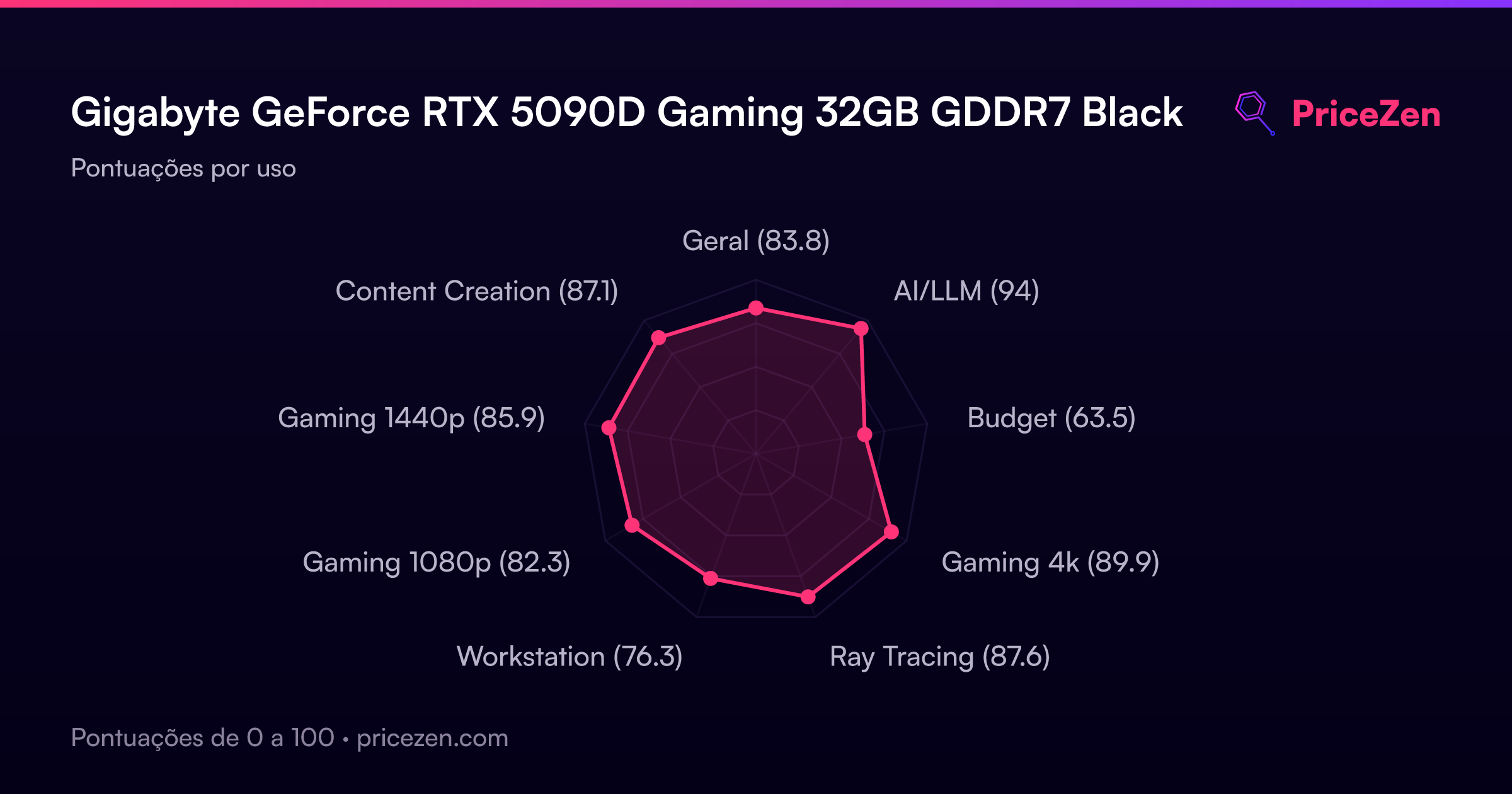
Who's it for? Two groups, mostly. People chasing 4K with ray tracing switched on and no interest in compromising, and people running local AI models who need a big pile of fast VRAM on a single card. Our scoring puts it at 94.2/100 for AI and LLM work and 90/100 for 4K gaming, with ray tracing at 87.6/100. Those aren't marketing categories we made up, they're where the specs and benchmark data actually land it against everything else in the GPU pile.
What makes it interesting is how lopsided the profile is. Raster and compute both sit at the very top of our rankings, VRAM capacity is right up there too, and thermal performance is one of the best on the market thanks to that triple-fan cooler. Then efficiency lands near the bottom and affordability is worse still. We collect specs, prices and owner ratings from multiple stores with our own automated system and score every card against its category, and this one is a textbook example of a product that's brilliant at its job and expensive in every sense of the word.
Common Questions
Q: Will this actually fit in my case and work with my power supply?
Measure first. At 342mm long and 3.5 slots thick, it rules out a lot of compact and mid-tower cases, and it'll block neighbouring expansion slots. Power-wise the TDP is 575W and the recommendation is a 1000W supply, with a single 16-pin connector, so factor in your CPU draw before assuming an existing PSU is enough.
Q: Is 32GB of VRAM overkill, or do I actually need it?
For gaming alone, it's headroom you'll rarely fill, even at 4K. For local AI and LLM work it's the whole point: 32GB of GDDR7 on a 512-bit bus at 1,792 GB/s lets larger models stay on the card instead of spilling into slower system memory, which is why our AI score for it is 94.2/100 and VRAM capacity ranks in the top 2%.
Q: How much faster is this than the standard Gigabyte GAMING model?
The difference on paper is the factory boost clock: 2,550 MHz here versus 2,407 MHz on the standard GAMING version. Everything else that defines the tier stays the same, including the 21,760 CUDA cores and the 32GB GDDR7 configuration. Treat it as a modest out-of-the-box uplift rather than a different class of card.
Q: Does it handle ray tracing well, or is it mainly a raster card?
It handles it well, but ray tracing is its relatively softer spot at 87.6/100 compared with raster and compute both sitting in the top 1%. Dedicated RT hardware and DLSS 4 support are on board, so heavy path-traced titles are best approached with upscaling enabled rather than expecting native-everything performance.
Who Should Skip This
Skip this if you game at 1440p or 1080p, if your case can't clear 342mm and 3.5 slots, or if you're not prepared to build around a 1000W power supply. A 575W TDP puts efficiency in the bottom quarter of the category, and paying flagship money for raster headroom your monitor can't display is the classic overspend. The MSI GeForce RTX 5070 Ti Ventus 3X OC, PNY GeForce RTX 5080 ARGB OC and Sapphire Radeon RX 9070 XT PULSE are all worth a serious look before you spend CAD 12,000.
Also skip it if you need retailer choice or a competitive price. Our data currently shows one listing, and affordability ranks in the 2nd percentile, so there's no shopping-around leverage. If your AI experiments fit in a smaller buffer, or your work is occasional rather than sustained, you're buying the most expensive part of this card's capability and leaving it parked.
Verdict
If you're running local LLMs, doing GPU-accelerated rendering or training, or gaming at 4K with ray tracing on and refusing to turn things down, this card earns its place. The AI score of 94.2/100 and the 32GB buffer at 1,792 GB/s are the reason to buy it, and the 4K gaming score of 90/100 means it's not a one-trick workstation part. Just go in with your eyes open about the build requirements: a 1000W supply, a case that clears 342mm and 3.5 slots, and a single 16-pin power connection done properly.
For everyone else, this is more card than the job needs. Owners have rated it 4.2/5 across 16 reviews, which is good rather than ecstatic, and at this price you'd want ecstatic. Our recommendation is conditional: buy it for the workload that fills 32GB of VRAM or pushes 4K pixels hard, and buy something further down the stack if you're mostly playing at 1440p or watching your power bill. Nobody can pay us to say a product is good, and we're not going to pretend a 2nd-percentile affordability ranking is anything other than what it is.
Usage Scores
- Geral83.8
- AI/LLM94
- Budget63.5
- Gaming 4k89.9
- Ray Tracing87.6
- Workstation76.3
- Gaming 1080p82.3
- Gaming 1440p85.9
- Content Creation87.1