HP OmniDesk M03-0057C 2025, Core Ultra 7 265, 64GB, 2TB SSD, Dark Wood

Espaço de sobra com 64 GB de RAM verificado em 29 de nov.
77/100 pontuação geral
- CPU
- Intel Core Ultra 7 265
- RAM
- 64 GB
- Storage
- 2 TB
- GPU
- Intel Graphics
- Form factor
- desktop
- OS
- Windows 11 Pro
Resumo
The 30-Second Version
The HP OmniDesk M03-0057C packs 64GB of DDR5 and a 20-core Core Ultra 7 265 into a $2,179 tower that's built for developers and heavy multitaskers. Port selection is top of the charts and storage is generous at 3TB combined. But the integrated graphics make gaming a non-starter (20.3/100 in our scoring). Buy it for the RAM and CPU, skip it if you need a GPU.
Pros & Cons
Prós
- 64GB DDR5 RAM ranks at the 97th percentile, more than almost any desktop we track 98th
- 20-core Core Ultra 7 265 hits 5.2GHz turbo, strong for parallel workloads 97th
- Port selection is best-in-class: 2x USB-C, 10x USB-A, HDMI, DisplayPort 1.4, Ethernet, Wi-Fi 6 88th
- 2TB SSD plus bundled 1TB docking station gives you 3TB total storage out of the box 83rd
- Windows 11 Pro included, with wireless keyboard and mouse in the bundle
Contras
- Integrated Intel Graphics only, gaming score of 20.3/100 makes it unsuitable for any serious gaming
- Seller-managed warranty through PC Heaven rather than HP directly, which complicates support
- Only one USD listing tracked at $2,179, so no price competition to drive deals
- Professionally upgraded and resealed unit, not a factory-standard HP configuration
- Reliability ranking sits at the 70th percentile, solid but not a standout for long-term confidence
As provas
Performance
Let's talk about that Core Ultra 7 265. Twenty cores and twenty threads with a 5.2GHz max turbo puts it in the upper tier of desktop processors we track, ranking among the best. In practice, that means heavy multitasking and parallel workloads (think builds, virtual machines, data processing) have plenty of headroom. The 64GB of DDR5 is the real headline though, ranking at the 97th percentile against every desktop in our database. Most machines in this category ship with a fraction of that. For a developer running Docker containers, a local Kubernetes cluster, or multiple VMs simultaneously, that memory ceiling is the difference between smooth sailing and constant swapping. Storage lands well above average with the 2TB SSD, which should keep load times snappy across the board.
And then there's the elephant in the room: gaming scores 20.3 out of 100 in our model, and the integrated Intel Graphics sits at only about average even among integrated solutions. This is not a gaming machine, full stop. The GPU can handle desktop compositing, video playback, and maybe some very light creative work, but anything that leans on graphics horsepower will hit a wall fast. The port selection, on the other hand, is genuinely excellent, ranking near the top. Two USB-C ports, ten USB-A ports spread across different speed tiers, HDMI, DisplayPort 1.4, Ethernet, and Wi-Fi 6 mean you can wire up a serious multi-peripheral workstation without reaching for a hub. For the developer or power-office user this machine targets, that connectivity is a real quality-of-life win.
Specifications
Full Specifications
Processor
| CPU | Intel Core Ultra 7 265 |
| Cores | 20 |
| Frequency | 2.4 GHz |
| L3 Cache | 30 MB |
Graphics
| GPU | Intel Graphics |
| Type | Integrated |
Memory & Storage
| RAM | 64 GB |
| RAM Generation | DDR5 |
| Storage | 2 TB |
| Storage Type | SSD |
Build
| Form Factor | desktop |
| Weight | 5.8 kg / 12.7 lbs |
Connectivity
| USB-C Ports | 2 |
| USB Ports | 10 |
| HDMI | 1x HDMI |
| DisplayPort | 1 x DisplayPort 1.4 |
| Wi-Fi | Wi-Fi 6 |
| Bluetooth | Yes |
| Ethernet | Gigabit Ethernet |
System
| OS | Windows 11 Pro |
vs Competition
The competitor set here tells you a lot about where this machine sits. The Apple Mac Studio M5 Max is the obvious cross-shop for creative professionals and developers who live in macOS, and it's a fundamentally different platform choice. The OmniDesk wins on raw port count and the flexibility of Windows 11 Pro, plus that 64GB of DDR5 is a standout even against premium machines. But if your workflow is tied to Apple's tools, the Mac Studio is the natural pick and no amount of USB-A ports will change that.
On the Windows side, the Lenovo Legion Tower 5a Gen 10, ASUS ROG GM700, and MSI Aegis ZS2 A9NVP-1407US are all gaming-oriented towers, and they'll almost certainly offer discrete GPUs that the OmniDesk simply doesn't have. If gaming or GPU-accelerated work matters to you at all, those machines are worth a look even if their RAM configs are more modest. The Dell Desktop ECT1250 is the closest philosophical match, another business-focused tower, and the OmniDesk's advantage there comes down to its leading CPU ranking and that massive memory pool. Our overall score of 77.9 places it as a strong contender, but it's a specialist, not a generalist. It beats the gaming towers at productivity and loses to them everywhere a GPU matters.
| Spec | HP OmniDesk M03-0057C | Apple Mac Studio M5 Max | Lenovo T Series Towers Legion Tower 5a Gen 10 | Dell Desktop ECT1250 | ASUS ROG GM700 | CLX SET TGMSETRTU5204BM |
|---|---|---|---|---|---|---|
| CPU | Intel Core Ultra 7 265 | Apple M5 Max | AMD Ryzen 7 7800X3D | Intel Core Ultra 7 265 | AMD Ryzen 7 9800X3D | Intel Core i9 14900KF |
| RAM (GB) | 64 | 48 | 32 | 32 | 32 | 64 |
| Storage (GB) | 2048 | 1024 | 4096 | 2048 | 2048 | 8192 |
| GPU | Intel Graphics | Apple (40-Core) | NVIDIA GeForce RTX 5070 Ti | Intel UHD Graphics | NVIDIA GeForce RTX 5070 Ti | NVIDIA GeForce RTX 5070 |
| Form Factor | desktop | mini | mid-tower | sff | mid-tower | mid-tower |
| Psu W | - | 480 | 850 | 180 | 850 | 850 |
| OS | Windows 11 Pro | macOS | Windows 11 Home | Windows 11 Home | Windows 11 Home | Windows 11 Home |
| Compare | Compare | Compare | Compare | Compare |
| Produto | CPU | GPU | RAM | Portas | Armazenamento | Confiabilidade |
|---|---|---|---|---|---|---|
| HP OmniDesk M03-0057C | 88 | 60.1 | 96.5 | 97.9 | 82.5 | 70.2 |
| Apple Mac Studio M5 Max Compare | 95.7 | 85 | 95 | 89.1 | 68.6 | 99.3 |
| Lenovo T Series Towers Legion Tower 5a Gen 10 Compare | 73.2 | 94.6 | 78 | 88.6 | 98.1 | 70.2 |
| Dell Desktop ECT1250 Compare | 88 | 60.1 | 81.6 | 75.1 | 82.5 | 70.2 |
| ASUS ROG GM700 Compare | 80.3 | 94.6 | 81.6 | 96.1 | 90 | 37.7 |
| CLX SET TGMSETRTU5204BM Compare | 94.8 | 90.7 | 96.5 | 84.5 | 99.2 | 11.7 |
Preço
Value & Pricing
At $2,179 from Best Buy, you're paying a premium for that 64GB of DDR5 and the 20-core processor, and honestly, the spec sheet justifies a good chunk of it. Configurations with this much RAM are rare in pre-built desktops, and the bundled accessories (docking station with 1TB storage, 32GB MicroSD card, cables, keyboard and mouse) add tangible value that you'd otherwise buy separately. The catch is that we only track a single listing at a single store, so there's no cross-retailer price pressure working in your favor. Best Buy offers a price match guarantee, which helps if you find it cheaper elsewhere, but right now there's nowhere else to find it in our data.
The bigger value question is whether you need everything this machine offers. If you're a developer who'll actually use 64GB of RAM and 20 cores daily, the price-to-performance ratio is strong. If you're a general home office user who mostly lives in a browser and Office apps, you're paying for headroom you'll never touch. Our home office score of 78.5 is good, but it's carried by specs that exceed what most office work demands. Know your workload before you swipe the card.
Saiba mais
Overview
The HP OmniDesk M03-0057C is one of those machines that looks like a normal office tower on paper and then quietly flexes in the spec sheet. It's an upgraded configuration sold through Best Buy, built around Intel's Core Ultra 7 265 (20 cores, 20 threads, up to 5.2GHz turbo), 64GB of DDR5, and a 2TB SSD with a bundled docking station that adds another 1TB. Windows 11 Pro comes preinstalled, along with a wireless keyboard and mouse. The whole thing weighs 5.77kg and measures 13.27 x 6.1 x 12.4 inches, so it'll sit under a desk without drama.
Who's this for? Developers, mostly. Our scoring model gives it 80.9 out of 100 for developer workloads and 78.5 for home office use, which lines up neatly with what the hardware actually is: a lot of CPU cores, an absurd amount of RAM for a desktop at this tier, and fast storage. If your day involves running containers, compiling code, juggling a dozen browser tabs alongside an IDE and a local database, this configuration is aimed squarely at you. The 64GB of DDR5 sits near the very top of everything we track in this category, and that's the number that matters most here.
What makes it interesting is the trade-off baked into the design. There's no discrete graphics card. You get Intel's integrated graphics, which is fine for driving displays and handling video calls but not much else. So HP (or rather, the seller doing the upgrade) spent the budget on memory and CPU instead of a GPU. That's a deliberate choice, and it means this machine either fits your life perfectly or misses it entirely. We'll get into which.
Common Questions
Q: Can I game on this desktop?
Not really. The Intel integrated graphics scored just 20.3 out of 100 in our gaming assessment, and the GPU ranks at only about average even among all desktops we track. You can run older or very lightweight titles, but anything modern or demanding will struggle. If gaming is part of your plan, look at the Lenovo Legion Tower 5a Gen 10 or MSI Aegis ZS2 instead.
Q: Is 64GB of RAM overkill for most people?
For typical home office tasks like browsing, email, and document editing, yes, it's far more than you need. But for developers running multiple containers, virtual machines, or large in-memory datasets, 64GB is a genuine advantage. It ranks at the 97th percentile in our database, meaning very few desktops offer this much. The question is whether your workload will actually use it.
Q: What does 'professionally upgraded' mean, and should I worry about the warranty?
This unit has been modified by a third-party seller (PC Heaven) with new components and then resealed, so it's not a standard factory HP configuration. The warranty is handled by the seller for one year rather than by HP directly. That's worth considering because seller-managed support can be less predictable than manufacturer coverage, especially if the seller's availability changes down the road.
Q: How does the storage setup work with the docking station?
You get a 2TB SSD inside the tower plus a bundled 7-in-1 docking station that includes 1TB of additional storage, for 3TB total. The internal SSD handles your OS and applications at full speed, while the dock storage connects externally. It's a convenient bundle, but keep in mind the dock storage won't match the internal SSD's performance for demanding tasks.
Who Should Skip This
Gamers should walk away immediately. A 20.3 gaming score and integrated-only graphics mean this tower can't keep up with anything that needs real GPU power. The Lenovo Legion Tower 5a Gen 10, ASUS ROG GM700, and MSI Aegis ZS2 A9NVP-1407US are all better fits if you want to play games or do GPU-accelerated creative work like 3D rendering or heavy video editing.
Casual users should also think twice. If your daily routine is a browser, some spreadsheets, and video calls, you don't need 64GB of DDR5 or 20 cores, and you're paying a premium for capacity that'll sit idle. A simpler, cheaper desktop will serve you just as well. And if you're deep in Apple's world, the Mac Studio M5 Max is the more natural home for your workflow, regardless of how good this machine's specs look on paper.
Verdict
If you're a developer or a power user who runs memory-hungry workloads (VMs, containers, large datasets, heavy IDE sessions), this machine is a genuinely compelling option. The 64GB of DDR5 and 20-core CPU give you room to grow, the port selection means you won't be daisy-chaining hubs, and the 3TB of combined storage means you won't be managing disk space for a long while. For that specific buyer, the $2,179 asking price buys a configuration that's hard to replicate in a pre-built at this tier.
For everyone else, pump the brakes. If you game, edit video professionally, or do any GPU-heavy work, the integrated graphics will frustrate you within a week. Look at the Legion Tower 5a or the MSI Aegis instead. And if you're a casual home office user, you're overpaying for specs you won't use. This is a machine that rewards a very specific kind of buyer and punishes anyone who buys it for the wrong reasons. Know which one you are.
Usage Scores
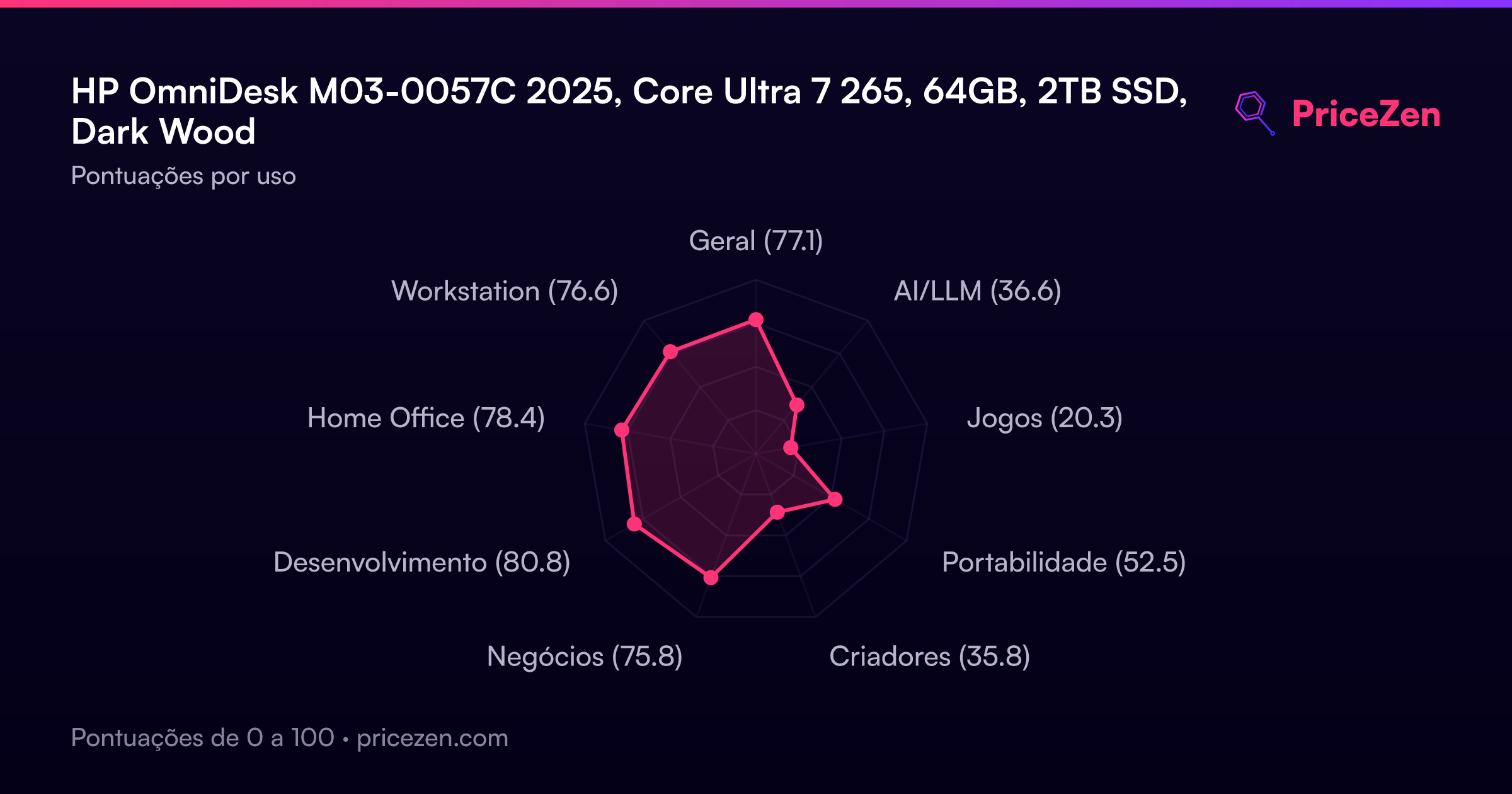
- Geral77.1
- AI/LLM36.6
- Jogos20.3
- Portabilidade52.5
- Criadores35.8
- Negócios75.8
- Desenvolvimento80.8
- Home Office78.4
- Workstation76.6