ASUS NUC 14 Pro RNUC14RVHV70000UI 2024, Core Ultra 7 165H, 32GB, 2TB SSD, Black
The Intel Core Ultra 7 165H 16-core processor and 32GB DDR5 RAM handle demanding office workloads, while the 2TB NVMe SSD offers ample storage. Its compact 0.77kg chassis with Thunderbolt 4, HDMI 2.1, and Wi-Fi 6E supports up to four displays, making it a flexible desktop replacement. Best for home-office users who need a small, powerful PC for multitasking and media consumption, not for gaming.

Sem preço atual de lojas


Resumo
The 30-Second Version
The ASUS NUC 14 Pro is a tiny Windows workhorse with elite port selection and a generous 2TB SSD plus 32GB of RAM. It's great for office work and coding, but the integrated graphics mean gaming and 4K video editing are off the table. Buy it if you need a compact productivity machine, just make sure you're getting the fully loaded version and not a barebone kit.
Pros & Cons
Prós
- Port selection is elite, 98th percentile with Thunderbolt 4, dual HDMI 2.1, and a pile of USB ports 98th
- 2TB NVMe SSD and 32GB DDR5 mean you won't need upgrades for years 90th
- Toolless chassis makes RAM and storage swaps genuinely easy 82nd
- Improved cooling over the old Intel NUCs, according to a long-time NUC buyer
Contras
- Integrated graphics can't handle gaming or 4K video editing
- Barebone kit confusion means you might not get a power cable or OS
- Reliability score sits at a mediocre 36th percentile
- Only one customer review and it's a 2-star rating
O que dizem os donos
The Word on the Street
Como a opinião dos donos mudou ao longo do tempo
ExclusivoCom base em quando os clientes realmente escreveram suas avaliações - para ver se os elogios iniciais se mantiveram.
2 avaliações escritas, nov. de 2024 – jan. de 2025: 2 sem estrelas
Em todas as 1 notas das lojas: 4,0★. O gráfico conta as 2 avaliações escritas.
Cada ponto é uma avaliação escrita, no mês em que foi escrita. Satisfeitos = 4-5★, neutros = 3★, insatisfeitos = 1-2★.
As provas
Performance
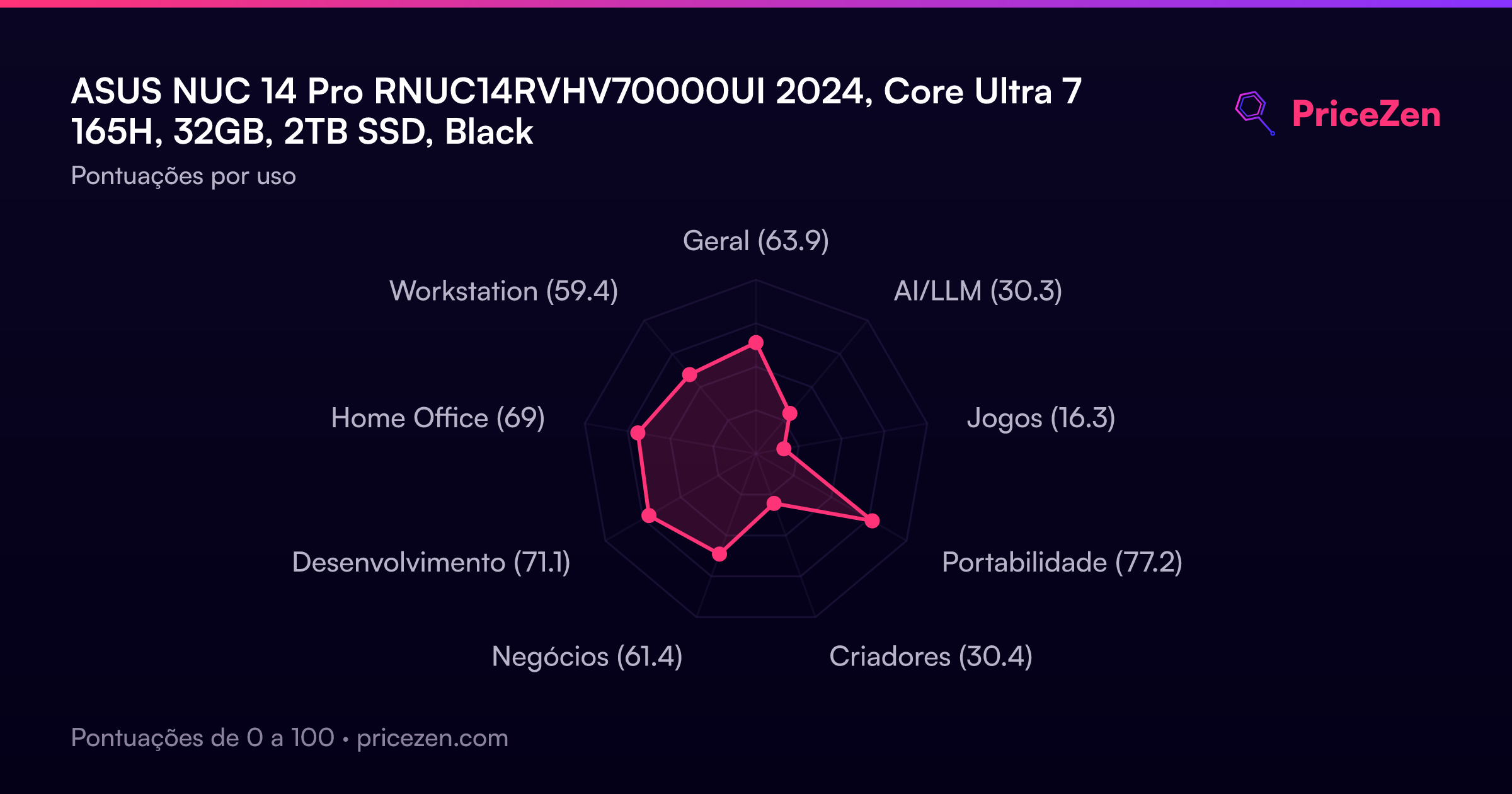
The Core Ultra 7 165H is a 16-core chip that sits right around the middle of our database for CPU performance. That's not a knock, it's just honest. For spreadsheets, browser tabs, and light photo work, it'll feel snappy. The 32GB of DDR5 helps a lot here, landing in the top fifth of all products we track. Storage is even better at the 92nd percentile, and 2TB means you won't be juggling external drives. The integrated Intel Arc graphics are fine for driving displays, but don't expect to game or edit 4K video. Our gaming score for this thing is 15.8 out of 100, which is rough. One owner specifically called out that it's not suitable for 4K or 8K video editing without a dedicated GPU.
Specifications
Full Specifications
Processor
| CPU | Intel Core Ultra 7 165H |
| Cores | 16 |
| Frequency | 3.8 GHz |
| L3 Cache | 24 MB |
Graphics
| GPU | Intel Arc Graphics |
| Type | Integrated |
| VRAM Type | Shared |
Memory & Storage
| RAM | 32 GB |
| RAM Generation | DDR5 |
| Storage | 2 TB |
| Storage Type | NVMe SSD |
Build
| Form Factor | mini |
| PSU | 120 |
| Weight | 0.8 kg / 1.7 lbs |
Connectivity
| USB-C Ports | 3 |
| USB Ports | 7 |
| Thunderbolt | Thunderbolt 4 x 2 |
| HDMI | 2x HDMI |
| DisplayPort | 0 |
| Wi-Fi | Wi-Fi 6E |
| Bluetooth | Bluetooth 5.3 |
| Ethernet | 1x Ethernet |
System
| OS | Windows 11 Pro |
vs Competition
Against the Apple Mac Studio M5 Max, this NUC gets absolutely destroyed on GPU performance and raw compute, but it costs a fraction of the price and runs Windows natively. The Lenovo Legion and HP OMEN are gaming machines, so they'll crush this in any graphics workload, but they're also much larger and louder. The Dell Tower Plus and Acer Nitro offer more traditional desktop expandability, but none of them can hide behind a monitor like this thing can. If you need a tiny Windows box with tons of ports and don't care about gaming, the NUC 14 Pro is the pick. If you need any GPU muscle at all, look at the Legion or OMEN.
| Spec | ASUS NUC 14 Pro RNUC14RVHV70000UI | Apple Mac Studio M5 Max | Lenovo T Series Towers Legion Tower 5a Gen 10 | HP OMEN GT16-0364 | Dell Desktop ECT1250 | MSI Aegis ZS2 A9NVP-1407US |
|---|---|---|---|---|---|---|
| CPU | Intel Core Ultra 7 165H | Apple M5 Max | AMD Ryzen 7 7800X3D | AMD Ryzen 7 8700F | Intel Core Ultra 7 265 | AMD Ryzen 9 9900X |
| RAM (GB) | 32 | 48 | 32 | 32 | 32 | 32 |
| Storage (GB) | 2048 | 1024 | 4096 | 1024 | 2048 | 2048 |
| GPU | Intel Arc Graphics | Apple (40-Core) | NVIDIA GeForce RTX 5070 Ti | NVIDIA GeForce RTX 5070 | Intel UHD Graphics | NVIDIA GeForce RTX 5070 |
| Form Factor | mini | mini | mid-tower | mid-tower | sff | mid-tower |
| Psu W | 120 | 480 | 850 | 850 | 180 | 750 |
| OS | Windows 11 Pro | macOS | Windows 11 Home | Windows 11 Home | Windows 11 Home | Windows 11 Home |
| Compare | Compare | Compare | Compare | Compare |
| Produto | CPU | GPU | RAM | Portas | Armazenamento | User Sentiment | Confiabilidade | Prova social |
|---|---|---|---|---|---|---|---|---|
| ASUS NUC 14 Pro RNUC14RVHV70000UI | 62 | 60 | 81.6 | 98.2 | 90 | 9.4 | 37.8 | 13.6 |
| Apple Mac Studio M5 Max Compare | 95.7 | 84.9 | 95 | 89.1 | 68.6 | 95 | 99.3 | 71.1 |
| Lenovo T Series Towers Legion Tower 5a Gen 10 Compare | 73.2 | 94.6 | 78 | 88.6 | 98.1 | 95 | 70.3 | 99.9 |
| HP OMEN GT16-0364 Compare | 69.3 | 90.6 | 87 | 97.9 | 53.3 | 98.5 | 70.3 | 98.2 |
| Dell Desktop ECT1250 Compare | 88.1 | 60 | 81.6 | 75.1 | 82.5 | 98.5 | 70.3 | 98.2 |
| MSI Aegis ZS2 A9NVP-1407US Compare | 92.3 | 90.6 | 87 | 90.4 | 82.5 | 88.6 | 37.8 | 99.3 |
Preço
Value & Pricing
Pricing is all over the place. US listings range from $803 to $1,500, which is a $697 spread for what should be the same machine. At the low end, this is a compelling little workhorse. At the high end, you're getting fleeced. The CAD listing at $1,367 is the only Canadian option we see. If you're shopping in the US, hunt for the $803 listing and don't pay a cent more than you have to. The 1-year seller warranty from Velztorm is fine, but it's not the same as ASUS backing the product directly.
Saiba mais
Overview
The ASUS NUC 14 Pro is a tiny desktop that punches way above its weight class for office work and general productivity. This particular config comes pre-upgraded with 32GB of DDR5 and a 2TB NVMe SSD, so it's ready to go out of the box. The port selection is genuinely ridiculous for a box this size, and that's the main reason to buy it.
But here's the thing. This listing is a bit of a mess. The description calls it a barebone kit, yet the specs show a fully loaded system with Windows 11 Home. Customer Q&A is split on whether it even includes a power cable. And the single customer review gives it 2 stars. We'll sort through the confusion below.
Common Questions
Q: Does this come with a power cable?
It depends on the listing. The barebone kit version does not include a power cable, but some pre-configured versions do. Check the seller's description carefully before you buy.
Q: Can I install Linux on this?
Yes. Once you install memory and storage, you can load Ubuntu or most other Linux distros without much hassle. The hardware is standard enough that drivers shouldn't be a problem.
Q: Is this good for video editing?
Not for 4K or 8K work. The integrated Intel Arc graphics don't have the horsepower for heavy editing workloads. For 1080p edits it'll get by, but a dedicated GPU machine is the better call for anything serious.
Who Should Skip This
Skip this if you need any real GPU performance. Gamers, video editors, and anyone doing 3D work should look at the Lenovo Legion or HP OMEN instead. Also skip it if you're not comfortable sorting through confusing listings. The barebone vs pre-built mess means you might end up with a box that has no power cable and no OS, and the documentation won't save you.
Verdict
This is a niche product for a specific buyer. You want a tiny, quiet Windows desktop for office work, coding, or running a home server. You don't care about gaming or video editing. You want lots of ports without a dongle farm. If that's you, the NUC 14 Pro is a solid choice, especially at the $803 price point. Just make sure you know exactly what's in the box before you buy, because the barebone vs pre-built confusion is real.
Usage Scores
- Geral63.9
- AI/LLM30.3
- Jogos16.3
- Portabilidade77.2
- Criadores30.4
- Negócios61.4
- Desenvolvimento71.1
- Home Office69
- Workstation59.4