Lenovo All in One 24", Intel N100, 16GB, 512GB SSD, White
The Intel N100 quad-core processor and 16GB of DDR4 RAM handle office multitasking and web-based work without lag. Its 23.8-inch FHD IPS anti-glare display with 99% sRGB and 250 nits brightness delivers clear, color-accurate visuals for spreadsheets and documents. This AIO is best for a home-office or business user who needs a space-saving desktop for productivity tasks like email, browsing, and light document editing.

Sem preço atual de lojas
Resumo
The 30-Second Version
The Lenovo All in One 24" is a budget-friendly Windows 11 Pro desktop that nails the basics: easy setup, slim design, and enough RAM and storage for everyday tasks. The Intel N100 processor is weak for anything demanding, and gaming is basically a no-go. It's a solid choice for home offices and students who value simplicity over speed.
Pros & Cons
Prós
- Easy setup, ready to go in minutes 77th
- Slim, space-saving design with no tower 70th
- 16GB RAM and 512GB SSD at a fair price
- Built-in HD camera and speakers for video calls
- Wi-Fi 6 and Bluetooth 5.2 included
Contras
- Intel N100 CPU is weak for anything beyond basic tasks
- Stand has no height adjustment
- Ports on the back are hard to reach
- Power button on the back is awkward
- Gaming performance is nearly nonexistent
O que dizem os donos
The Word on the Street
Como a opinião dos donos mudou ao longo do tempo
ExclusivoCom base em quando os clientes realmente escreveram suas avaliações - para ver se os elogios iniciais se mantiveram.
8 avaliações escritas, out. de 2025 – mai. de 2026: 8 satisfeitos
Em todas as 39 notas das lojas: 4,6★. A maioria dos donos dá nota sem escrever avaliação. O gráfico conta as 8 avaliações escritas.
Cada ponto é uma avaliação escrita, no mês em que foi escrita. Satisfeitos = 4-5★, neutros = 3★, insatisfeitos = 1-2★.
As provas
Performance
Let's be honest about the Intel N100. In our database, this CPU lands near the bottom of the pack for all-in-ones, which isn't surprising for a 4-core chip with a 3.4GHz max turbo. It's designed for low power draw and quiet operation, not benchmark glory. For everyday tasks like document editing, web browsing with a dozen tabs, and streaming video, it feels responsive enough, especially paired with 16GB of RAM and that NVMe SSD.
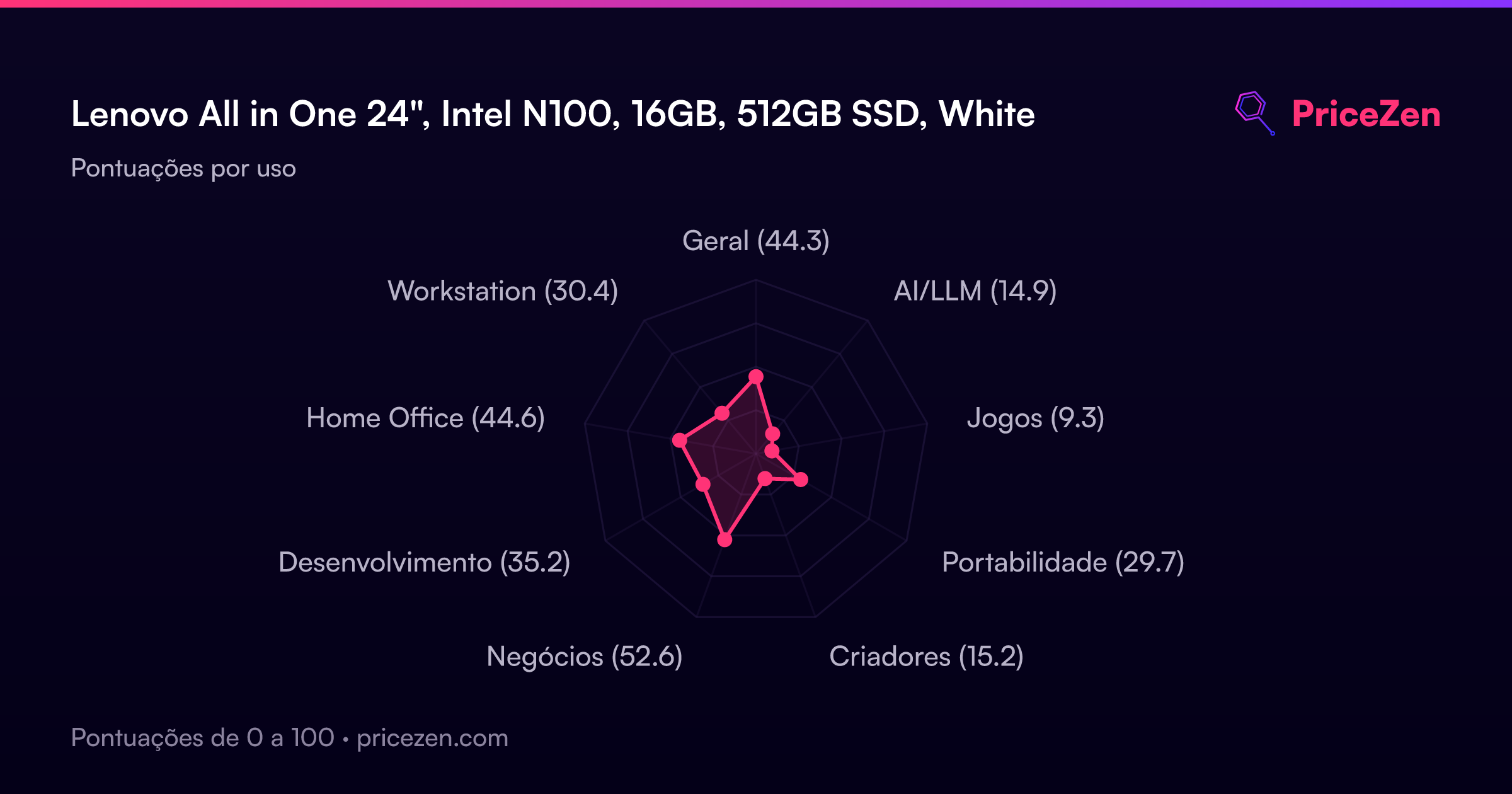
Where it falls apart is anything demanding. The integrated Intel UHD Graphics puts gaming performance at 9.3 out of 100 in our scoring, which is about as low as it gets. You're not playing anything beyond casual browser games or very old titles at low settings. The 512GB SSD is solidly average for this category, and the port selection is a bit underwhelming with just four USB-A ports and a single HDMI 1.4b out. If you need to drive a second monitor, that HDMI port will do 1080p fine, but don't expect 4K at high refresh rates.
Specifications
Full Specifications
Processor
| CPU | Intel Processor N100 |
| Cores | 4 |
| Frequency | 700 MHz |
| L3 Cache | 6 MB |
Graphics
| GPU | Intel UHD Graphics |
| Type | Integrated |
| VRAM Type | Shared |
Memory & Storage
| RAM | 16 GB |
| RAM Generation | DDR4 |
| Storage | 512 GB |
| Storage Type | NVMe SSD |
Build
| Form Factor | aio |
| PSU | 65 |
| Weight | 6.9 kg / 15.2 lbs |
Connectivity
| USB-C Ports | 0 |
| USB Ports | 4 |
| HDMI | 1x HDMI 1.4b |
| Wi-Fi | Wi-Fi 6 |
| Bluetooth | Bluetooth 5.2 |
| Ethernet | Gigabit Ethernet |
System
| OS | Windows 11 Pro |
vs Competition
Stacked against the Apple iMac M4, the Lenovo 24" AIO looks like a different species. The iMac's M4 chip is in a completely different performance universe, and its display is brighter and sharper. But the iMac starts well above this Lenovo's price, so it's not a fair fight. If you're budget-locked and need Windows, the Lenovo is the practical choice.
Against something like the HP OMEN GT16-0364 or the MSI Aegis Z2, the comparison gets awkward fast. Those are gaming desktops with dedicated GPUs that make the Lenovo's integrated graphics look like a calculator. The Dell Tower Plus EBT2250 is closer in spirit, but it's a tower, so you lose the all-in-one convenience. The iBUYPOWER Slate SWI7N56T01 is another tower that offers far more performance per dollar. The Lenovo's real competition is other budget AIOs, and in that narrow lane, it holds its own on features like Wi-Fi 6 and the included wireless peripherals.
| Spec | Lenovo All in One 24" | Apple Mac Studio M5 Max | HP OMEN GT16-0364 | Dell Desktop ECT1250 | ASUS ROG GM700 | MSI Aegis ZS2 A9NVP-1407US |
|---|---|---|---|---|---|---|
| CPU | Intel Processor N100 | Apple M5 Max | AMD Ryzen 7 8700F | Intel Core Ultra 7 265 | AMD Ryzen 7 9800X3D | AMD Ryzen 9 9900X |
| RAM (GB) | 16 | 48 | 32 | 32 | 32 | 32 |
| Storage (GB) | 512 | 1024 | 1024 | 2048 | 2048 | 2048 |
| GPU | Intel UHD Graphics | Apple (40-Core) | NVIDIA GeForce RTX 5070 | Intel UHD Graphics | NVIDIA GeForce RTX 5070 Ti | NVIDIA GeForce RTX 5070 |
| Form Factor | aio | mini | mid-tower | sff | mid-tower | mid-tower |
| Psu W | 65 | 480 | 850 | 180 | 850 | 750 |
| OS | Windows 11 Pro | macOS | Windows 11 Home | Windows 11 Home | Windows 11 Home | Windows 11 Home |
| Compare | Compare | Compare | Compare | Compare |
| Produto | CPU | GPU | RAM | Portas | Armazenamento | User Sentiment | Confiabilidade | Prova social |
|---|---|---|---|---|---|---|---|---|
| Lenovo All in One 24" | 11.9 | 36.5 | 31.3 | 34.5 | 40.5 | 53.1 | 70.3 | 77.2 |
| Apple Mac Studio M5 Max Compare | 95.7 | 84.9 | 95 | 89.1 | 68.6 | 95 | 99.3 | 71.1 |
| HP OMEN GT16-0364 Compare | 69.3 | 90.6 | 87 | 97.9 | 53.3 | 98.5 | 70.3 | 98.2 |
| Dell Desktop ECT1250 Compare | 88.1 | 60 | 81.6 | 75.1 | 82.5 | 98.5 | 70.3 | 98.2 |
| ASUS ROG GM700 Compare | 80.3 | 94.6 | 81.6 | 96.1 | 90 | 98.5 | 37.8 | 99.3 |
| MSI Aegis ZS2 A9NVP-1407US Compare | 92.3 | 90.6 | 87 | 90.4 | 82.5 | 88.6 | 37.8 | 99.3 |
Preço
Value & Pricing
At $620 USD, the Lenovo 24" AIO is priced like a budget all-in-one, and that's exactly what it is. You're paying for the form factor and the convenience of a built-in display, not for processing power. Compared to a similarly priced tower, you'd get more performance, but you'd also need to buy a monitor, keyboard, and mouse separately. If desk space and simplicity matter more than raw speed, the value proposition makes sense. Just know that alternatives like the Apple iMac M4 absolutely demolish this thing in performance, but they also cost significantly more. For a Windows 11 Pro machine with 16GB of RAM and a 512GB SSD, the price is reasonable, not a steal.
Saiba mais
Overview
The Lenovo All in One 24" sits in that budget-friendly all-in-one space where you trade raw horsepower for a clean desk and a simple setup. At around $620 USD, it's aimed squarely at home offices, students, and small businesses that need a dependable Windows 11 Pro machine without a tower taking up floor space. The headline specs are an Intel N100 processor, 16GB of DDR4 RAM, and a 512GB NVMe SSD, all packed behind a 23.8-inch 1080p IPS display.
Is the Lenovo 24" AIO good for everyday work? For email, web browsing, spreadsheets, and video calls, yes. The N100 is an efficiency-focused chip, not a performance monster. It'll handle your daily grind without breaking a sweat, but don't expect it to chew through video editing or anything GPU-heavy. The 16GB of RAM is a nice touch at this price, and the 512GB SSD means fast boot times and plenty of room for documents and apps.
Setup is genuinely painless. Plug it in, connect the wireless keyboard and mouse, and you're off. The built-in HD camera and speakers make it ready for Zoom calls out of the box. It's a practical machine that prioritizes simplicity over excitement.
Common Questions
Q: Is the Lenovo 24" All-in-One good for gaming?
No, the Lenovo 24" AIO is not good for gaming. The integrated Intel UHD Graphics and Intel N100 processor score just 9.3 out of 100 for gaming in our database, so you're limited to casual browser games and very old titles at low settings.
Q: Can the Lenovo 24" AIO run Windows 11?
Yes, the Lenovo 24" All-in-One comes with Windows 11 Pro pre-installed and includes a firmware TPM 2.0 chip, so it's fully compatible out of the box.
Q: Does the Lenovo 24" AIO have a touchscreen?
No, the 23.8-inch FHD IPS display on this Lenovo all-in-one is non-touch. It's an anti-glare panel with 250 nits of brightness and 99% sRGB coverage, which is fine for office work but not touch-enabled.
Q: Can I connect a second monitor to the Lenovo 24" AIO?
Yes, the Lenovo 24" All-in-One has one HDMI 1.4b output port, so you can connect a second monitor. Just keep in mind that HDMI 1.4b is limited to 1080p at 60Hz or 4K at 30Hz, so it's best for a standard 1080p display.
Who Should Skip This
Skip the Lenovo 24" AIO if you need any real processing power. Gamers, video editors, 3D modelers, and anyone running demanding software should look at a tower with a dedicated GPU, like the HP OMEN GT16-0364 or the MSI Aegis Z2. If you're picky about ergonomics, the non-adjustable stand will drive you nuts, and you'd be better off with a machine that offers height adjustment or a VESA mount. And if you're already in the Apple ecosystem, the iMac M4 is worth the extra money for the performance leap alone. This Lenovo is for people who want a simple, affordable Windows machine that just works for the basics, nothing more.
Verdict
Should you buy the Lenovo All in One 24"? If you need a simple, clean Windows 11 Pro machine for everyday office work, school, or a home office, and you don't want to deal with a tower, this is a solid pick. The 16GB of RAM and 512GB SSD keep things snappy for daily tasks, and the setup is genuinely effortless. Buyers consistently praise the slim design and how quickly they were up and running.
But if you need any real computing power, look elsewhere. The N100 CPU is a weak spot, and gaming is effectively off the table. The stand's lack of height adjustment and the awkward rear ports are minor annoyances that add up over time. For the right user, this is a dependable, no-fuss machine. For everyone else, it's a reminder that all-in-ones at this price are about convenience, not performance.
Usage Scores
- Geral44.3
- AI/LLM14.9
- Jogos9.3
- Portabilidade29.7
- Criadores15.2
- Negócios52.6
- Desenvolvimento35.2
- Home Office44.6
- Workstation30.4