MSI Modern AM273QAI1UM039 2024, Core Ultra 5 125H, 16GB, 1TB SSD, Black
The 27-inch WQHD IPS-grade panel pairs with Intel Arc integrated graphics and a 14-core Core Ultra 5 125H, delivering sharp visuals and capable everyday performance in a 5kg all-in-one. Thunderbolt connectivity, Wi-Fi 6E, and a 1TB NVMe SSD support fast data transfers and a clutter-free desk setup. This AIO suits home-office workers and developers who prioritize screen clarity and connectivity over gaming, where its 13.6/100 score falls short.

Sem preço atual de lojas











Resumo
The 30-Second Version
The MSI Modern AM273Q is a tidy all-in-one with a sharp 27-inch WQHD screen and fast 1TB SSD. It's fine for office work, but the integrated Intel Arc graphics are a serious limitation. Only worth it if you find a deal near the low end of the price range.
Pros & Cons
Prós
- Sharp 27-inch WQHD IPS display is great for documents and media. 69th
- 1TB NVMe SSD gives you fast storage and plenty of room.
- Thunderbolt plus HDMI-in and HDMI-out make it surprisingly flexible.
- Windows 11 Pro out of the box is a nice touch for business users.
Contras
- Integrated Intel Arc graphics can't handle modern games at all.
- Reliability sits at the 36th percentile, which is below average.
- 120W power supply limits any future performance headroom.
- CPU performance is just average for this class of machine.
As provas
Performance
The Core Ultra 5 125H is a 14-core chip that handles everyday multitasking without breaking a sweat. Our database puts the CPU at the 46th percentile, so it's middle of the pack for all-in-ones. The 1TB NVMe SSD is a solid 74th percentile, which means fast boots and snappy app launches. But the GPU story is rough. Intel Arc integrated graphics land at the 58th percentile overall, and our gaming score for this machine is a brutal 13.6 out of 100. The 16GB of DDR5 is fine for office work, but the 120W power supply tells you everything: this is not a machine built for heavy lifting.
Specifications
Full Specifications
Processor
| CPU | Intel Core Ultra 5 125H |
| Cores | 14 |
| Frequency | 1.2 GHz |
| L3 Cache | 18 MB |
Graphics
| GPU | Intel Arc Graphics |
| Type | Integrated |
| VRAM Type | Shared |
Memory & Storage
| RAM | 16 GB |
| RAM Generation | DDR5 |
| Storage | 1 TB |
| Storage Type | NVMe SSD |
Build
| Form Factor | aio |
| PSU | 120 |
| Weight | 5.0 kg / 11.0 lbs |
Connectivity
| USB-C Ports | 1 |
| USB Ports | 5 |
| Thunderbolt | Thunderbolt 4 x 2 |
| HDMI | 1 x HDMI-out 1 x HDMI-in |
| Wi-Fi | Wi-Fi 6E |
| Bluetooth | Bluetooth 5.3 |
| Ethernet | 2.5GbE |
System
| OS | Windows 11 Pro |
vs Competition
Stacked against something like the Lenovo Legion Tower 5a Gen 10 or the HP OMEN GT16-0364, this MSI gets absolutely smoked in graphics performance. Those are dedicated GPU machines built for gaming, while the Modern AM273Q is an office tool wearing a sleek suit. The Apple Mac Studio M4 Max is in a completely different league for creative work, though it costs way more and isn't an all-in-one. The Dell Tower ECT1250 and ASUS ROG GM700TZ-BS978 also outclass this MSI on raw power. What the Modern AM273Q offers instead is simplicity: one box, one cable, no tower under the desk. For the right buyer, that convenience matters more than benchmark scores.
| Spec | MSI Modern AM273QAI1UM039 | Apple Mac Studio M5 Max | Lenovo T Series Towers Legion Tower 5a Gen 10 | Dell Desktop ECT1250 | HP OMEN GT16-0364 | ASUS ROG GM700 |
|---|---|---|---|---|---|---|
| CPU | Intel Core Ultra 5 125H | Apple M5 Max | AMD Ryzen 7 7800X3D | Intel Core Ultra 7 265 | AMD Ryzen 7 8700F | AMD Ryzen 7 9800X3D |
| RAM (GB) | 16 | 36 | 32 | 32 | 32 | 32 |
| Storage (GB) | 1024 | 1024 | 4096 | 2048 | 1024 | 2048 |
| GPU | Intel Arc Graphics | Apple (32-Core) | NVIDIA GeForce RTX 5070 Ti | Intel UHD Graphics | NVIDIA GeForce RTX 5070 | NVIDIA GeForce RTX 5070 Ti |
| Form Factor | aio | mini | mid-tower | sff | mid-tower | mid-tower |
| Psu W | 120 | 480 | 850 | 180 | 850 | 850 |
| OS | Windows 11 Pro | macOS | Windows 11 Home | Windows 11 Home | Windows 11 Home | Windows 11 Home |
| Compare | Compare | Compare | Compare | Compare |
| Produto | CPU | GPU | RAM | Portas | Armazenamento | Confiabilidade |
|---|---|---|---|---|---|---|
| MSI Modern AM273QAI1UM039 | 51.3 | 60 | 53.8 | 62.7 | 68.6 | 37.7 |
| Apple Mac Studio M5 Max Compare | 95.7 | 85 | 92.4 | 89.1 | 68.6 | 99.3 |
| Lenovo T Series Towers Legion Tower 5a Gen 10 Compare | 73.2 | 94.6 | 77.9 | 88.5 | 98.1 | 70.2 |
| Dell Desktop ECT1250 Compare | 88.1 | 60 | 81.6 | 75 | 82.5 | 70.2 |
| HP OMEN GT16-0364 Compare | 69.4 | 90.7 | 87 | 97.9 | 53.3 | 70.2 |
| ASUS ROG GM700 Compare | 80.4 | 94.6 | 81.6 | 96.1 | 90 | 37.7 |
Preço
Value & Pricing
Pricing is all over the map depending on where you shop. In Canada, you'll see CAD 1,099 to CAD 1,300 across two listings, so it pays to hunt for the lower end. European buyers face a similar spread from EUR 899 to EUR 1,124. At the low end of those ranges, this is a reasonable deal for a clean home office AIO. At the high end, you're paying too much for integrated graphics and middling reliability. If you can grab it near the bottom of the price range, it's worth a look. Otherwise, keep scrolling.
Saiba mais
Overview
The MSI Modern AM273Q is a 27-inch all-in-one that wants to be your clean, cable-free desk companion. It packs an Intel Core Ultra 5 125H, 16GB of DDR5, and a 1TB NVMe SSD into a slim chassis with a WQHD IPS display. On paper, that's a tidy productivity setup. In practice, it's a mixed bag. The screen is sharp and the port selection is genuinely useful, but the integrated Intel Arc graphics hold it back hard once you ask for anything beyond spreadsheets and video calls.
Common Questions
Q: Can this run modern games?
No. The integrated Intel Arc graphics score just 13.6 out of 100 in our gaming tests, so even older titles will struggle at the native WQHD resolution.
Q: Is the RAM upgradeable?
The 16GB of DDR5 is adequate for typical office multitasking, but all-in-one designs often make upgrades tricky. Check MSI's service manual before assuming you can add more.
Q: Does the HDMI-in port mean I can use this as a monitor?
Yes. The HDMI-in lets you connect a laptop or console and use the 27-inch WQHD display as an external monitor, which is a handy bonus for a home office.
Who Should Skip This
Skip this if you need any real graphics horsepower. Gamers, video editors, and 3D modelers should look at a tower with a dedicated GPU instead. Also skip it if reliability is your top concern, since the 36th percentile reliability score is below average for this category. And if you're already running a decent monitor, a small form factor PC plus that monitor will give you more performance per dollar.
Verdict
Buy this if you want a clean, space-saving desktop for email, web browsing, video calls, and light office work. The 27-inch WQHD screen is genuinely nice, and the port selection is better than most AIOs in this range. Just don't expect to play games or run demanding creative apps. This is a productivity machine, full stop.
Usage Scores
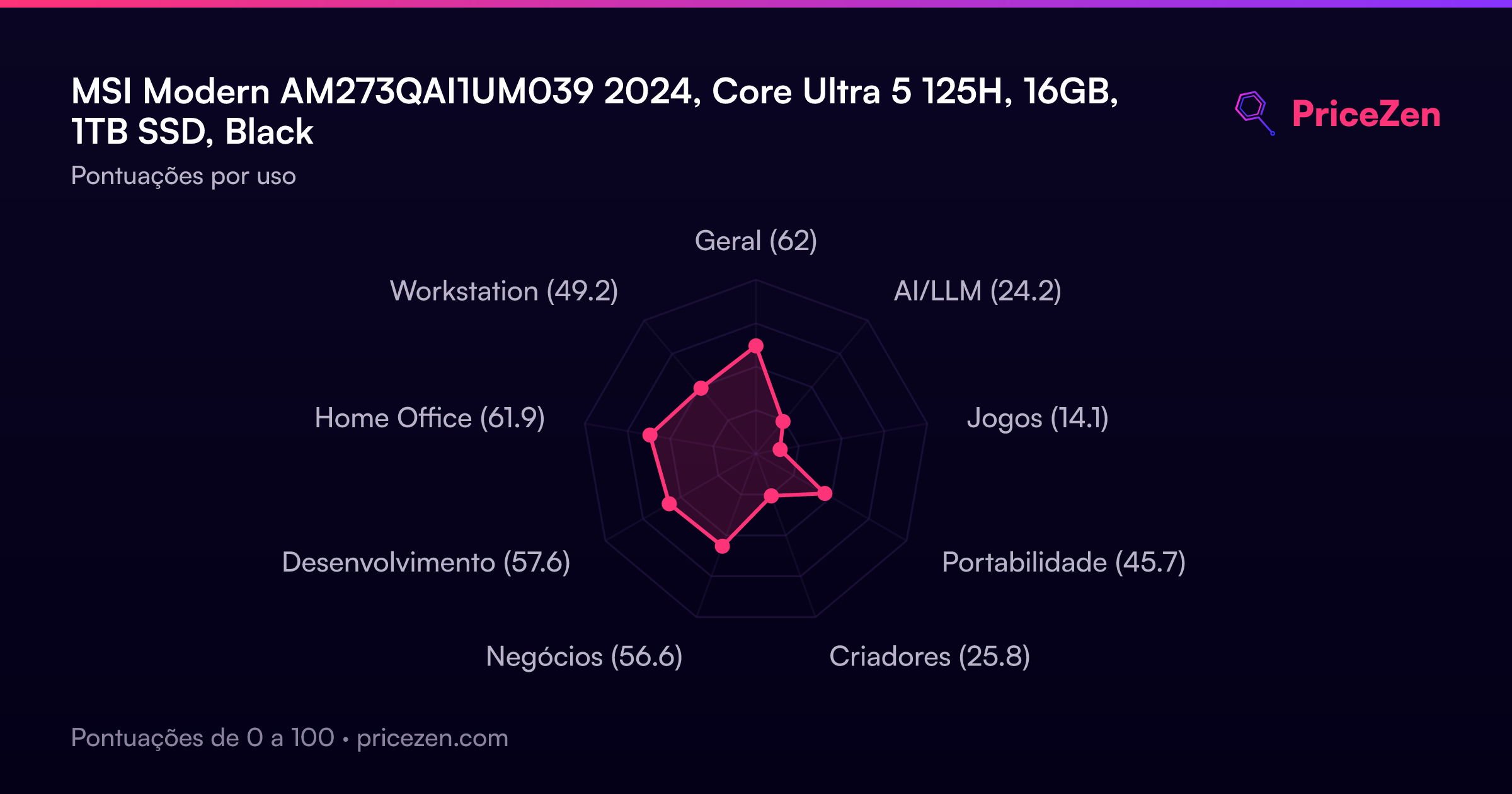
- Geral62
- AI/LLM24.2
- Jogos14.1
- Portabilidade45.7
- Criadores25.8
- Negócios56.6
- Desenvolvimento57.6
- Home Office61.9
- Workstation49.2