Samsung Galaxy Tab S10+ 12.4" 2024, MediaTek Dimensity 9300+, 8GB, 512GB, Cellular, Platinum Silver

S Pen-ready AMOLED, and it shrugs off water verified Nov 23
59/100 overall score 4.7 average from 703 owner ratings
- CPU
- MediaTek Dimensity 9300+
- RAM
- 8 GB
- Storage
- 512 GB
- Screen
- 12.4" 2800x1752
- OS
- Android
- Stylus
- Yes
- Cellular
- Yes
Snapshot
The 30-Second Version
The Galaxy Tab S10+ nails the fundamentals: a stunning 12.4-inch AMOLED display, IP68 durability, 512GB of storage, and an included S Pen. The Dimensity 9300+ chip is mid-pack, not flagship-tier, so heavy creative work will feel constrained. The catch is the price, which currently sits at $1,300, well above where we've tracked it before, and that makes the mid-pack processor much harder to forgive. Battery life is excellent and the AI features are genuinely useful, but at this number we'd wait for a drop or look hard at the Apple iPad Pro 13" M5 before committing.
Pros & Cons
Pros
- Stunning 12.4-inch AMOLED display with 120Hz refresh rate, top-tier screen quality 97th
- 512GB of storage is generous and ranks near the top 95th
- IP68 water and dust resistance, rare for a tablet this size 93rd
- S Pen included with excellent AI-powered note and sketch features 93rd
- Long-lasting 10,090mAh battery, highly rated for endurance
Cons
- Dimensity 9300+ CPU and GPU rank in the mid-30s percentile, well behind the strongest silicon in our rankings
- 8GB of RAM is adequate but not future-proof for heavy multitasking
- No expandable storage despite the premium price
- Android tablet app selection still lags behind iPadOS for creative software
- At $1,300 it asks flagship money for a mid-pack chip, and there's no keyboard in the box
What owners think
The Word on the Street
- A recurring theme is that the display quality exceeds expectations, with multiple owners describing it as one of the best screens they've seen on any device, not just tablets.
- Many buyers report that battery life is a standout, with several mentioning they can go multiple days of light use between charges.
- Some owners feel the performance is adequate but not exceptional, noting that heavy multitasking or demanding apps occasionally cause slowdowns.
- The S Pen and note-taking features get consistent praise, with users saying the AI summarization and organization tools are more useful than expected.
The proof
Performance
The Dimensity 9300+ is an interesting choice here. MediaTek's flagship silicon has come a long way, and in day-to-day use, this thing feels snappy. Apps open fast, multitasking with split-screen is smooth, and the 8GB of RAM handles most workflows without breaking a sweat. But here's the thing: our database puts this CPU in the 36th percentile for tablets, which means it's solidly middle of the pack. That's not a knock on MediaTek, it's just reality. The iPad Pro M5 and Surface Pro 11 are running silicon that absolutely demolishes this chip in raw compute. For most people, you won't notice. For heavy video editing or 3D work, you will.
The GPU situation is similar, landing in the 37th percentile. Casual games and emulators run fine, but if you're expecting desktop-class graphics performance, you'll be disappointed. The 512GB of storage is a genuine highlight, sitting in the 93rd percentile. That's a ton of room for apps, games, offline Netflix downloads, and raw photo files. The 10,090mAh battery is also a standout, ranking in the 90th percentile. In real terms, you're looking at all-day battery life with mixed use, and even heavy video streaming won't kill it before bedtime. The screen is where this tablet really shines, though. That 12.4-inch AMOLED panel hits the 94th percentile, and it's gorgeous. Deep blacks, punchy colors, and a 120Hz refresh rate make everything from scrolling to sketching feel fluid.
Specifications
Full Specifications
Processor
| CPU | MediaTek Dimensity 9300+ |
Memory & Storage
| RAM | 8 GB |
| Storage | 512 GB |
| Storage Type | SSD |
| Expandable | No |
Display
| Size | 12.4" |
| Resolution | 2800x1752 |
| Panel | AMOLED |
Connectivity
| USB-C | 1 |
| Cellular | Yes |
Features
| Stylus Support | Yes |
| Stylus Model | S Pen |
| Fingerprint Reader | Yes |
| Face Unlock | Yes |
| IP Rating | IP68 |
Physical
| Weight | 0.6 kg / 1.3 lbs |
| OS | Android |
vs Competition
The obvious cross-shop is the Apple iPad Pro 13" M5, and at $1,300 the gap between these two feels a lot narrower than it used to. Where the Tab S10+ wins is the stuff Samsung bundles in: the S Pen ships in the box, the body carries an IP68 rating, and 512GB of storage puts it near the top of our data. Where it loses is compute. The Dimensity 9300+ sits in the 36th percentile for CPU and the 37th for GPU in our rankings, so if your workload leans on raw processing power, the math tilts toward Apple. Android's file system is more open and split-screen multitasking is more flexible, and those things matter to some people more than benchmark scores. They just don't matter as much when the price climbs this high.
The Microsoft Surface Pro 13" 11 is a different animal. It's a Windows machine in tablet clothing, which means real desktop software rather than mobile apps, and that alone will decide the question for anyone whose work depends on a specific professional program. The trade-off is that it behaves like a laptop first and a tablet second, and the couch-and-streaming experience is clunkier than what Android gives you. The Tab S10+ is lighter at 571 grams, its battery is highly rated, and it's simply nicer to hold for an evening.
Then there's the value end of the field. The Xiaomi Pad 7 11.2" 2AFZZCRP4CG and the TABWEE T60 Pro 13.4" both sit in our top five for the category, and their presence there is a reminder of how much tablet you can get without spending flagship money. Neither is trying to be a sketching machine with an included stylus and an IP68 badge, and that's the Tab S10+'s genuine differentiator. But at $1,300, the question stops being whether Samsung's tablet is good and starts being whether it's good enough to justify the premium over everything else we rank alongside it. For note-takers and artists who want the S Pen, yes. For everyone else, it's a much harder sell than it was.
| Spec | Samsung Galaxy Tab S10+ 12.4" | Apple iPad Pro 13" M5 | Microsoft Surface Pro 11 13" | Lenovo Yoga Tab Plus 12.7" ZAEG0096US | Xiaomi Pad 11.2" 2AFZZCRP4CG | TABWEE T60 Pro 13.4" |
|---|---|---|---|---|---|---|
| CPU | MediaTek Dimensity 9300+ | Apple M5 | Qualcomm Snapdragon X Elite X1E-84-100 | QTI SM8650 | Snapdragon 7+ Gen 3 | Unisoc |
| RAM (GB) | 8 | 16 | 16 | 16 | 8 | 8 |
| Storage (GB) | 512 | 1024 | 1024 | 256 | 256 | 256 |
| Screen | 12.4" 2800x1752 | 13" 2752x2064 | 13" 2880x1920 | 12.7" 2944x1840 | 11.2" 3200x2136 | 13.4" 1920x1200 |
| OS | Android | iPadOS | Windows 11 Home | Android 14 | Android 14 | Android 15 |
| Stylus | Yes | Yes | Yes | Yes | Yes | Yes |
| Cellular | Yes | Yes | No | No | No | No |
| Battery (Wh) | - | 39 | 53 | - | - | - |
| Compare | Compare | Compare | Compare | Compare |
| Product | CPU | GPU | RAM | Screen | Battery | Feature | Storage | Sharpness | Portability | Connectivity | Social Proof | Affordability | Reading Battery | Water Resistance |
|---|---|---|---|---|---|---|---|---|---|---|---|---|---|---|
| Samsung Galaxy Tab S10+ 12.4" | 38.2 | 36.7 | 66.3 | 93.4 | 87.9 | 86.6 | 93.1 | 82.8 | 49.6 | 66.8 | 94.5 | 6.8 | 56.7 | 97.3 |
| Apple iPad Pro 13" M5 Compare | 99.1 | 99.4 | 92.7 | 99.7 | 97.7 | 96.3 | 97.9 | 73.9 | 48.3 | 99.3 | 99.2 | 2.8 | 41.2 | 46.4 |
| Microsoft Surface Pro 11 13" Compare | 98.4 | 96.6 | 92.7 | 99 | 99.8 | 74.2 | 97.9 | 82.8 | 21.7 | 92.9 | 90.9 | 5.5 | 87 | 97.3 |
| Lenovo Yoga Tab Plus 12.7" ZAEG0096US Compare | 84.5 | 82.6 | 92.7 | 96.2 | 88.6 | 96.3 | 84.1 | 90.1 | 42.7 | 92.9 | 87 | 21.2 | 51.8 | 46.4 |
| Xiaomi Pad 11.2" 2AFZZCRP4CG Compare | 86.8 | 84.4 | 66.3 | 97.9 | 85.1 | 54.6 | 84.1 | 99.3 | 59.9 | 76.8 | 90.9 | 34.1 | 71.2 | 46.4 |
| TABWEE T60 Pro 13.4" Compare | 95.5 | 89 | 66.3 | 55.2 | 86.6 | 88.5 | 75.3 | 28 | 32.7 | 76.8 | 87 | 36.9 | 18 | 46.4 |
Price
Value & Pricing
We track this tablet's price over time, partly through our community browser extension, and right now it sits at $1,300. That's a meaningful jump from where we last saw it, and it changes the conversation quite a bit. At the old number, the Tab S10+ was an easy sell: a gorgeous screen, IP68 durability, half a terabyte of storage, and a stylus in the box for a price that felt fair. At $1,300, you're paying full flagship money, and the value argument has to work much harder.
What hasn't changed is what you get. The 12.4-inch AMOLED panel is among the best in our rankings, the 512GB of storage is near the top, and the 10,090mAh battery is also highly rated. Those are genuinely top-shelf numbers, and the S Pen coming in the box still counts for something when you're tallying up what a setup actually costs. The problem is the silicon. The Dimensity 9300+ lands in the 36th percentile for CPU and the 37th for GPU, which is middle of the pack, and middle of the pack is a hard thing to justify at this price. Our scoring model is built from specs and external benchmarks, and it doesn't care how nice the packaging is.
So who does this still make sense for? Someone who specifically wants a big Android tablet with a stylus included, water resistance, and enough storage to never think about storage again. If that's your list, the Tab S10+ ticks every box and nothing else on the market ticks all of them at once. But if you're buying on value rather than on that specific wish list, wait for the price to come back down or look at what else your money buys. We'd keep an eye on it rather than pull the trigger today.
Read more
Overview
The Galaxy Tab S10+ is Samsung's big swing at the premium Android tablet space, and honestly, it lands most of the punches. You're getting a 12.4-inch AMOLED display, a MediaTek Dimensity 9300+ chip, 8GB of RAM, and a massive 512GB of storage, all wrapped in an IP68-rated body that can survive a splash or a dusty backpack. The S Pen comes in the box, which is still a rarity in this price bracket, and Samsung's Galaxy AI features are front and center. This is a tablet aimed squarely at people who want to sketch, take notes, watch content, and occasionally pretend they're going to get work done on it.
Who's this for? Students who want a digital notebook that won't die halfway through a lecture. Artists who want a portable drawing surface without paying iPad Pro money. And anyone who wants a big, gorgeous screen for streaming that also happens to be water-resistant. The 5G option means you're not tethered to Wi-Fi, which is a bigger deal than it sounds if you travel or commute. At 571 grams, it's not featherweight, but it's manageable for a tablet this size.
What makes it interesting is the AI angle. Samsung's pushing Sketch to Image, Circle to Search, and Note Assist hard, and unlike a lot of marketing fluff, these features actually work. Circle to Search is genuinely useful, and Note Assist's ability to summarize and organize messy notes is the kind of thing that sounds gimmicky until you use it. The question is whether the Dimensity 9300+ can keep up with the AI workload and whether the whole package justifies the price. We'll get into that.
Common Questions
Q: Is the S Pen included with the Galaxy Tab S10+?
Yes, the S Pen comes in the box with the Tab S10+. That still counts in its favor at the current price, since a stylus is usually a separate line item on a tablet purchase. The S Pen charges wirelessly when attached to the tablet and supports Samsung's AI features like Sketch to Image and Note Assist.
Q: How does the Dimensity 9300+ compare to Apple's M-series chips?
The Dimensity 9300+ is a capable chip, but it ranks in the 36th percentile for CPU performance in our database, which puts it well behind the strongest silicon in our tablet rankings. For everyday tasks like browsing, streaming, and note-taking, you will not notice a difference. But for heavy video editing, 3D rendering, or demanding creative apps, the Apple iPad Pro 13" M5 is the faster machine, and at $1,300 that gap matters more than it did at a lower price.
Q: Can the Galaxy Tab S10+ replace a laptop?
For many people, yes, with caveats. The Android app selection has improved, and Samsung's DeX mode gives you a desktop-like experience when connected to a monitor or keyboard. But the 8GB of RAM and mid-pack processor mean heavy multitasking or professional software will feel constrained. If you need full desktop applications, the Microsoft Surface Pro 13" 11 runs Windows and is the better fit for that job.
Q: Is the Galaxy Tab S10+ good for drawing and digital art?
The 12.4-inch AMOLED display is excellent for art, ranking among the best in our data, and the 120Hz refresh rate keeps drawing feeling responsive. Owners praise the S Pen for note-taking and sketching. However, Android's creative app selection still lags behind iPadOS, and the GPU sits in the 37th percentile. For hobbyists and students who want the included stylus, it is great. For professional artists, the Apple iPad Pro 13" M5 remains the stronger choice.
Who Should Skip This
If you are a professional video editor, 3D artist, or someone who needs desktop-class performance from a tablet, the Tab S10+ is not for you. The Dimensity 9300+ and 8GB of RAM will bottleneck demanding workflows, and at $1,300 you would be paying flagship money for that bottleneck. Look at the Apple iPad Pro 13" M5 or the Microsoft Surface Pro 13" 11 instead. The Surface runs full Windows, which means real desktop apps, and the iPad Pro is the stronger pick if your work lives in creative software.
Skip it too if you are shopping purely on value. The Xiaomi Pad 7 11.2" 2AFZZCRP4CG and the TABWEE T60 Pro 13.4" both earn their place in our top five for the category, and neither asks anything close to flagship money. You give up the included S Pen, the IP68 rating, and the top-tier AMOLED panel, but if those are not on your must-have list, the savings are hard to ignore.
And if you are already deeply invested in Apple products, this will not play nice with your iPhone, AirPods, and MacBook the way an iPad will. Handoff, AirDrop, and iMessage integration are things you will miss. For an Android user who specifically wants a big water-resistant tablet with a stylus in the box, the Tab S10+ is still one of the best options going. Just try not to buy it at the top of its price curve.
Verdict
For students and note-takers, the Tab S10+ is still a very good tablet, though the recommendation comes with more hesitation than it used to. The S Pen is excellent, Note Assist genuinely helps organize messy lecture notes, and the battery will get you through a full day of classes. The IP68 rating means you don't have to baby it, and 512GB of storage means you won't run out of space for textbooks, PDFs, and recordings. The 5G option is a bonus if you're on campus Wi-Fi that's perpetually overloaded. All of that is true. What's also true is that $1,300 is a lot of money for a student budget, and if the price drops back toward where we've tracked it before, this becomes an easy yes again.
For creative professionals, it's more complicated, and the higher price makes it more complicated still. The display is fantastic for sketching and color work, ranking among the best in our data, and Sketch to Image is a fun party trick that occasionally produces something useful. But the Dimensity 9300+ isn't going to keep up with heavy Photoshop or video editing workflows, and Android's creative app selection still trails iPadOS. Paying flagship money for mid-pack silicon is a tough ask when the Apple iPad Pro 13" M5 is right there. If you're a hobbyist or student artist who specifically wants the S Pen and the big AMOLED canvas, the Tab S10+ will serve you well. If you're earning a living from this thing, spend the money where the performance is.
Usage Scores
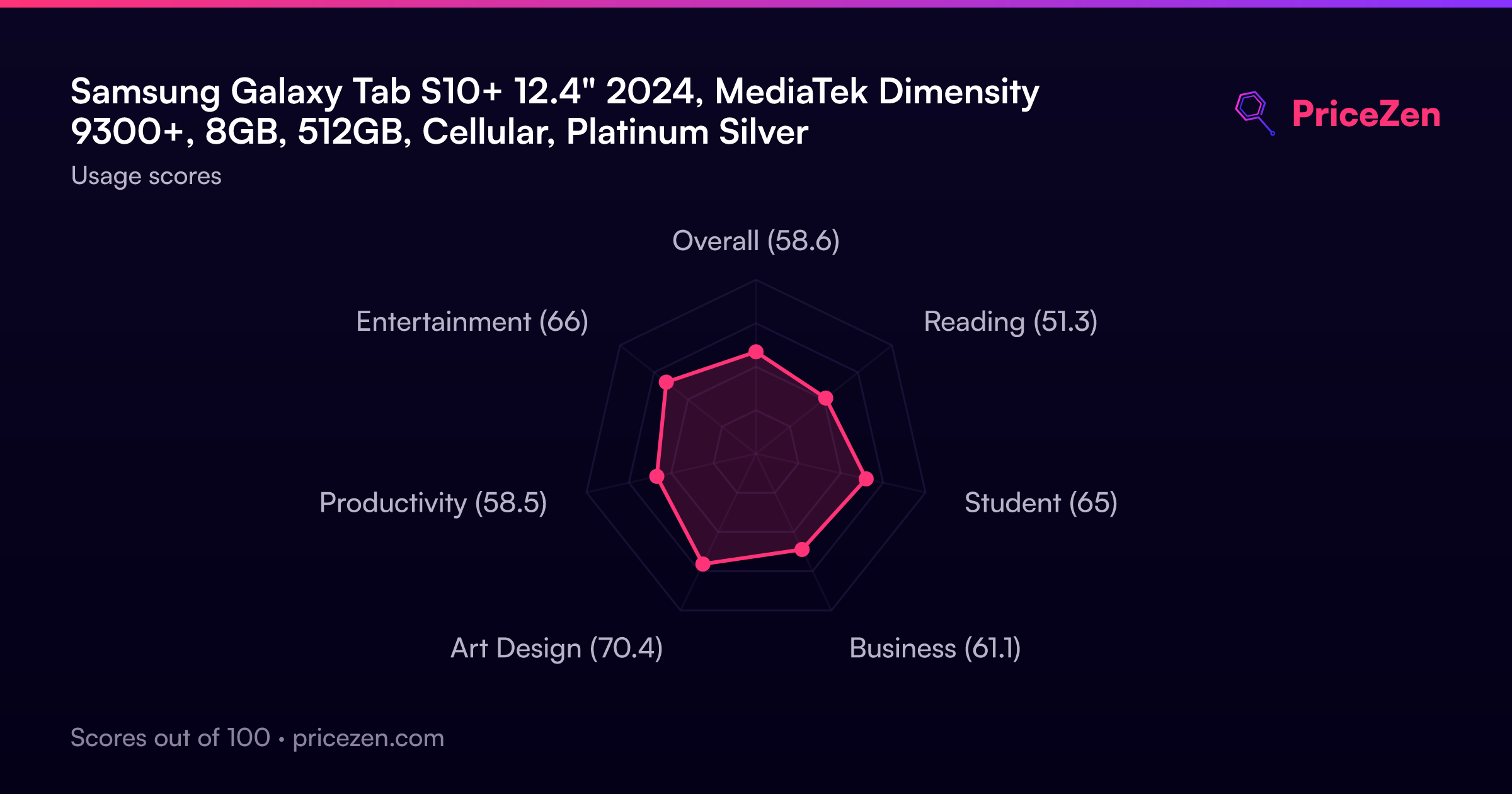
- Overall58.6
- Reading51.3
- Student65
- Business61.1
- Art Design70.4
- Productivity58.5
- Entertainment66