LYANGET DDR4-2133 SODIMM

SODIMM size for laptops and mini PCs verified Nov 28
12/100 overall score 1.5 average from 2 owner ratings
Prices checked on 1 days so far, too few to say what is usual.
- Memory
- DDR4
- Speed
- 2133 MT/s
- Form factor
- SODIMM
Compare prices at 1 store
Cheapest first. New, refurbished and bundled offers are kept apart, so you compare like with like.
| Store | Sold by | Colour and condition | Price | vs lowest | Last checked | Link |
|---|---|---|---|---|---|---|
| New1 offerSingle unit | ||||||
| Amazon | Not known | Not listed | R$119.72 | Lowest price | 3 days ago | Go to store |
 Source: PriceZen, checked Nov 25, 2026
A price counts as current when we checked it in the last 7 days. “Marketplace seller” means a third-party seller on that store, not the store itself.











Snapshot
The 30-Second Version
The LYANGET is a SO-DIMM to DIMM adapter card, not a memory kit, and that's the single most important thing to know before buying. At USD 13 on Amazon it's the cheapest thing in our memory category, though European listings run EUR 33 to EUR 43 for the same board. The 2133 MT/s rating is slow, latency and capacity rank at the bottom, and owners have given it 1.5/5 across 2 reviews. Buy it as a cheap test-bench tool if you already own laptop sticks, otherwise get real RAM.
Pros & Cons
Pros
- USD 13 at Amazon, top of the charts for affordability in our data 99th
- Lets you reuse laptop DDR4 SO-DIMMs in a desktop DIMM slot
- Genuinely useful as a test-bench tool for checking SO-DIMM health
- Unbuffered DDR4 class matches standard consumer desktop boards
- Simple drop-in concept, no technical experience needed to fit it
Cons
- It's an adapter, not RAM, so you still need to supply the memory
- 2133 MT/s is a disappointing speed showing against the category
- Latency ranks among the worst we track, capacity sits dead last
- 1.5/5 customer rating, and only 2 reviews to go on
- EUR listings run EUR 33 to EUR 43, far above the USD 13 asking price
The proof
Performance
The 2133 MT/s figure is the number to stare at. That's the transfer rate attached to this listing, and it's on the slow end of DDR4, which is why our speed score comes back disappointing rather than merely average. For context on what that means in practice: if you're moving files around, compiling code, or running anything that leans on memory bandwidth, a 2133 MT/s path is going to feel dated compared to what most current DDR4 kits offer. And remember, an adapter can't make a stick faster than it already is. Best case, it passes through what the module can do. Worst case, the extra connection between the SO-DIMM and the motherboard slot becomes the thing that limits you.
Latency is the other sore spot, scoring near the bottom of everything we track in this category. Latency is the delay before a memory request gets answered, and it's the difference between a system that feels snappy and one that feels like it's thinking about it. A pass-through board adds physical distance and another set of contacts to that path, so a weak latency showing isn't surprising. The unbuffered class is normal for consumer desktop memory and nothing to worry about on its own. But combine middling-to-poor speed, bottom-tier latency and a dead-last capacity score, and this is not a part you buy chasing performance. Our overall score of 11.8/100 reflects that plainly.
Specifications
Full Specifications
Memory
| Type | DDR4 |
| Form Factor | SODIMM |
Performance
| Speed | 2133 |
Class
| Registered | No |
vs Competition
Our data puts the LYANGET up against Timetec 16GB DDR3L SODIMM, Samsung 4GB DDR4 SODIMM, G.Skill Ripjaws, Dell 912441 and Kingston ValueRAM. Here's the awkward part: those are memory products, and this is an adapter. So the comparison isn't really apples to apples, and that's exactly why the total score lands at 11.8/100. If you're shopping for RAM to put in a machine, any of those named alternatives is solving the actual problem, while the LYANGET only solves the problem of connecting a stick you already own. Cross-shop the Timetec and Samsung options if you specifically need laptop-format modules, and look at G.Skill Ripjaws or Kingston ValueRAM if you're filling desktop slots and want memory that arrives ready to run.
Where the LYANGET wins is narrow but real: none of those competitors let you take a SO-DIMM and drop it into a desktop board. That's a genuinely different job, and at USD 13 it's the cheapest way we track to do it. Where it gives ground is everywhere else. Its 2133 MT/s rating is a weak spot on speed, its feature score lags behind most of the field, and its capacity ranking is dead last, which is what happens when a product ships with no memory at all. The Dell 912441 and Kingston ValueRAM are also the sort of parts people buy when they want boring reliability, and with a 1.5/5 rating from 2 reviews, boring reliability is not what this adapter is currently offering.
| Spec | LYANGET DDR4 SODIMM | Corsair Vengeance RGB | G.Skill TridentZ RGB | PNY XLR8 Gaming EPIC-X RGB | Kingston FURY Renegade | Timetec Pinnacle Konduit RGB |
|---|---|---|---|---|---|---|
| Capacity | - | 32GB | 32GB | 32GB | 16GB | 32GB |
| Kit | - | 2 x 16GB | 2 x 16GB | 2 x 16GB | 1 x 16GB | 4 x 8GB |
| Memory Type | DDR4 | DDR5 | DDR4 | DDR4 | DDR5 | DDR4 |
| Speed Mts | 2133 | 6200 | 4000 | 3200 | 7200 | 3200 |
| Cas Latency | - | CL36 | CL18 | CL16 | CL38 | CL16 |
| Form Factor | SODIMM | UDIMM | UDIMM | UDIMM | DIMM | UDIMM |
| Ecc | - | No | No | No | No | No |
| Compare | Compare | Compare | Compare | Compare |
| Product | Speed | Feature | Latency | Capacity | Social Proof | Affordability |
|---|---|---|---|---|---|---|
| LYANGET DDR4 SODIMM | 22 | 18 | 6.4 | 0.7 | 0.8 | 98.9 |
| Corsair Vengeance RGB Compare | 92.6 | 89.5 | 76.8 | 70.5 | 69.1 | 16.6 |
| G.Skill TridentZ RGB Compare | 64.6 | 89.5 | 98.1 | 70.5 | 96.4 | 41 |
| PNY XLR8 Gaming EPIC-X RGB Compare | 53.3 | 89.5 | 87.6 | 70.5 | 87.3 | 45.7 |
| Kingston FURY Renegade Compare | 98.3 | 66.8 | 80.6 | 44.8 | 0 | 35.6 |
| Timetec Pinnacle Konduit RGB Compare | 53.3 | 89.5 | 87.6 | 70.5 | 87.3 | 39.5 |
Price
Value & Pricing
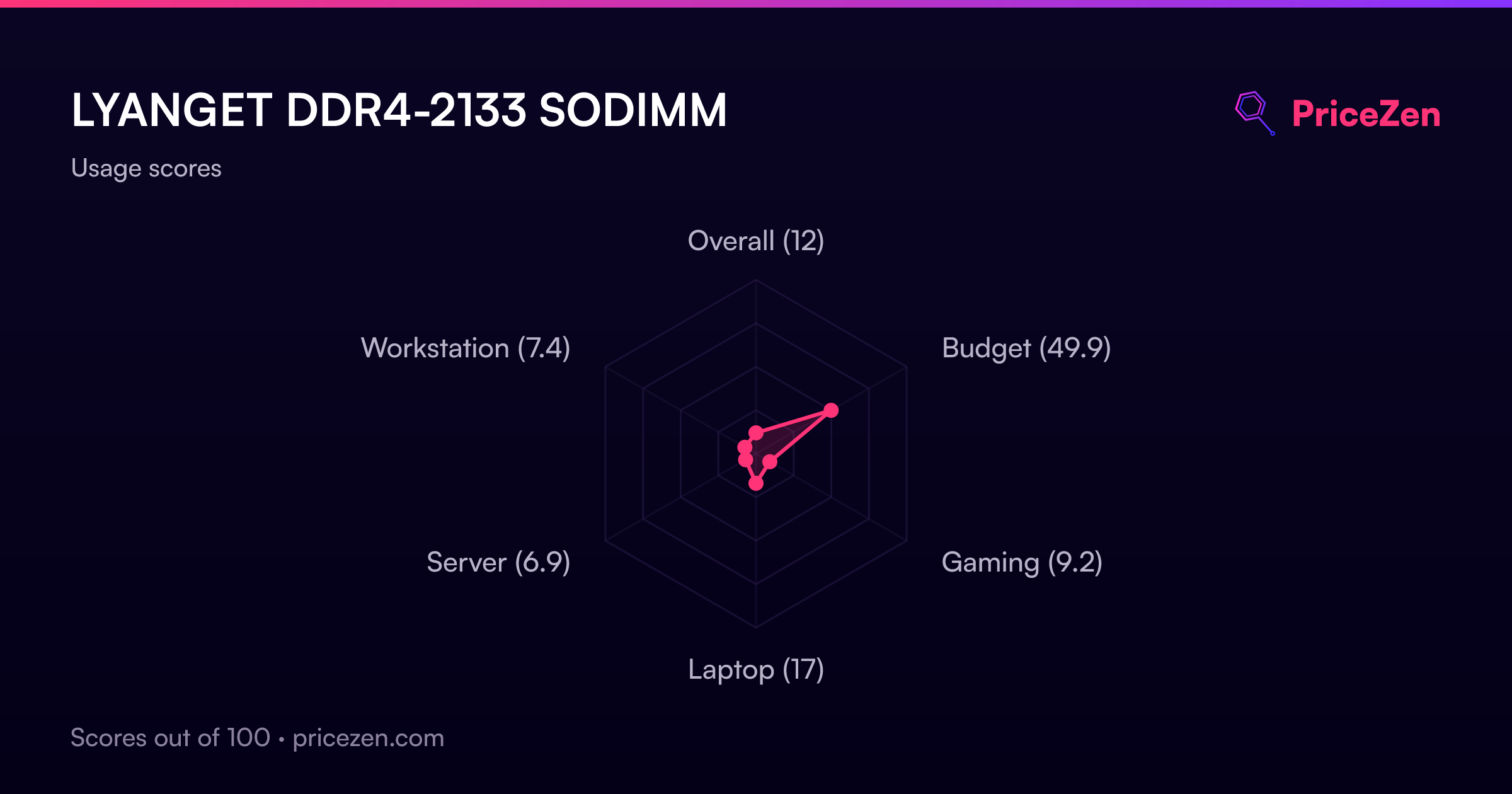
On raw price, this thing is untouchable. USD 13 at Amazon is the cheapest ticket in the category by a wide margin, and our affordability ranking has it at the 99th percentile. If your only question is "what's the least I can spend to get a SO-DIMM talking to a desktop board," the answer is probably this. But value is price divided by what you get, and the denominator here is thin. You get a converter, not memory, and our budget score of 49.6/100 says the maths only half works once you factor in buying the actual stick separately.
And the pricing gets weird across borders. We track EUR 33 to EUR 43 across the Spanish and Italian listings, a EUR 10 spread between two shops selling the same adapter. That's a big gap for a low-cost part, and it's worth clicking around before you commit if you're buying in Europe. Canadian buyers see CAD 23 and Brazilian buyers BRL 120. These aren't conversions of each other, they're separate local listings, and the European ones in particular are asking a lot more relative to what this board does. Our rule of thumb: at USD 13 it's an impulse-buy tool, at EUR 43 it's a purchase you should think twice about.
We started tracking prices for this product on Nov 25, 2026. The chart appears once we have more data.
Read more
Overview
Let's get one thing straight before we go any further: the LYANGET isn't memory. It's an adapter card that lets you plug a laptop DDR4 SO-DIMM into a desktop DIMM slot. The listing sits in the memory category and carries a 2133 MT/s DDR4 SODIMM, unbuffered spec line, but what lands in your mailbox is a converter board. That distinction matters a lot here, because our scoring model compares it against actual RAM kits, and an adapter with no chips on it is always going to look strange next to them.
So who's this for? Honestly, a pretty narrow crowd. If you've got a drawer full of pulled laptop sticks and a desktop test bench, or you're the person at a repair shop who constantly needs to check whether a SO-DIMM is alive without hunting down a laptop to drop it into, this is a cheap tool for that job. The manufacturer leans into exactly that pitch, calling out factories, distributors and people who test laptop RAM compatibility on desktops. As a workshop gadget, the idea makes sense. As a way to upgrade your daily-driver PC's memory, it's a much harder sell.
What makes it interesting is the price. At USD 13 on Amazon, it's cheaper than almost anything else we track in this category, and our affordability ranking puts it at the very top of the charts. But cheap and good value aren't the same thing, and the rest of the scorecard is rough. Speed lands in disappointing territory, features lag behind most of the field, latency is one of the worst we've seen, and capacity sits dead last. Add a 1.5/5 customer rating from just 2 reviews, and you've got a product that's inexpensive for a reason.
Common Questions
Q: Does this come with memory, or do I need to buy RAM separately?
You need to supply the memory. This is a converter board that adapts a laptop DDR4 SO-DIMM to a desktop DIMM slot, which is why our capacity ranking puts it dead last against actual memory kits. Budget for the adapter plus the stick, because the USD 13 price only covers the first half of the job.
Q: Will it work with any DDR4 laptop stick and any desktop motherboard?
The manufacturer claims broad compatibility with most motherboards and modules, and the unbuffered DDR4 class is standard for consumer desktop boards. But the listing carries a 2133 MT/s rating, which is a slow showing in our speed rankings, so don't expect it to unlock higher speeds from a faster module. With only 2 owner reviews and a 1.5/5 rating, we'd treat compatibility as something to verify on your own board rather than assume.
Q: Is this a good way to cheaply upgrade my gaming or work PC?
No, and the numbers say why. Speed ranks in disappointing territory at 2133 MT/s, latency is among the worst in our data, and the overall score is 11.8/100. Adding an adapter between your memory and your motherboard is not a performance move, it's a workaround for people who already have spare laptop modules and a specific reason to use them.
Q: Why is it so much more expensive in Europe?
We track EUR 33 to EUR 43 across the Spanish and Italian listings, a EUR 10 spread between two shops, while the US listing sits at USD 13 and Canada at CAD 23. Those are separate local prices, not currency conversions of one another. If you're buying in Europe, compare both listings before checkout, because at the top of that range the value argument gets a lot weaker.
Who Should Skip This
Anyone shopping for memory to fix a slow PC should walk past this. If your machine is stuttering with too many tabs open or choking on a big project file, you need actual RAM, and this ships with none. Our capacity ranking has it at the very bottom for that reason. Look at the Kingston ValueRAM or G.Skill Ripjaws options in our competitor set instead, or the Timetec and Samsung SODIMM listings if you're upgrading a laptop. Those solve the problem you actually have.
Also skip it if you're building anything you depend on. A pass-through adapter adds another connection point between your memory and your board, and the latency score here is one of the weakest we track. Pair that with a 1.5/5 rating from just 2 reviews and you've got too much uncertainty for a work machine, a home server, or anything a client pays you to keep running. Our server score of 6.7/100 is the lowest of any use case we rate, which tells you everything about where this belongs. Workshop drawer, yes. Production build, no.
Verdict
If you run a repair bench, teach hardware, or hoard laptop pulls the way some people hoard cables, this is a reasonable USD 13 gamble. It does one specific mechanical job, it does it cheaply, and our affordability ranking backs that up. Treat it as a jig, not a component. Keep expectations low, keep a known-good stick handy for sanity checks, and don't build anything you care about on top of it.
If you're upgrading a PC you actually use every day, skip it. The 2133 MT/s speed showing, the bottom-tier latency and capacity scores, and that 1.5/5 owner rating all point the same direction. Buy proper memory in the format your board takes and save yourself the troubleshooting. Our total score of 11.8/100 isn't us being harsh on a niche gadget, it's the honest result of comparing an adapter against products that ship with actual RAM. Different tools, different jobs, and this one only makes sense if you already know you need it.
Usage Scores
- Overall12
- Budget49.9
- Gaming9.2
- Laptop17
- Server6.9
- Workstation7.4