Acer Nitro XF243Y X1 24" Black 2026
The 200Hz refresh rate and 0.5ms response time virtually eliminate blur and ghosting, making fast-paced action crisp. The 23.8-inch IPS panel delivers accurate colors and consistent brightness across angles, with height-adjustable ergonomics for comfort. This monitor suits competitive gamers who prioritize smooth, responsive gameplay over portability.

No current retailer price
Where we saw it before. Check the store for today's price.











Snapshot
The 30-Second Version
All speed, no substance: 200Hz for USD 156 is a steal, but 250 nits means you'd better own some curtains.
Pros & Cons
Pros
- 200Hz and a 0.5ms claim put motion performance among the best on the market 91st
- USD 156 is a genuinely low entry point for high-refresh IPS 67th
- IPS panel keeps colors consistent off-angle
- Height adjustment plus 100x100mm VESA mounting
Cons
- 250 nits is dim, and color ranks near the bottom of the category
- No adaptive sync listed, so tearing is on you
- 1080p only, despite marketing copy name-dropping WQHD
- Exactly one owner review on record, so buyer feedback is thin
What owners think
The Word on the Street
How owner sentiment changed over time
ExclusiveBased on when customers actually wrote their reviews - so you can see whether early praise held up.
1 written review, Jun 2026: 1 happy
Across all 1 store ratings: 4.0★. The chart counts the 1 written review.
Each dot is one written review, in the month it was written. Happy = 4-5★, mixed = 3★, unhappy = 1-2★.
The proof
Performance
What surprised us is how lopsided the numbers are. A 200Hz refresh with a 0.5ms claim on an IPS panel lands near the top of the market for raw motion performance, and IPS means viewing angles hold up instead of washing out like cheap TN panels do. Then you look at the display side and it falls apart: 250 nits is dim enough that a sunny room will fight you, and both display and color rank in the bottom quarter of the category. Connectivity is middle of the pack with 2x HDMI and 1x DisplayPort, which covers a PC plus a console just fine. And the marketing copy for this thing brags about WQHD resolution while the actual spec sheet says 1920x1080. Trust the spec sheet.
Specifications
Full Specifications
Display
| Size | 24" |
| Resolution | 1920x1080 (Full HD) |
| Panel Type | IPS |
| Aspect Ratio | 16:9 |
| Curved | No |
| Screen Finish | matte |
Performance
| Refresh Rate | 200 Hz |
| Response Time | 0.5 |
Color & HDR
| Brightness | 250 nits |
| Color Gamut | 99% sRGB |
| Color Depth | 8-bit |
Connectivity
| HDMI Ports | 1 |
| DisplayPort | 1 |
| Speakers | Yes |
Ergonomics
| Height Adjustable | Yes |
| Tilt | Yes |
| Swivel | Yes |
Features
| Touchscreen | No |
| Weight | 4.7 kg / 10.3 lbs |
vs Competition
Every serious rival in our data is a 27-inch panel: the MSI MAG 271QPX QD-OLED E2, the Gigabyte M Series OLED MO27Q28G, the LG UltraGear 27G810A-B, the ASUS ROG Strix XG27JCG and the Dell S2725QC. Cross-shop the two OLEDs if image quality is your whole reason for upgrading, because this Acer's color and brightness rankings sit near the floor and no amount of refresh rate fixes that. Look at the LG and ASUS if you want a bigger, sharper daily driver. The Acer wins on exactly one axis, and it wins hard: 200Hz and 0.5ms at USD 156, with a compact 23.8" footprint that suits a small desk. Pick it for competitive play on a tight budget, pick the others for everything else.
| Spec | Acer Nitro XF243Y X1 24" | LG UltraGear 45GX950A-B 45" | ASUS ROG Strix XG27UCDMG 27" | Dell UltraSharp U4025QW 39.7" | Alienware AW-Series AW3425DW 34" | MSI MAG 271QPX QD-OLED E2 27" |
|---|---|---|---|---|---|---|
| Screen Size | 24 | 45 | 27 | 39.7 | 34 | 27 |
| Resolution | 1920 x 1080 | 5120 x 2160 | 3840 x 2160 | 5120 x 2160 | 3440 x 1440 | 2560 x 1440 |
| Panel Type | IPS | OLED | QD-OLED | IPS | QD-OLED | QD-OLED |
| Refresh Rate | 200 | 330 | 240 | 120 | 240 | 240 |
| Response Time Ms | 0.5 | 0.03 | 0.03 | 5 | 0.03 | 0.03 |
| Adaptive Sync | - | FreeSync Premium Pro | FreeSync Premium Pro | Adaptive-Sync | FreeSync Premium Pro | FreeSync Premium Pro |
| Hdr | - | DisplayHDR True Black 400 | DisplayHDR True Black 400 | HDR600 | HDR400 | DisplayHDR True Black 400 |
| Compare | Compare | Compare | Compare | Compare |
| Product | Color | Portability | Display | Feature | Ergonomic | Performance | Connectivity | Social Proof |
|---|---|---|---|---|---|---|---|---|
| Acer Nitro XF243Y X1 24" | 35.8 | 43.2 | 37.5 | 21.1 | 66.8 | 91.2 | 43 | 6.8 |
| LG UltraGear 45GX950A-B 45" Compare | 99.4 | 76.5 | 99.7 | 96.3 | 90.7 | 99.4 | 96.9 | 92 |
| ASUS ROG Strix XG27UCDMG 27" Compare | 96.5 | 57.3 | 97.7 | 85 | 90.7 | 97.9 | 81 | 98.9 |
| Dell UltraSharp U4025QW 39.7" Compare | 97.9 | 76.5 | 98.6 | 96.3 | 90.7 | 56.1 | 99.3 | 96.8 |
| Alienware AW-Series AW3425DW 34" Compare | 98.9 | 73.9 | 84.1 | 96.3 | 90.7 | 97.9 | 95.3 | 96.8 |
| MSI MAG 271QPX QD-OLED E2 27" Compare | 99.2 | 57.3 | 73.4 | 85 | 90.7 | 97.9 | 81 | 98.9 |
Price
Value & Pricing
At USD 156 it's worth it if your priority is frames, not fidelity. We track prices across stores and this is the kind of number where you stop cross-shopping and just buy, provided you're playing shooters in a room you control the lighting in. Pay more only if you actually care how things look.
Read more
Overview
The Acer Nitro XF3 UM.QX1AA.103 is a speed-first budget monitor, and it's honest about that. You get a 23.8" IPS panel at 1920x1080, a 200Hz refresh rate and a claimed 0.5ms response time for USD 156 at Best Buy. That combination puts its performance in the 91st percentile against everything else in our gaming monitor data, which is genuinely impressive at this price.
But here's the one thing to know before you click buy: this is a fast panel wrapped around a mediocre image. Brightness tops out at 250 nits, color scores in the bottom fifth of the category, and there's no adaptive sync listed in the spec sheet. Our scoring model gives it 41.4/100 for gaming and 29.1 overall. Fast? Absolutely. Well-rounded? Not remotely.
Common Questions
Q: Is this 1080p or 1440p?
1080p. 1920x1080 on a 23.8" panel. Ignore the WQHD mention in the highlights, the spec sheet is what you're getting.
Q: Can I put it on a monitor arm?
Yes, it's VESA compatible at 100x100mm, and the stand also does height adjustment if you'd rather keep it.
Q: Does it have FreeSync or G-Sync?
The spec sheet lists synchronization technology as not applicable, so don't count on variable refresh. You're buying 200Hz raw.
Who Should Skip This
If you want a monitor that looks good, this isn't it. Dim 250-nit output and bottom-tier color make it a poor fit for movies, creative work or bright rooms. Go look at the MSI MAG 271QPX QD-OLED E2 or the Gigabyte M Series OLED MO27Q28G instead, and if you just want a bigger all-rounder, the LG UltraGear 27G810A-B is the smarter cross-shop.
Verdict
Buy it if you're a competitive shooter player on a shoestring who wants high refresh more than pretty pixels. Skip it if you watch movies, edit photos or game in a bright room, because 250 nits and weak color will annoy you daily. As a cheap second screen for a laptop or console, it's a solid grab. As your only monitor for mixed use, it's too one-dimensional.
Usage Scores
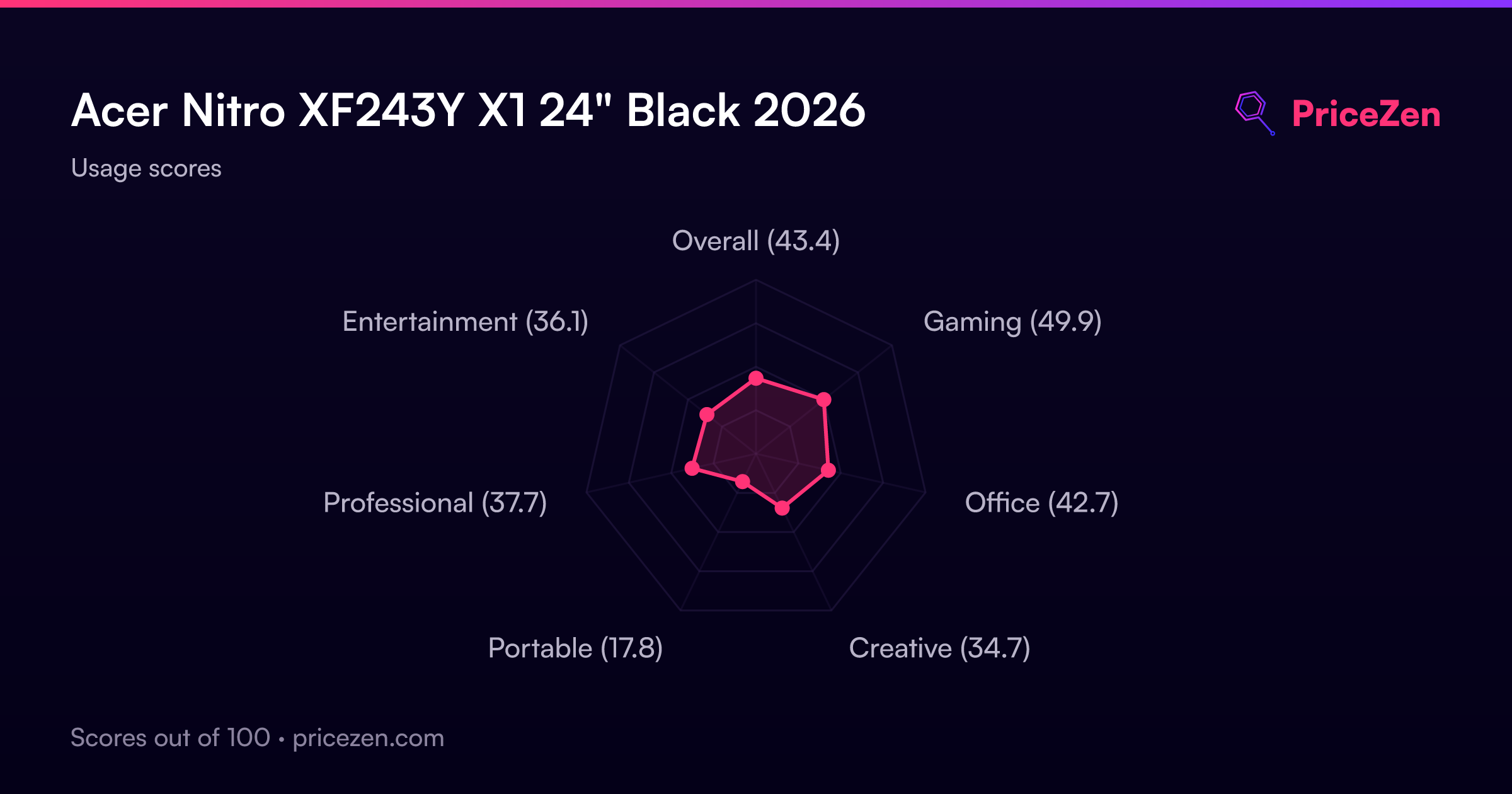
- Overall43.4
- Gaming49.9
- Office42.7
- Creative34.7
- Portable17.8
- Professional37.7
- Entertainment36.1