Dell SE2419H 24" Black
The 24-inch IPS panel delivers sharp 1080p visuals with 250 nits brightness and 178-degree viewing angles, while the 5ms response time and 60Hz refresh rate handle everyday gaming and video smoothly. Its flicker-free, antiglare screen and HDMI plus VGA inputs make it a flexible, eye-friendly choice for mixed digital and analog setups. Best for budget-conscious office workers and casual gamers who prioritize comfort and simplicity over high-refresh-rate performance.

No current retailer price










Snapshot
The 30-Second Version
The SE2419H sits in the bottom quarter of our database at the 22nd percentile for performance. With 60Hz, 250 nits, and a single HDMI port, it's a bare-bones office monitor. At $150, you can do better.
Pros & Cons
Pros
- IPS panel with 178-degree viewing angles, colors stay consistent from the side
- 5ms response time is decent for a budget office monitor
- Flicker-free screen reduces eye strain during long work sessions
- Only 17W power draw, cheap to run all day
- HDMI and VGA inputs cover both modern and legacy devices
Cons
- 60Hz refresh rate is bottom-tier for anything beyond basic use
- 250 nits brightness struggles in well-lit rooms
- No height adjustment, tilt only, ergonomics score in the 23rd percentile
- Single HDMI port limits multi-device setups
- No built-in speakers or USB hub
What owners think
How owner sentiment changed over time
ExclusiveBased on when customers actually wrote their reviews - so you can see whether early praise held up.
2 written reviews, Mar – Aug 2020: 2 happy
Across all 2 store ratings: 5.0★. The chart counts the 2 written reviews.
Each dot is one written review, in the month it was written. Happy = 4-5★, mixed = 3★, unhappy = 1-2★.
The proof
Performance
Let's talk numbers. The SE2419H runs at 60Hz with a 5ms response time, which puts it in the bottom fifth of monitors we've tested. For everyday office work, that's fine. For gaming, it's a hard pass unless you're playing solitaire. The 250 nits brightness is another weak spot, landing in the 16th percentile for color and brightness. You'll notice it in a bright room, and HDR is completely off the table.
The 1080p resolution on a 24-inch panel gives you a pixel density of about 92 PPI, which is acceptable but not sharp by modern standards. The 8,000,000:1 dynamic contrast ratio sounds impressive on a spec sheet, but the typical contrast is 1,000:1, which is standard IPS fare. Nothing here is going to blow you away, but it won't actively hurt your eyes either.
Specifications
Full Specifications
Display
| Size | 24" |
| Resolution | 1920x1080 (Full HD) |
| Panel Type | IPS |
| Aspect Ratio | 16:9 |
| Curved | No |
| Screen Finish | matte |
Performance
| Refresh Rate | 60 Hz |
| Response Time | 5 |
Color & HDR
| Brightness | 250 nits |
Connectivity
| HDMI Ports | 1 |
| DisplayPort | 0 |
| USB-C | 0 |
| Speakers | No |
| Headphone Jack | No |
Ergonomics
| Height Adjustable | No |
| Tilt | Yes |
Features
| Webcam | No |
| PIP/PBP | No |
| Power | 17 |
| Weight | 3.7 kg / 8.1 lbs |
vs Competition
Stacked against the competition, the SE2419H looks rough. The LG UltraGear 27G810A-B and ASUS ROG Strix XG27JCG are gaming-focused panels with much higher refresh rates and better color coverage, though they cost more. The BenQ MA Series MA270U brings 4K resolution to the table. Even the Acer Nitro XV272U W2bmiiprx offers a 1440p panel with better ergonomics. The Samsung G75T LS32BG652ENXGO is a curved 32-inch beast that makes the Dell look like a relic. If you're shopping in this price range, the Acer Nitro is probably the closest competitor, and it outclasses the Dell in nearly every metric.
| Spec | Dell SE2419H 24" | LG UltraGear 45GX950A-B 45" | ASUS ROG Strix XG27UCDMG 27" | Alienware AW-Series AW3425DW 34" | MSI MAG 271QPX QD-OLED E2 27" | Samsung Odyssey G80SH 32" |
|---|---|---|---|---|---|---|
| Screen Size | 24 | 45 | 27 | 34 | 27 | 32 |
| Resolution | 1920 x 1080 | 5120 x 2160 | 3840 x 2160 | 3440 x 1440 | 2560 x 1440 | 3840 x 2160 |
| Panel Type | IPS | OLED | OLED | QD-OLED | QD-OLED | OLED |
| Refresh Rate | 60 | 330 | 240 | 240 | 240 | 240 |
| Response Time Ms | 5 | 0.029999999329447746 | 0.029999999329447746 | 0.029999999329447746 | 0.029999999329447746 | 0.029999999329447746 |
| Adaptive Sync | - | FreeSync Premium Pro | FreeSync Premium Pro | FreeSync Premium Pro | FreeSync Premium Pro | FreeSync Premium Pro |
| Hdr | - | DisplayHDR True Black 400 | DisplayHDR True Black 400 | HDR400 | DisplayHDR True Black 400 | HDR10+ |
| Compare | Compare | Compare | Compare | Compare |
| Product | Color | Portability | Display | Feature | Ergonomic | Performance | Connectivity | Social Proof |
|---|---|---|---|---|---|---|---|---|
| Dell SE2419H 24" | 15.5 | 49.4 | 37.6 | 21.2 | 21.7 | 22.4 | 20.7 | 31.2 |
| LG UltraGear 45GX950A-B 45" Compare | 99.4 | 76.6 | 99.7 | 96.3 | 90.8 | 99.4 | 97 | 92 |
| ASUS ROG Strix XG27UCDMG 27" Compare | 96.5 | 57.4 | 97.7 | 85.1 | 90.8 | 97.9 | 81.1 | 98.9 |
| Alienware AW-Series AW3425DW 34" Compare | 98.9 | 74 | 84.1 | 96.3 | 90.8 | 97.9 | 95.4 | 96.8 |
| MSI MAG 271QPX QD-OLED E2 27" Compare | 99.2 | 57.4 | 73.5 | 85.1 | 90.8 | 97.9 | 81.1 | 98.9 |
| Samsung Odyssey G80SH 32" Compare | 94.4 | 49.4 | 99 | 70.2 | 90.8 | 97.9 | 81.1 | 96.8 |
Price
Value & Pricing
At $150 USD, the SE2419H is in a weird spot. You can find 24-inch 1080p IPS monitors with 75Hz or even 100Hz refresh rates for less money these days. The single US listing at that price doesn't help its case. The Japanese listing at 67,922 JPY is a different market entirely, so we won't compare those directly. For what you get, the value proposition is weak. You're paying for the Dell name and not much else.
Read more
Overview
The Dell SE2419H is a 24-inch 1080p IPS panel that lands in the bottom quarter of our database for overall performance, sitting at the 22nd percentile. That's not a typo. For a monitor that still shows up on store shelves, it's genuinely behind the curve in 2025. The 250 nits of brightness and 60Hz refresh rate were fine when this thing launched, but they're now the kind of specs you'd expect from a budget office display, not something competing with modern panels.
That said, it's not a total disaster. The IPS panel gives you solid viewing angles at 178 degrees both ways, and the 5ms response time is workable for casual use. At 3674g it's not exactly a featherweight, but it's not a monster either. The real question is whether the price makes sense, and with only one US listing at $150, that's a tough sell when better options exist.
Common Questions
Q: Is the Dell SE2419H good for gaming?
Not really. The 60Hz refresh rate and 5ms response time put it in the bottom fifth of monitors we've tested for gaming performance. It'll handle casual games fine, but competitive shooters or fast-paced titles will feel sluggish compared to even budget 144Hz panels.
Q: Can I mount this monitor on a wall or monitor arm?
The SE2419H only comes with a tilt stand, and its ergonomics score is in the 23rd percentile. It does have VESA mount compatibility, so you can add a third-party arm or wall mount, but that's an extra cost on top of the $150 price tag.
Q: How does the picture quality compare to other budget monitors?
The 250 nits brightness and 1,000:1 typical contrast ratio are standard for budget IPS panels, but the color performance lands in the 16th percentile. That means colors will look a bit washed out compared to newer budget monitors with better panels. The 178-degree viewing angles are a plus, so it's fine for sharing your screen with a coworker.
Who Should Skip This
Anyone who wants to game, edit photos, or work in a bright room should look elsewhere. The 60Hz refresh rate and 250 nits brightness are dealbreakers for those use cases. If you need height adjustment or multiple inputs, the tilt-only stand and single HDMI port will frustrate you. And if you're spending $150, there are simply better monitors available at that price point.
Verdict
The Dell SE2419H is a monitor that time forgot. Its 22nd percentile performance ranking tells the story: this is a basic office display that hasn't kept up with the market. If you need a cheap second monitor for spreadsheets and email, and you can find it for under $100, it's tolerable. At $150, you're better off looking at newer options with higher refresh rates and better brightness. The 5/5 rating from two reviews is nice, but two reviews don't make a trend.
Usage Scores
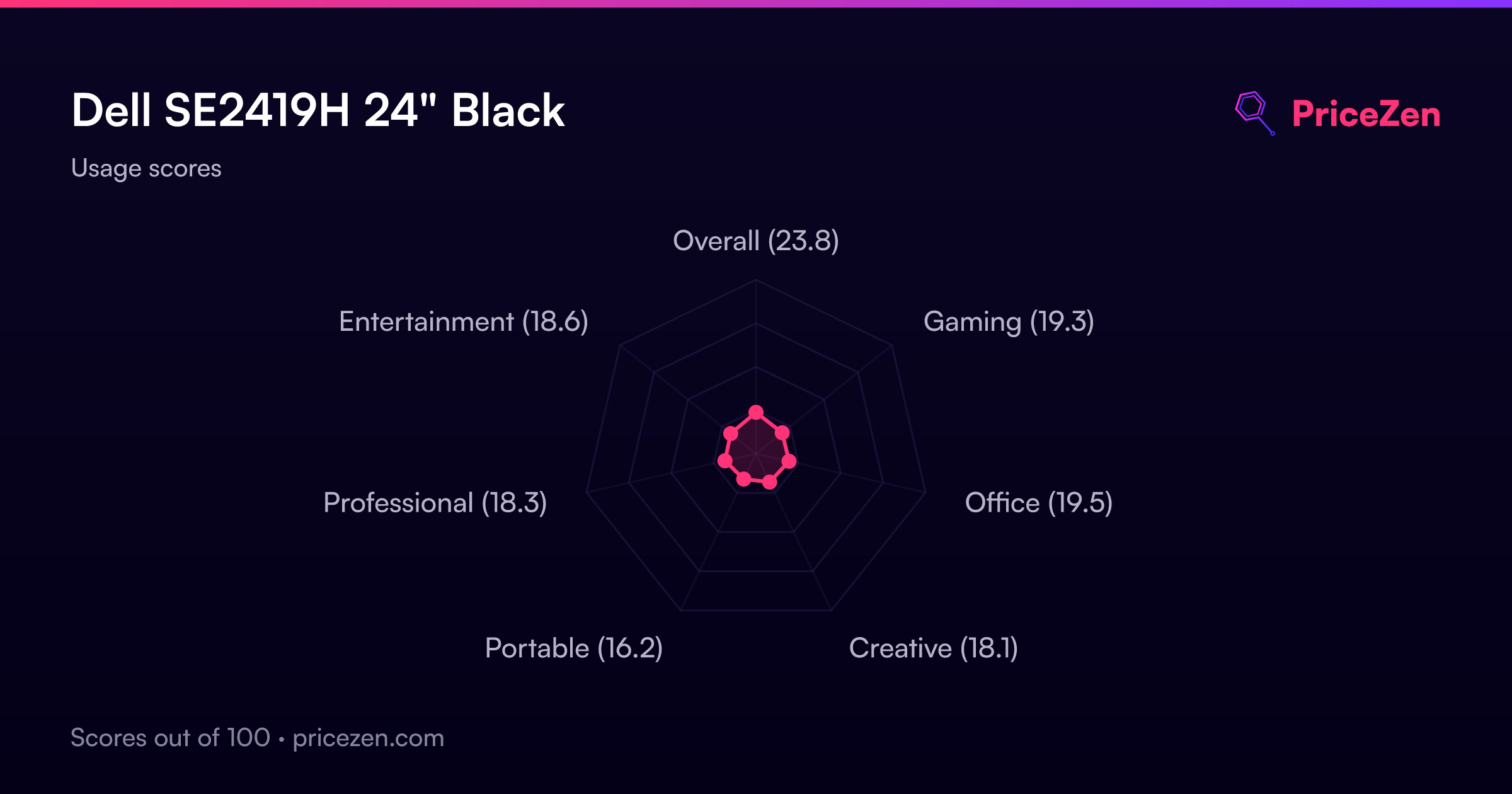
- Overall23.8
- Gaming19.3
- Office19.5
- Creative18.1
- Portable16.2
- Professional18.3
- Entertainment18.6