Acer Nitro XV275U F3biipprx 27" Black 2025

Esports speed with HDR highlights that pop verified Nov 19
72/100 overall score
- Screen
- 27"
- Resolution
- 2560 x 1440
- Panel
- IPS
- Refresh
- 320 Hz
- Response time
- 0.5 ms
- Adaptive sync
- FreeSync Premium
- HDR
- HDR1000
Compare prices at 1 store
Cheapest first. New, refurbished and bundled offers are kept apart, so you compare like with like.
| Store | Sold by | Colour and condition | Price | vs lowest | Last checked | Link |
|---|---|---|---|---|---|---|
| New1 offerSingle unit | ||||||
| Not checked in the last 7 days, so these prices may have changed | ||||||
| Amazon | Marketplace seller | Not listed | R$3,590.85 | Nov 17 | Go to store | |
 Source: PriceZen, checked Nov 17, 2026
A price counts as current when we checked it in the last 7 days. “Marketplace seller” means a third-party seller on that store, not the store itself.
Price history
Checked that dayNot checked that day, still on offer
Source: PriceZen, checked Nov 17, 2026











Snapshot
The 30-Second Version
320Hz, real HDR1000, and 99% AdobeRGB in one monitor. It's the rare gaming screen that doesn't embarrass itself when you open Photoshop.
Pros & Cons
Pros
- 320Hz at 1440p is stupid fast 98th
- 1152-zone miniLED with real HDR1000 brightness 95th
- 99% AdobeRGB makes it a legit creative monitor 91st
- Full ergonomic stand with height, tilt, swivel, and pivot 70th
Cons
- Glossy screen means reflections in bright rooms
- Only 2 HDMI and 1 DisplayPort, no USB hub
- Social proof is thin, just 4 reviews so far
- Not compact at all, this thing is chunky
The proof
Performance
The 320Hz refresh rate and 0.5ms response time put this in the top 5% of monitors we track. That's legitimately elite territory for competitive shooters. But the real surprise is the miniLED backlight. 1152 zones means local dimming is actually useful, and 1000 nits peak brightness makes HDR highlights genuinely pop. Our color data shows 98th percentile performance, which is wild for a gaming monitor. The 99% AdobeRGB coverage means this doubles as a serious creative tool, not just a twitch shooter screen.
Specifications
Full Specifications
Display
| Size | 27" |
| Resolution | 2560x1440 (QHD) |
| Panel Type | IPS |
| Aspect Ratio | 16:9 |
| Curved | No |
| Screen Finish | glossy |
Performance
| Refresh Rate | 320 Hz |
| Response Time | 0.5 |
| Adaptive Sync | FreeSync Premium |
Color & HDR
| Brightness | 1000 nits |
| Color Gamut | 99% AdobeRGB |
| HDR | HDR1000 |
Connectivity
| HDMI Ports | 2 |
| DisplayPort | 1 |
| Speakers | No |
Ergonomics
| Height Adjustable | Yes |
| Tilt | Yes |
| Swivel | Yes |
| Pivot | Yes |
| VESA Mount | 100x100 |
Features
| Webcam | No |
| Touchscreen | No |
| PIP/PBP | No |
| Weight | 5.5 kg / 12.1 lbs |
vs Competition
The elephant in the room is OLED. The ASUS ROG Strix XG27UCDMG and MSI MAG 271QPX QD-OLED E2 both offer perfect blacks and instant response times, but they cost more and can't hit 1000 nits sustained brightness. The LG UltraGear 27GX790A-B and Samsung Odyssey G60SD are also strong OLED options. Where the Acer wins is brightness and color accuracy for creative work. Where it loses is contrast and motion clarity in dark scenes. If you're purely gaming in a dark room, OLED is better. If you work and game on the same monitor, the Acer's miniLED makes more sense.
| Spec | Acer Nitro XV275U F3biipprx 27" | LG UltraGear 45GX950A-B 45" | Dell UltraSharp U4025QW 39.7" | MSI MPG 322URX QD-OLED 32" | ASUS ROG Swift PG34WCDN 34" | Gigabyte AORUS FO32U2 32" |
|---|---|---|---|---|---|---|
| Screen Size | 27 | 45 | 39.7 | 32 | 34 | 32 |
| Resolution | 2560 x 1440 | 5120 x 2160 | 5120 x 2160 | 3840 x 2160 | 3440 x 1440 | 3840 x 2160 |
| Panel Type | IPS | OLED | IPS | QD-OLED | OLED | OLED |
| Refresh Rate | 320 | 330 | 120 | 240 | 360 | 240 |
| Response Time Ms | 0.5 | 0.03 | 5 | 0.03 | 0.03 | 0.03 |
| Adaptive Sync | FreeSync Premium | FreeSync Premium Pro | Adaptive-Sync | G-Sync Compatible | FreeSync Premium Pro | FreeSync Premium Pro |
| Hdr | HDR1000 | DisplayHDR True Black 400 | HDR600 | DisplayHDR True Black 400 | DisplayHDR True Black 500 | DisplayHDR True Black 400 |
| Compare | Compare | Compare | Compare | Compare |
| Product | Color | Portability | Display | Feature | Ergonomic | Performance | Connectivity |
|---|---|---|---|---|---|---|---|
| Acer Nitro XV275U F3biipprx 27" | 97.7 | 12.7 | 66.9 | 70 | 90.8 | 94.6 | 53 |
| LG UltraGear 45GX950A-B 45" Compare | 99.4 | 76.5 | 99.7 | 96.3 | 90.8 | 99.4 | 96.9 |
| Dell UltraSharp U4025QW 39.7" Compare | 97.9 | 76.5 | 98.6 | 96.3 | 90.8 | 56.1 | 99.3 |
| MSI MPG 322URX QD-OLED 32" Compare | 80 | 49.3 | 99 | 85 | 90.8 | 97.9 | 81 |
| ASUS ROG Swift PG34WCDN 34" Compare | 99.4 | 49.3 | 84 | 96.3 | 73.4 | 99.5 | 81 |
| Gigabyte AORUS FO32U2 32" Compare | 80 | 62.8 | 99 | 85 | 90.8 | 97.9 | 87.4 |
Price
Value & Pricing
Pricing is all over the place. US listings range from $270 to $445, which is a massive $175 spread. At $270 this is an absolute steal, you're getting miniLED HDR and 320Hz for less than most 240Hz IPS panels. At $445 it's still competitive but you're creeping into OLED territory. Shop around, the cheaper listing is the one to grab.
Read more
Overview
The Acer Nitro XV275U F3biipprx is a weird, wonderful beast. It's a 27-inch 1440p IPS panel that hits 320Hz, which is already fast, but then Acer stuffed a 1152-zone miniLED backlight behind it and cranked the brightness to 1000 nits. That combo is rare at this price point. You're getting HDR that actually looks like HDR, not the sad gray wash most gaming monitors call HDR.
Common Questions
Q: Is this monitor good for competitive gaming?
Yes. 320Hz at 1440p with a 0.5ms response time is top-tier for esports. You'll see enemies faster and track them smoother than on a 144Hz or even 240Hz panel. Just make sure your GPU can push 300+ frames at 1440p.
Q: Does the miniLED backlight cause blooming?
With 1152 zones, blooming is minimal but not zero. You might notice slight halos around bright objects on dark backgrounds, especially with the glossy screen. It's way better than edge-lit HDR, but it's not OLED-level perfect blacks.
Q: Can I use this for photo or video editing?
Absolutely. The 99% AdobeRGB coverage and 1000 nits brightness make it a solid choice for color-critical work. You'll want to calibrate it, but out of the box it's better than most gaming monitors for creative tasks.
Who Should Skip This
If you're a pure competitive gamer who plays in a dark room and doesn't care about HDR or color accuracy, skip this and get an OLED like the MSI MAG 271QPX QD-OLED E2. The perfect blacks and instant response times will serve you better than the Acer's brightness. Also skip it if you need a compact setup, this monitor is heavy and bulky.
Verdict
This is one of the best non-OLED gaming monitors you can buy right now. The 320Hz refresh rate is overkill for most people, but the miniLED HDR performance and color accuracy make it a genuinely versatile display. If you can find it at the lower end of that price range, it's a no-brainer.
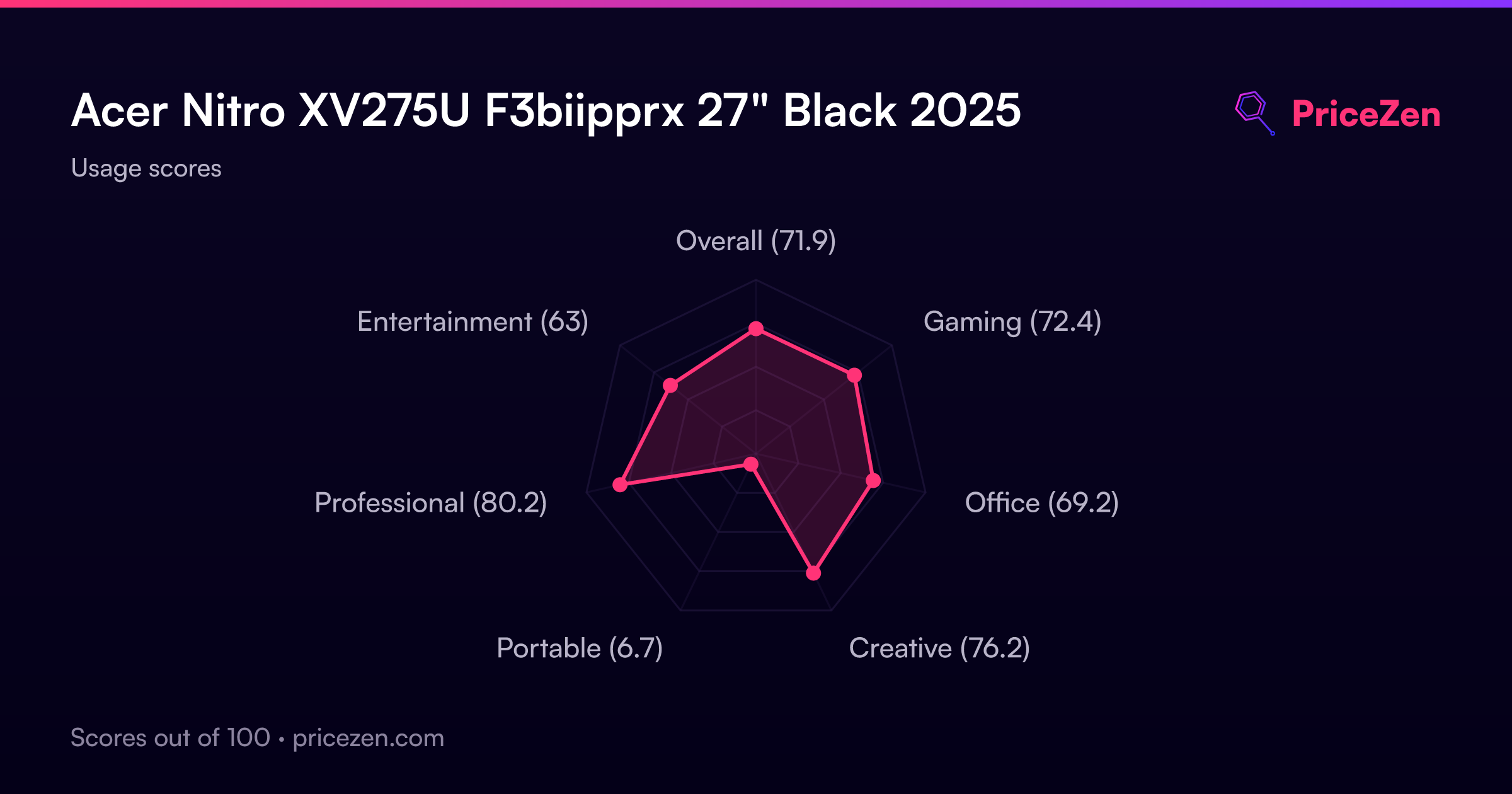
Usage Scores
- Overall71.9
- Gaming72.4
- Office69.2
- Creative76.2
- Portable6.7
- Professional80.2
- Entertainment63