HP ZBook Power 16" G11 A 2025, Ryzen 7 8845HS, 32GB, 1TB SSD
Combining an AMD Ryzen 7 8845HS with an NVIDIA RTX 2000 Ada Generation GPU and 32GB of DDR5 memory, this workstation tackles certified professional 3D and compute workloads reliably. Its durable all-aluminum chassis passes MIL-STD testing and includes a spill-resistant keyboard, offering a premium, resilient build for a 2.04kg mobile workstation. This configuration is best for developers and engineers who need ISV-certified drivers and a 5MP camera for collaboration, but not for color-critical creative work due to its 45% NTSC display.

No current retailer price
Snapshot
The 30-Second Version
The ZBook Power G11 A is a proper mobile workstation: Ryzen 7 8845HS, RTX 2000 Ada with 8GB VRAM, 32GB DDR5 and a 1TB NVMe SSD, with a port lineup in the 94th percentile. It scores 75.4/100 for developers but only 22.1 for gaming, so know which camp you're in. At USD 2,766 from Newegg it's expensive, and the 45% NTSC, 300-nit display is merely average. Great for CAD, code and VMs, wrong for gamers and color-critical creatives.
Pros & Cons
Pros
- 32GB DDR5 as standard, ranking at the 86th percentile 95th
- RTX 2000 Ada with 8GB VRAM, certified for pro apps 86th
- Port selection in the 94th percentile: Thunderbolt, HDMI 2.1, Ethernet 85th
- Ryzen 7 8845HS eight-core CPU, a leading performer at the 85th percentile 84th
- 83Wh battery and Wi-Fi 6E in an all-aluminum, mil-spec-tested chassis
Cons
- Gaming score of just 22.1/100, the weakest area by far
- Affordability ranks in the 8th percentile at USD 2,766
- Display covers only 45% NTSC at 300 nits, middling at the 66th percentile
- 2.04kg puts portability in the 18th percentile
- Reliability ranking is underwhelming at the 34th percentile
The proof
Performance
Let's talk about what those rankings mean in practice. The Ryzen 7 8845HS sits at the 85th percentile against everything else in our laptop database, which puts it in leading territory for a mobile chip. Eight cores at 3.8GHz is plenty for parallel compiles, container workloads and running a couple of VMs alongside your IDE. Pair that with 32GB of DDR5, which ranks at the 86th percentile, and you've got the headroom to keep a browser with far too many tabs open while Docker does its thing. The 1TB NVMe drive lands well above average at the 79th percentile, so storage isn't going to be your bottleneck unless you're hoarding raw footage.
The RTX 2000 Ada also ranks at the 86th percentile, and the important detail is that it's certified for professional applications. That certification matters more than raw horsepower for CAD, simulation and DCC work, because it means the drivers are validated against the software you're paying for. But here's the trade-off: our gaming score is 22.1 out of 100, the weakest area by a mile. Pro GPUs are tuned for accuracy and stability, not for pushing frames in shooters. And the 16" 1920x1200 IPS panel at 300 nits with 45% NTSC coverage ranks about average at the 66th percentile. It's a fine engineering display. It is not a color-critical one, and 300 nits will feel dim if you work near a sunny window.
Specifications
Full Specifications
Processor
| CPU | AMD Ryzen 7 8845HS |
| Cores | 8 |
| Frequency | 3.8 GHz |
| L3 Cache | 16 MB |
Graphics
| GPU | NVIDIA RTX 2000 Ada Generation |
| VRAM | 8 GB |
Memory & Storage
| RAM | 32 GB |
| RAM Generation | DDR5 |
| Storage | 1 TB |
| Storage Type | NVMe SSD |
Display
| Size | 16" |
| Resolution | 1920x1200 (Full HD) |
| Panel | IPS |
| Brightness | 300 nits |
| Color Gamut | 45% NTSC |
Connectivity
| USB-C Ports | 2 |
| USB Ports | 2 |
| Thunderbolt | Thunderbolt 4 |
| HDMI | HDMI 2.1 |
| Wi-Fi | Wi-Fi 6E |
| Bluetooth | Bluetooth 5.3 |
| Ethernet | GbE |
Physical
| Weight | 2.0 kg / 4.5 lbs |
| Battery | 83 Wh |
| OS | Windows 11 Pro |
vs Competition
The competitor set here is unusually varied, which tells you something about how the ZBook Power straddles categories. Against the Apple MacBook Pro 14.2" M4 Max and the Samsung Galaxy Book5 Pro 14", the HP's argument is expandability and connections: a 94th-percentile port score with Thunderbolt, two USB-A ports, HDMI 2.1 and full Ethernet means you can dock a monitor, plug in a wired network and connect legacy peripherals without a bag full of dongles. Its 32GB of DDR5 and 1TB NVMe also give you a lot of working memory and local storage out of the box. Where it gives ground is bulk and screen quality, since 2.04kg lands in the 18th percentile for compactness and the 45% NTSC panel is only about average.
Then there are the ASUS ROG Zephyrus 14" and the Lenovo Legion Pro 7i Gen 10 16", and this is where you need to be clear-eyed. Those are gaming-first machines, and the ZBook's 22.1/100 gaming score means it isn't competing with them on that turf at all. What it offers instead is the pro-app certification on the RTX 2000 Ada and a business-oriented build with a spill-resistant keyboard. The Dell Premium 14.5" is another thin alternative worth cross-shopping if travel weight dominates your decision. Our take: if you want one machine for CAD by day and games by night, cross-shop the Zephyrus or Legion seriously. If your income depends on validated drivers and a wired network port, the ZBook is the more sensible tool.
| Spec | HP ZBook Power 16" G11 A | Apple MacBook Pro 14.2" M4 Max | ASUS ROG Zephyrus 14" GA403WW-G14.R95080 | Lenovo Legion Pro 7i Gen 10 16" | Samsung Galaxy Book5 Pro 14" NP944XHA-KG3US | Dell Premium 14.5" LDA14250-7667SLV-PUS |
|---|---|---|---|---|---|---|
| CPU | AMD Ryzen 7 8845HS | Apple M4 Max | AMD Ryzen AI 9 HX 370 | Intel Core Ultra 9 275HX | Intel Core Ultra 7 258V | Intel Core Ultra 7 255H |
| RAM (GB) | 32 | 64 | 32 | 32 | 32 | 32 |
| Storage (GB) | 1024 | 4096 | 2048 | 1024 | 1024 | 1024 |
| Screen | 16" 1920x1200 | 14.2" 3024x1964 | 14" 2880x1800 | 16" 2560x1600 | 14" 2880x1800 | 14.5" 3200x2000 |
| GPU | NVIDIA RTX 2000 Ada Generation | Apple (40-Core) | NVIDIA GeForce RTX 5080 | NVIDIA GeForce RTX 5070 Ti | Intel Arc Graphics 140V | Intel Arc Graphics |
| OS | Windows 11 Pro | macOS | Windows 11 Home | Windows 11 Home | Windows 11 Pro | Windows 11 Home |
| Weight (kg) | 2 | 1.6 | 1.6 | 2.7 | 1.2 | 1.7 |
| Battery (Wh) | 83 | 72 | - | 99 | 63 | 62 |
| Compare | Compare | Compare | Compare | Compare |
| Product | CPU | GPU | RAM | Ports | Screen | Portability | Storage | Reliability | Affordability |
|---|---|---|---|---|---|---|---|---|---|
| HP ZBook Power 16" G11 A | 84.3 | 85.4 | 86.3 | 94.6 | 63.8 | 18.1 | 79.2 | 33.7 | 8.1 |
| Apple MacBook Pro 14.2" M4 Max Compare | 93.7 | 91.5 | 95.6 | 73.8 | 99.1 | 68.9 | 98.4 | 98.3 | 1.7 |
| ASUS ROG Zephyrus 14" GA403WW-G14.R95080 Compare | 91.2 | 98.3 | 90.8 | 89.4 | 96 | 73.7 | 89.7 | 60.7 | 5.9 |
| Lenovo Legion Pro 7i Gen 10 16" Compare | 97.2 | 96.7 | 89 | 97.3 | 94.9 | 9.5 | 79.2 | 82.1 | 5.7 |
| Samsung Galaxy Book5 Pro 14" NP944XHA-KG3US Compare | 65.7 | 69.6 | 79.4 | 83.4 | 90.3 | 89.5 | 79.2 | 82.1 | 21 |
| Dell Premium 14.5" LDA14250-7667SLV-PUS Compare | 87 | 69.6 | 89 | 66.7 | 96.8 | 61.2 | 65.2 | 33.7 | 14.4 |
Price
Value & Pricing
At USD 2,766 from Newegg, this is not a cheap machine, and our affordability ranking of the 8th percentile says exactly that. You're paying a workstation premium for the certified GPU, the aluminum build, Windows 11 Pro and the port array. If your work genuinely needs those things, the premium is defensible. If it doesn't, you're spending a lot of money on features you'll never touch.
We track prices across stores over time, partly through our community browser extension, and right now we only have one US listing on file for this configuration, so there's no cross-store bargain to point you toward. That's worth knowing before you buy: with a single retailer carrying it, you don't have much leverage to wait for a price war. Our advice is to be honest about whether the pro GPU certification is something your software actually checks for. If yes, this is a reasonable buy. If no, cheaper machines will do the same job.
Read more
Overview
The HP ZBook Power G11 A is a mobile workstation, and it wears that label honestly. Inside you get an AMD Ryzen 7 8845HS with eight cores running at 3.8GHz, an NVIDIA RTX 2000 Ada Generation GPU with 8GB of VRAM, 32GB of DDR5 and a 1TB NVMe SSD. That's not a spec sheet built for chasing frame rates. It's built for people who compile code, run virtual machines, push CAD assemblies around or edit video on a deadline, and who need the machine to survive being shoved into a bag every day.
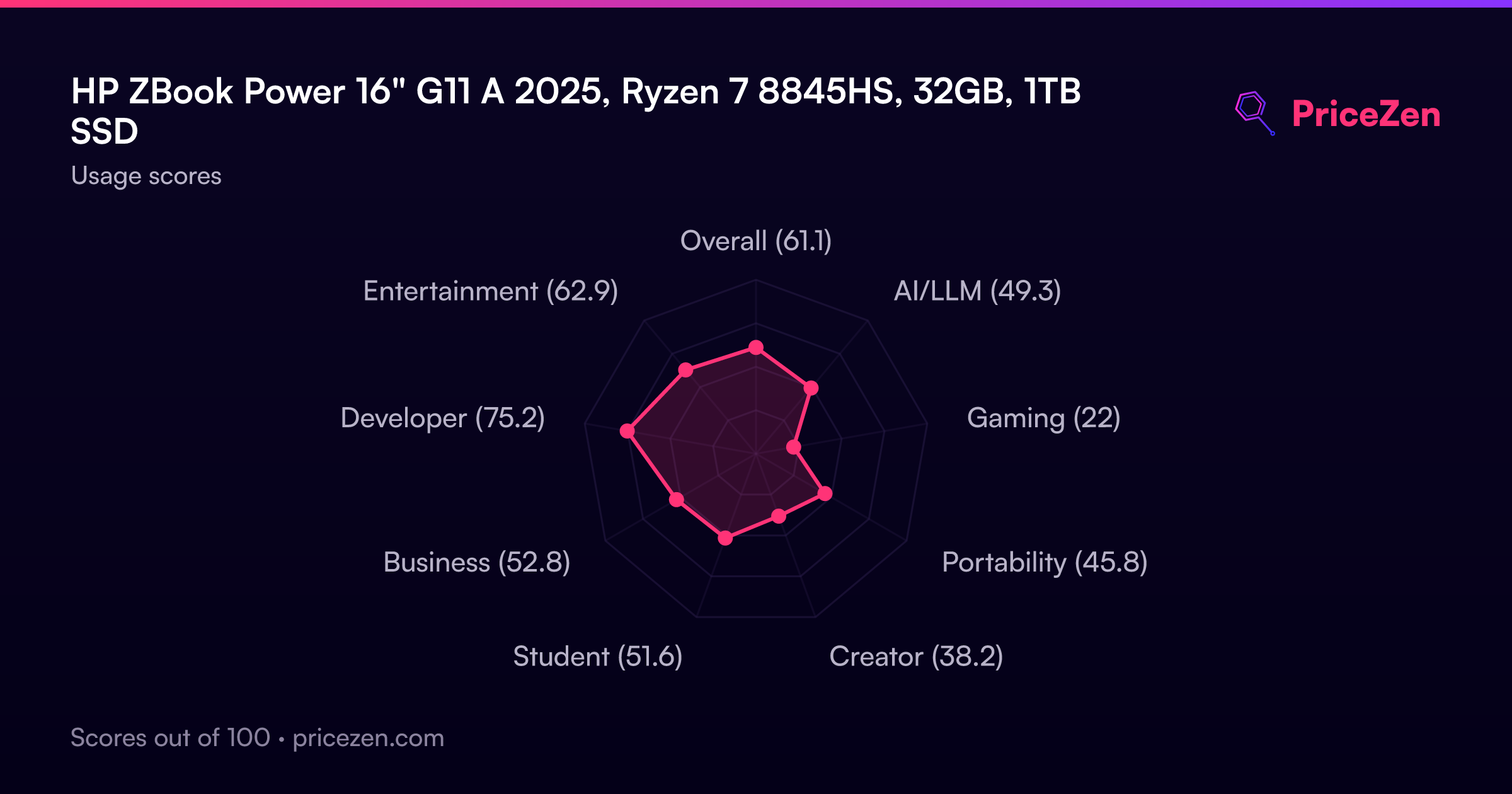
Our scoring model likes it most as a developer machine, where it lands at 75.4 out of 100. Entertainment sits lower at 63.6, and the overall score comes in at 61.3. The reason for that spread is pretty clear once you look at the parts: the CPU, GPU and memory all rank among the best on the market right now, while the display and the price pull the average down. This is a tool, not a toy, and it scores like one.
What makes it interesting is the combination of pro-certified graphics and genuinely good connectivity in a chassis HP says is all-aluminum and designed to pass military standard testing. You get Thunderbolt, two USB-C ports, two USB-A ports, HDMI 2.1, Ethernet and Wi-Fi 6E, plus a backlit, spill-resistant keyboard with a drain hole. At 2.04kg with an 83Wh battery, it's a desk-replacement workstation that you can actually carry, rather than a thin-and-light pretending to be one.
Common Questions
Q: What resolution and quality is the display?
It's a 16" IPS panel at 1920x1200, which gives you a bit of extra vertical room over standard 1080p, useful for code and spreadsheets. Brightness is 300 nits and color coverage is 45% NTSC, which puts it around the middle of the pack in our rankings at the 66th percentile. Fine for engineering and development work, but not the panel you want for photo retouching or grading video.
Q: Which processor does it use, and is it fast enough for heavy work?
It runs an AMD Ryzen 7 8845HS, an eight-core chip clocked at 3.8GHz that ranks at the 85th percentile against all the laptops we track. That's leading territory, and combined with 32GB of DDR5 it handles compiles, virtual machines and multi-app workloads comfortably. It's paired with an RTX 2000 Ada GPU that also ranks at the 86th percentile, so GPU-accelerated pro work is well covered too.
Q: Can I game on it?
You can launch games, but our gaming score for this machine is 22.1 out of 100, its weakest category by a wide margin. The RTX 2000 Ada is a professional card certified for CAD and creative applications rather than tuned for game frame rates, and the 1920x1200 panel isn't a high-refresh gaming screen. If gaming matters to you, the ASUS ROG Zephyrus 14" or Lenovo Legion Pro 7i Gen 10 are better places to spend this kind of money.
Q: Is it practical to carry around every day?
At 2.04kg it lands in the 18th percentile for compactness, so it's noticeably heavier than the thin 14" machines it competes against. The 83Wh battery and Wi-Fi 6E help it work away from a desk, and the all-aluminum chassis is designed to pass military standard testing. Think of it as a workstation you can commute with, not an ultrabook you forget is in your bag.
Who Should Skip This
Gamers should skip this outright. A 22.1/100 gaming score is a weak spot, not a rounding error, and paying USD 2,766 for a machine that struggles with the thing you bought it for is a bad trade. Look at the ASUS ROG Zephyrus 14" or the Lenovo Legion Pro 7i Gen 10 16" instead. Color-critical creatives should also walk away: 45% NTSC coverage and 300 nits simply isn't enough for print work or grading, and that panel ranks about average rather than anywhere near the top.
And if you mostly write documents, browse and stream, this is overkill in the expensive direction. Our affordability ranking puts it in the 8th percentile, and the reliability score of the 34th percentile is underwhelming enough that we wouldn't pay the workstation premium on faith alone. Frequent flyers who count grams should check the Samsung Galaxy Book5 Pro 14" or Dell Premium 14.5", because 2.04kg adds up fast when you're carrying it through airports.
Verdict
For developers, engineers and technical professionals, we think this is a solid pick. The 75.4/100 developer score reflects a genuinely well-balanced setup: eight fast cores, 32GB of RAM, a terabyte of NVMe storage and enough ports to run a proper desk setup without adapters. Owners give it 4.1 out of 5 across 16 reviews, which is respectable if not glowing, and the sample is small enough that we'd read individual complaints carefully rather than treating the average as gospel.
For anyone whose main use is media, gaming or general home computing, we'd steer you elsewhere. The 63.6 entertainment score and that 22.1 gaming result aren't accidents, they're the direct consequence of choosing a pro GPU and a modest 1920x1200 panel. And at USD 2,766, you're paying workstation money for a machine that will disappoint you in exactly the scenarios most home buyers care about. Buy it for the work it was designed for, and it should serve you well. Buy it as an everything-laptop and you'll resent the price.
Usage Scores
- Overall61.1
- AI/LLM49.3
- Gaming22
- Portability45.8
- Creator38.2
- Student51.6
- Business52.8
- Developer75.2
- Entertainment62.9