Lenovo IdeaPad 15.3" 83K4000RUS 2025, Core 5 210H, 16GB, 1TB SSD, Cosmic Blue
The 8-core Intel Core 5 210H processor and 16GB of DDR5 RAM provide capable multitasking performance for everyday workloads. A 15.3-inch touchscreen with a 16:10 aspect ratio and backlit keyboard adds functional flexibility in a 1.63kg chassis. This laptop is best for students and office workers who need a responsive Windows 11 machine for productivity apps and web-based tasks.

No current retailer price


Snapshot
The 30-Second Version
The IdeaPad Slim 3i 83K4000RUS is a study-and-work laptop with the sensible parts upgraded: 16GB DDR5, a 1TB NVMe SSD and a 15.3" 1920x1200 touchscreen in a 1.63kg body. Gaming is off the table at 16.4/100 with integrated graphics. Prices run from USD 489 to 699 and the only new in-stock store price we see is Amazon at USD 699, the top of that range. Great buy near the bottom, hard pass at the top.
Pros & Cons
Pros
- Full 1TB NVMe SSD, a strong storage showing in our rankings 82nd
- 16GB of DDR5-4800 as standard, no 8GB trap 79th
- 15.3" 1920x1200 IPS touchscreen, taller than typical 1080p panels
- Reliability ranks well above average against the category
- 1.63kg with a backlit keyboard, 1080p webcam and privacy shutter
Cons
- Gaming scores 16.4/100, integrated graphics only
- 300-nit screen is only middling in our rankings, rough outdoors
- Single USB-C port shared between charging and everything else
- HDMI 1.4 rather than a newer version limits external display flexibility
- QLC SSD and 16GB RAM cap heavier creative and VM workloads
The proof
Performance
The Core 5 210H is an eight-core chip with a 2.2GHz base and boost up to 4.8GHz, and its CPU ranking lands solidly mid-pack against everything else we track. In practice that means fast boots, quick app launches and no drama when you've got a dozen browser tabs, a spreadsheet and a video call going at once. The 16GB of DDR5-4800 is the part doing the heavy lifting there, though 16GB is only about average in our data now, so heavy virtual machine or big-project video work will find the ceiling. The 1TB NVMe drive ranks strong, and it's QLC flash, which is fine for everyday reads and writes but not the fastest option for sustained large file transfers.
Graphics are integrated Intel Graphics, sitting around the middle of our GPU rankings, and that's the honest limit of this thing. It'll drive the internal panel and an external display over HDMI 1.4 without complaint, handle video playback and light photo edits, and then stop. Our gaming score of 16.4 isn't a subtle hint. The 60Wh battery is a reasonable size for a 15.3" machine with no discrete GPU pulling power, and the 300-nit IPS panel is bright enough indoors but middling overall in our screen ranking, so don't plan on working in direct sun. Port selection scores about average too: one USB-C with Power Delivery, two USB-A, HDMI 1.4, Wi-Fi 6 and Bluetooth 5.2 cover the basics, but one USB-C means charging and docking fight over the same hole.
Specifications
Full Specifications
Processor
| CPU | Intel Core 5 210H |
| Cores | 8 |
| Frequency | 2.2 GHz |
| L3 Cache | 12 MB |
Graphics
| GPU | Intel Graphics |
| Type | Integrated |
Memory & Storage
| RAM | 16 GB |
| RAM Generation | DDR5 |
| Storage | 1 TB |
| Storage Type | NVMe SSD |
Display
| Size | 15.3" |
| Resolution | 1920x1200 (Full HD) |
| Panel | IPS |
| Brightness | 300 nits |
Connectivity
| USB-C Ports | 1 |
| USB Ports | 2 |
| HDMI | HDMI 1.4 |
| Wi-Fi | Wi-Fi 6 |
| Bluetooth | Bluetooth 5.2 |
Physical
| Weight | 1.6 kg / 3.6 lbs |
| Battery | 60 Wh |
| OS | Windows 11 Home |
vs Competition
Cross-shop the ASUS Vivobook S 14" S5406SA-DH76 and the HP OmniBook X Flip 14-fk0033dx first, because they're the closest fight. Both are 14" machines, and the IdeaPad's argument against them is surface area and storage: a 15.3" 1920x1200 touch panel and a full 1TB drive, with reliability sitting well above average in our rankings. If you want a bigger canvas for documents and spreadsheets without carrying much more weight at 1.63kg, this wins on paper. If a smaller footprint matters more, our compact score of 60.6 says this is fine, not exceptional, and the 14" options deserve a look.
The Apple MacBook Air 13.6" M4 is the aspirational cross-shop, and the trade-off is straightforward: you get Windows 11 Home, a touchscreen and a terabyte of storage here, none of which the Air offers in the same way. If your coursework or job needs Windows-only software, that settles it. The MSI Creator 14" A13V and Alienware Aurora 16" LAC16250-7568BLU-PUS are aimed at people who need real graphics muscle, and with integrated Intel Graphics and a gaming score of 16.4, this Lenovo isn't in that conversation. Don't buy it hoping to split the difference.
| Spec | Lenovo IdeaPad 15.3" 83K4000RUS | Apple MacBook Pro 14.2" M4 Max | ASUS ROG Zephyrus 14" GA403WW-G14.R95080 | HP OMEN Transcend | Samsung Galaxy Book5 Pro 14" NP944XHA-KG3US | Dell Premium 14.5" LDA14250-7667SLV-PUS |
|---|---|---|---|---|---|---|
| CPU | Intel Core 5 210H | Apple M4 Max | AMD Ryzen AI 9 HX 370 | Intel Core Ultra 9 285H | Intel Core Ultra 7 258V | Intel Core Ultra 7 255H |
| RAM (GB) | 16 | 64 | 32 | 32 | 32 | 32 |
| Storage (GB) | 1024 | 4096 | 2048 | 1024 | 1024 | 1024 |
| Screen | 15.3" 1920x1200 | 14.2" 3024x1964 | 14" 2880x1800 | 14" 2880x1800 | 14" 2880x1800 | 14.5" 3200x2000 |
| GPU | Intel Graphics | Apple (40-Core) | NVIDIA GeForce RTX 5080 | NVIDIA GeForce RTX 5070 | Intel Arc Graphics 140V | Intel Arc Graphics |
| OS | Windows 11 Home | macOS | Windows 11 Home | Windows 11 Home | Windows 11 Pro | Windows 11 Home |
| Weight (kg) | 1.6 | 1.6 | 1.6 | 1.6 | 1.2 | 1.7 |
| Battery (Wh) | 60 | 72 | - | 71 | 63 | 62 |
| Compare | Compare | Compare | Compare | Compare |
| Product | CPU | GPU | RAM | Ports | Screen | Portability | Storage | Reliability | Affordability |
|---|---|---|---|---|---|---|---|---|---|
| Lenovo IdeaPad 15.3" 83K4000RUS | 62.3 | 47.9 | 54.8 | 48.6 | 54 | 57.5 | 79.3 | 82 | 58 |
| Apple MacBook Pro 14.2" M4 Max Compare | 93.7 | 91.5 | 95.6 | 73.9 | 99.1 | 68.9 | 98.4 | 98.2 | 1.8 |
| ASUS ROG Zephyrus 14" GA403WW-G14.R95080 Compare | 91.2 | 98.3 | 90.8 | 89.5 | 96 | 73.6 | 89.7 | 60.6 | 6 |
| HP OMEN Transcend Compare | 90.1 | 93.5 | 89.7 | 89.5 | 96 | 72.2 | 65.4 | 33.7 | 8.9 |
| Samsung Galaxy Book5 Pro 14" NP944XHA-KG3US Compare | 65.9 | 69.7 | 79.5 | 83.5 | 90.4 | 89.4 | 79.3 | 82 | 21 |
| Dell Premium 14.5" LDA14250-7667SLV-PUS Compare | 87 | 69.7 | 89 | 66.8 | 96.8 | 61.3 | 65.4 | 33.7 | 14.6 |
Price
Value & Pricing
Here's where you need to pay attention. We track USD listings from 489 to 699, a 210 spread on the same machine, and the only new in-stock single-unit store price in our data right now is Amazon at USD 699. That's the top of the range. At USD 489 this is a genuinely great deal for 16GB, a 1TB drive and a touch panel. At USD 699 you're paying a premium for the same silicon, and our affordability ranking of 58 reflects that mixed picture rather than a bargain. Some of the cheaper listings we've seen are refurbished units, so read condition notes before you chase the low number.
In Canada there's a single listing at CAD 1,186, which is a different market and not comparable to the US figures. Our advice: if you can wait, watch the price. We track it over time partly through our community browser extension, and a 210 dollar swing on a laptop this class is worth a little patience.
Read more
Overview
The IdeaPad Slim 3i in this configuration (83K4000RUS) is Lenovo doing the boring stuff right. An Intel Core 5 210H with eight cores and a 4.8GHz boost, 16GB of DDR5-4800, a full 1TB NVMe SSD, and a 15.3" touchscreen at 1920x1200 instead of the usual 1920x1080. All of that in a 1.63kg chassis running Windows 11 Home. Nothing here is exotic, and that's kind of the point.
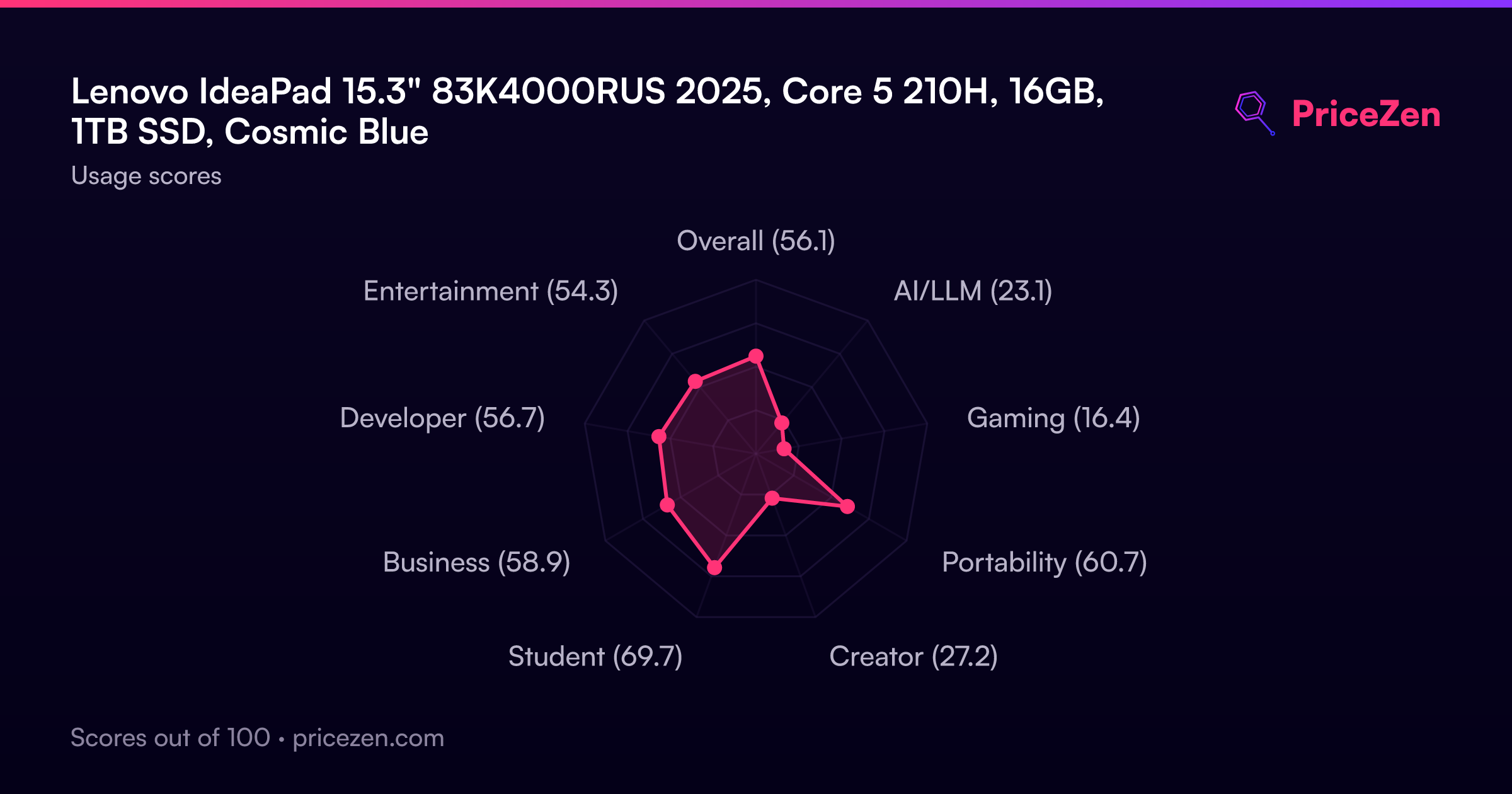
Our scoring model puts it highest for students at 69.4 out of 100, with compact use at 60.6 and business at 58.9. That tracks with the spec sheet: enough memory to keep a lecture's worth of tabs open, enough storage that you're not deleting files every semester, and a screen tall enough to show a document and a browser side by side without squinting. The extra 120 vertical pixels sound trivial until you've spent a week scrolling less.
What makes it interesting is where the money went. Lenovo skipped the discrete GPU entirely and put the budget into RAM, storage and a touch panel. Reliability sits well above average in our rankings, storage is strong, and gaming lands at 16.4 out of 100, which is our model politely telling you not to try. This is a work-and-study machine that happens to have a nice screen, not a do-everything laptop.
Common Questions
Q: Can it play games at all?
Not seriously. There's no discrete GPU, just integrated Intel Graphics, and our gaming score for this configuration is 16.4 out of 100. Older or very light titles and cloud streaming are the realistic ceiling, so if gaming matters, look at the MSI Creator 14" A13V or Alienware Aurora 16" instead.
Q: Is 16GB of RAM and 1TB of storage enough for four years of school?
For documents, research tabs, video calls and normal coursework, yes, and the 1TB drive ranks strong in our storage data so you're unlikely to run out of room. The 16GB of DDR5-4800 is only about average in our rankings now, so heavy virtual machines or large video projects are where you'd feel the limit.
Q: Is the touchscreen worth paying extra for?
It's a 15.3" IPS panel at 1920x1200 and 300 nits, so you get touch plus extra vertical space over a standard 1080p screen, which helps with documents and split-screen work. Brightness is only middling in our screen rankings, though, so it's an indoor panel rather than something you'll enjoy using outside.
Q: Why is the price so different between listings?
We track USD listings from 489 to 699 on this exact model, and some of the cheaper ones are refurbished units rather than new. The only new, in-stock, single-unit store price in our data currently is Amazon at USD 699, so check condition and stock status before assuming you've found a bargain.
Who Should Skip This
Gamers, obviously, but also anyone doing GPU-heavy work: 3D rendering, video editing with effects, or local AI experiments. Integrated Intel Graphics and a 16.4 gaming score mean this machine will technically open those apps and then make you regret it. The MSI Creator 14" A13V and Alienware Aurora 16" LAC16250-7568BLU-PUS exist for exactly that crowd.
Also skip it if you need a proper desk setup with several monitors, since HDMI 1.4 and a single USB-C that also handles charging will box you in fast. And if you work outdoors or in bright cafés with big windows, the 300-nit panel is a weak spot. Frequent flyers who want the smallest possible bag footprint should look hard at the ASUS Vivobook S 14" or HP OmniBook X Flip 14 before settling on a 15.3" screen.
Verdict
For students, this is the sweet spot, and our 69.4 student score backs that up. Eight cores, 16GB of DDR5, a 1TB drive you won't fill by second year, a touch panel with extra vertical room, a backlit keyboard for late nights and a 1080p webcam with a privacy shutter for group calls. At the lower end of the price range it's an easy recommendation. Business use at 58.9 is more conditional: fine for email, documents, calls and browser-based tools, less convincing if you live in heavy Excel models or need multiple monitors, given HDMI 1.4 and one USB-C.
At USD 699 from Amazon we'd hesitate, because you're paying top-of-range money for mid-pack CPU and screen rankings. Set a price alert and pounce closer to USD 489. And if gaming or GPU-accelerated creative work is anywhere on your list, walk away now rather than being disappointed later. This laptop knows exactly what it is, which is more than we can say for most things at this price.
Usage Scores
- Overall56.1
- AI/LLM23.1
- Gaming16.4
- Portability60.7
- Creator27.2
- Student69.7
- Business58.9
- Developer56.7
- Entertainment54.3