HP ZBook Firefly 14" 14 G11 A 2024, Ryzen 7 PRO 8840HS, 32GB, 512GB SSD

5MP webcam for clearer video calls verified Nov 29
62/100 overall score
- CPU
- AMD Ryzen 7 8840HS
- RAM
- 32 GB
- Storage
- 512 GB
- Screen
- 14" 1920x1200
- GPU
- AMD Radeon 780M
- OS
- Windows 11 Pro
- Weight
- 1.4 kg
- Battery
- 56 Wh


Snapshot
The 30-Second Version
Great portable dev box: strong 8-core CPU and 32GB of DDR5, which ranks among the best in this category. But the 45% NTSC screen and integrated graphics hold it back, and USD 1,769 stings. Worth it for business buyers, not for creators or gamers.
Pros & Cons
Pros
- 32GB of DDR5 is one of the best memory configs in this category. 86th
- Strong 8-core Ryzen 7 PRO 8840HS for compiling and multitasking. 79th
- Thunderbolt 4, dual USB-C, dual USB-A and HDMI 2.1b cover almost everything. 79th
- 1.42kg with a backlit keyboard, IR face login and a fingerprint reader. 78th
Cons
- The 45% NTSC, 300-nit 60Hz panel is mediocre for creative work.
- Integrated Radeon 780M makes gaming a weak spot at 21.1/100.
- Affordability lags behind most laptops we track.
- 512GB of storage is only middle of the pack.
The proof
Performance
The CPU is the strong part: our scoring puts it well above average for this class, and the 32GB of DDR5 sits among the best on the market, so heavy multitasking, VMs and big codebases aren't a problem. The Radeon 780M is integrated graphics, solid for its type but nowhere near a discrete GPU, which is why gaming lands at 21.1/100, one of the weakest scores we track. Storage is dead average at 512GB. Ports are a genuine win: Thunderbolt 4, two USB-C, two USB-A, HDMI 2.1b and Wi-Fi 6E mean you can skip the dongle bag. The 56Wh battery is modest, and the display's 45% NTSC coverage is the lowlight that matters most if you edit photos or video.
Specifications
Full Specifications
Processor
| CPU | AMD Ryzen 7 8840HS |
| Cores | 8 |
| Frequency | 3.3 GHz |
| L3 Cache | 16 MB |
Graphics
| GPU | AMD Radeon 780M |
| Type | Integrated |
| VRAM Type | Shared |
Memory & Storage
| RAM | 32 GB |
| RAM Generation | DDR5 |
| Storage | 512 GB |
| Storage Type | NVMe SSD |
Display
| Size | 14" |
| Resolution | 1920x1200 (Full HD) |
| Panel | IPS |
| Refresh Rate | 60 Hz |
| Brightness | 300 nits |
| Color Gamut | 45% NTSC |
Connectivity
| USB-C Ports | 2 |
| USB Ports | 2 |
| Thunderbolt | Thunderbolt 4 |
| HDMI | HDMI 2.1b |
| Wi-Fi | Wi-Fi 6E |
| Bluetooth | Bluetooth 5.3 |
Physical
| Weight | 1.4 kg / 3.1 lbs |
| Battery | 56 Wh |
| OS | Windows 11 Pro |
vs Competition
Cross-shop the Apple MacBook Pro 14.2" M4 Pro if the display matters, because this HP's 45% NTSC panel isn't in that conversation. The Samsung Galaxy Book5 Pro 14" is the closer fight for thin-and-light portability, and here the HP answers with 32GB of DDR5 and a port lineup that ranks well above average. Want to actually game? The ASUS ROG Zephyrus 14", Lenovo Legion Pro 7i Gen 10 16" and MSI Raider 16 Max HX exist for that, and this Firefly's 21.1/100 gaming score tells you it doesn't. Where the HP wins is compactness and business manageability, not muscle.
| Spec | HP ZBook Firefly 14" 14 G11 A | Apple MacBook Pro 14.2" M4 Pro | ASUS ROG Zephyrus 14" GA403WW-G14.R95080 | Lenovo Legion Pro 7i Gen 10 16" | Samsung Galaxy Book5 Pro 14" NP944XHA-KG3US | MSI Raider 16 Max HX |
|---|---|---|---|---|---|---|
| CPU | AMD Ryzen 7 8840HS | Apple M4 Pro | AMD Ryzen AI 9 HX 370 | Intel Core Ultra 9 275HX | Intel Core Ultra 7 258V | Intel Core Ultra 9 290HX |
| RAM (GB) | 32 | 48 | 32 | 32 | 32 | 32 |
| Storage (GB) | 512 | 4096 | 2048 | 1024 | 1024 | 1024 |
| Screen | 14" 1920x1200 | 14.2" 3024x1964 | 14" 2880x1800 | 16" 2560x1600 | 14" 2880x1800 | 16" 2560x1600 |
| GPU | AMD Radeon 780M | Apple (16-Core) | NVIDIA GeForce RTX 5080 | NVIDIA GeForce RTX 5070 Ti | Intel Arc Graphics 140V | NVIDIA GeForce RTX 5080 |
| OS | Windows 11 Pro | macOS | Windows 11 Home | Windows 11 Home | Windows 11 Pro | Windows 11 Home |
| Weight (kg) | 1.4 | 1.6 | 1.6 | 2.7 | 1.2 | 2.6 |
| Battery (Wh) | 56 | 72 | - | 99 | 63 | 100 |
| Compare | Compare | Compare | Compare | Compare |
| Product | CPU | GPU | RAM | Ports | Screen | Portability | Storage | Reliability | Affordability |
|---|---|---|---|---|---|---|---|---|---|
| HP ZBook Firefly 14" 14 G11 A | 78.7 | 74.2 | 86.3 | 77.7 | 63.8 | 79 | 51.1 | 33.7 | 22.4 |
| Apple MacBook Pro 14.2" M4 Pro Compare | 92.4 | 78.9 | 90.6 | 73.8 | 99.1 | 68.9 | 98.4 | 98.2 | 4.7 |
| ASUS ROG Zephyrus 14" GA403WW-G14.R95080 Compare | 91.2 | 98.3 | 90.8 | 89.4 | 96 | 73.6 | 89.7 | 60.6 | 6.1 |
| Lenovo Legion Pro 7i Gen 10 16" Compare | 97.2 | 96.7 | 89 | 97.3 | 94.9 | 9.5 | 79.3 | 82 | 5.9 |
| Samsung Galaxy Book5 Pro 14" NP944XHA-KG3US Compare | 65.8 | 69.6 | 79.6 | 83.5 | 90.4 | 89.4 | 79.3 | 82 | 21.4 |
| MSI Raider 16 Max HX Compare | 99.6 | 98.3 | 86.3 | 98.6 | 91.4 | 10.9 | 79.3 | 60.6 | 7.9 |
Price
Value & Pricing
USD 1,769 is steep for integrated graphics and a basic panel. What you're buying is the PRO chip, Windows 11 Pro, a SmartCard reader, HP Wolf Pro Security and a 5MP IR webcam, plus 32GB of RAM that would cost extra elsewhere. If your employer needs that stack, it's defensible. If you're paying out of pocket for speed per dollar, our affordability ranking puts it near the bottom and you should keep looking.
Read more
Overview
The HP ZBook Firefly 14 G11 A is a business laptop wearing a workstation badge. You get an 8-core Ryzen 7 PRO 8840HS at 3.3GHz, 32GB of DDR5 and a 512GB PCIe 4.0 SSD in a 1.42kg shell. That's a lot of memory for something this easy to carry.
The catch is the screen. It's a 14" 1920x1200 IPS panel at 60Hz, 300 nits and 45% NTSC. Fine for spreadsheets and code, underwhelming for anything color-critical. And at USD 1,769 from B&H Photo (CAD 2,532 up north), you're paying for security hardware and portability, not raw horsepower.
Common Questions
Q: Can it handle video editing or 3D work?
Light timelines, yes, thanks to the 8-core Ryzen 7 PRO 8840HS and 32GB of DDR5. But the Radeon 780M is integrated and the panel only covers 45% NTSC, so serious color work belongs on another machine.
Q: Is 512GB enough storage?
It's about average for this class, fine for code, documents and a moderate media library. Heavy video projects will fill it fast.
Q: Do I need a dock or dongles?
Probably not. You get Thunderbolt 4, two USB-C, two USB-A and HDMI 2.1b built in, which puts its port selection well above average.
Who Should Skip This
If you edit photos or video for a living, look elsewhere, because a 300-nit 60Hz panel at 45% NTSC will lie to you about color. Gamers should skip too: the Radeon 780M is integrated and our gaming score of 21.1/100 is brutal. And if you just want the most speed for USD 1,769, this isn't it.
Verdict
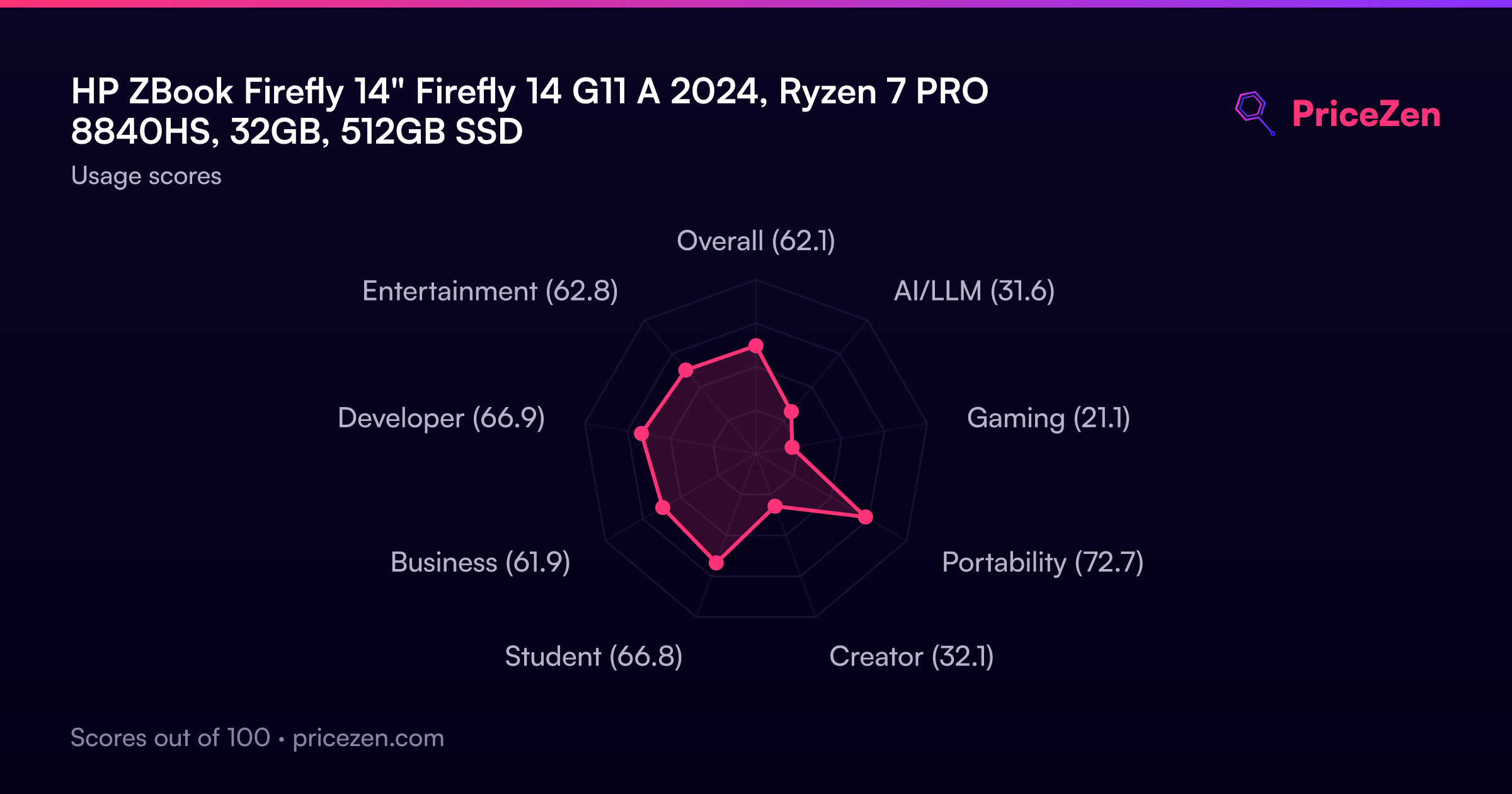
Buy it if you're a developer, IT-managed professional or student who lives in a browser, an IDE and a dozen tabs, and you want 32GB of RAM in a 1.42kg machine with real ports. Our best-fit score is compactness at 72.7/100, with developer and student use close behind. Skip it if your work involves color grading or your evenings involve games.
Usage Scores
- Overall62.1
- AI/LLM31.6
- Gaming21.1
- Portability72.6
- Creator32.1
- Student66.8
- Business61.9
- Developer66.9
- Entertainment62.8