Lexar NM990 4TB PCIe 5.0 x4 NVMe M.2 2280
The PCIe 5.0 x4 interface delivers 14000 MB/s reads and 11000 MB/s writes, with 2000K random read IOPS for demanding workloads. Its 4TB capacity and 3000 TBW endurance suit heavy write tasks, while the DRAM-less design keeps costs down. Best for laptop users needing high-speed storage for large file transfers and gaming.












Resumen
The 30-Second Version
The Lexar NM990 is a 4TB PCIe 5.0 monster with 14,000 MB/s reads and best-in-class random performance. It's priced competitively in the US at USD 676, but CAD buyers should watch for the CAD 1,000 to CAD 1,300 spread. If you move massive files daily, this is one of the fastest drives you can buy. Everyone else can save money with a good PCIe 4.0 drive.
Pros & Cons
Ventajas
- Blistering 14,000 MB/s sequential read speed 98th
- Massive 4TB capacity in a single-sided M.2 2280 97th
- Top-tier random performance at 2,000K IOPS 93rd
- Solid 3,000 TBW endurance rating 77th
- Strong laptop compatibility score of 83.7
Desventajas
- DRAM-less design may concern some buyers
- Pricing is all over the map across regions
- Only one customer review in our database
- Portable use case scores a weak 21.1
- No heatsink included on this model
Opinión de los propietarios
The Word on the Street
Cómo cambió la opinión de los propietarios con el tiempo
ExclusivaSegún cuándo escribieron realmente sus opiniones los clientes, para ver si los elogios iniciales se mantuvieron.
1 opinión escrita, ene 2026: 1 satisfecho
En las 1 valoraciones de tiendas: 5,0★. El gráfico cuenta 1 opinión escrita.
Cada punto es una opinión escrita, en el mes en que se escribió. Satisfechos = 4-5★, neutrales = 3★, insatisfechos = 1-2★.
Las pruebas
Performance
Let's talk raw numbers. 14,000 MB/s sequential read puts this in the top tier of PCIe 5.0 drives, right up there with the fastest stuff we've tested. The 11,000 MB/s write is a bit lower, which is normal, but still blazing. For context, that's roughly double what a good PCIe 4.0 drive manages. Copying a 100GB video project? You're looking at seconds, not minutes.
Random performance is where this drive really shines. 2,000K random read IOPS and 1,500K random write IOPS put it at the 98th percentile in our database. That's best-in-class territory. This matters more than sequential speed for everyday use, actually. Opening apps, booting Windows, loading game levels, all of that leans on random access. The DRAM-less design doesn't seem to hurt here, which is a pleasant surprise. The endurance rating of 3,000 TBW is solid, landing around the 77th percentile. Not class-leading, but plenty for almost anyone.
Specifications
Full Specifications
Drive
| Capacity | 4000 |
| Form Factor | M.2 2280 |
| Interface | PCIe 5.0 x4 |
| Protocol | NVMe |
| PCIe Generation | 5 |
| External | No |
Performance
| Sequential Read (MB/s) | 14000 |
| Sequential Write (MB/s) | 11000 |
| Random Read (IOPS) | 2000000 |
| Random Write (IOPS) | 1500000 |
Hardware
| NAND | TLC |
| DRAM Cache | No |
Reliability
| Endurance (TBW) | 3000 |
| MTBF (hours) | 1500000 |
vs Competition
The Samsung 9100 PRO is the obvious rival. Samsung has the brand trust, the software ecosystem, and a longer track record with PCIe 5.0. The Lexar matches it on speed and actually beats it on capacity options in some markets. But Samsung's endurance ratings tend to be higher, and their drives come with better warranty support in most regions. If you want the safe choice, Samsung is still the default.
The WD_BLACK SN850X and Kingston FURY Renegade are PCIe 4.0 drives, so they're not direct competitors on speed. But they're often half the price, and for most people, 7,000 MB/s is already overkill. The Crucial T710 is another PCIe 5.0 option that trades blows with the Lexar on paper. The Seagate FireCuda 530R is a solid PCIe 4.0 drive with better endurance ratings. Honestly, unless you're moving huge files daily, a good PCIe 4.0 drive will feel identical in real-world use.
| Spec | Lexar NM990 | Western Digital WD_BLACK SN8100 | Samsung 9100 PRO | Kingston FURY Renegade | Crucial T700 | SanDisk WD_BLACK |
|---|---|---|---|---|---|---|
| Capacity | 4TB | 4TB | 8TB | 4TB | 2TB | 8TB |
| Form Factor | M.2 2280 | M.2 2280 | M.2 2280 | M.2 2280 | M.2 2280 | M.2 2280 |
| Interface | PCIe 5.0 x4 | PCIe 5.0 x4 | PCIe 5.0 x4 | PCIe 4.0 x4 | PCIe 5.0 x4 | PCIe 5.0 x4 |
| Seq Read | 14,000 MB/s | 14,900 MB/s | 14,800 MB/s | 7,300 MB/s | 12,400 MB/s | 14,900 MB/s |
| Nand Type | TLC | TLC | TLC | TLC | TLC | TLC |
| Dram Cache | false | false | true | true | true | true |
| Endurance | 3000 TBW | 2400 TBW | 4800 TBW | 4000 TBW | 1200 TBW | 4800 TBW |
| Compare | Compare | Compare | Compare | Compare |
| Producto | Speed | Random | Feature | Capacity | Endurance | Valoración social | Affordability |
|---|---|---|---|---|---|---|---|
| Lexar NM990 | 97.3 | 98.2 | 71.5 | 92.6 | 76.8 | 20.1 | 13.5 |
| Western Digital WD_BLACK SN8100 Compare | 99.7 | 99.6 | 86 | 92.6 | 80.4 | 94.9 | 8.5 |
| Samsung 9100 PRO Compare | 99.2 | 99.8 | 99.8 | 98.1 | 85.7 | 94.9 | 1.9 |
| Kingston FURY Renegade Compare | 93.5 | 94.4 | 94.1 | 92.6 | 94 | 94.9 | 11 |
| Crucial T700 Compare | 96.7 | 97.7 | 97.7 | 78.8 | 82.6 | 75 | 21.9 |
| SanDisk WD_BLACK Compare | 99.1 | 99.3 | 97.7 | 98.1 | 80.4 | 39.9 | 3.1 |
Precio
Value & Pricing
Here's where things get tricky. The US price is USD 676, which is actually reasonable for a 4TB PCIe 5.0 drive. But the CAD pricing is wild. We're seeing CAD 1,000 to CAD 1,300 across two Canadian listings, and that spread is hard to ignore. If you're in Canada, shop around. Memory Express has it listed, and their price tends to sit at the lower end of that range, but don't take my word for it, check both listings before you buy.
The EUR pricing sits between EUR 584 and EUR 626, which is a tighter spread and more predictable. The GBP price of GBP 1,066 feels steep, but UK pricing on high-end storage is often inflated. Compared to the Samsung 9100 PRO, which is the other big PCIe 5.0 name, the Lexar is usually a bit cheaper. Whether that's enough to overcome Samsung's brand recognition is a different question.
Amazon 1 oferta Desde 704 US$
Historial de precios
Leer más
Overview
The Lexar NM990 is one of those drives that makes you do a double take. 14,000 MB/s read and 11,000 MB/s write on a 4TB stick. That's the kind of speed that would have sounded like science fiction five years ago, and now it's sitting in a plain M.2 2280 form factor. Lexar isn't always the first name people think of for high-end storage, but this drive puts them right in the conversation with Samsung and WD.
Who's this for? Honestly, it's for people who move massive files around all day. Video editors working with 8K footage, data hoarders who want one drive to rule them all, and gamers who are tired of staring at loading screens. The 4TB capacity means you're not making the usual speed-versus-space tradeoff. You get both, assuming your wallet can handle it.
What makes it interesting is the DRAM-less design. Usually that's a red flag for a high-performance drive, but Lexar is leaning on the NVMe 2.0 spec and Host Memory Buffer to keep things moving. It's a bold choice, and the benchmark numbers suggest it mostly works. Mostly.
Common Questions
Q: Does the DRAM-less design hurt performance?
Based on the benchmark data, not really. The NM990 hits 2,000K random read IOPS and 1,500K random write IOPS, which puts it at the 98th percentile in our database. It uses Host Memory Buffer to borrow a slice of your system RAM for caching, and that seems to work well. The only real concern is sustained write workloads that exceed the SLC cache, but for most users this won't be an issue.
Q: Will this drive work in my laptop?
It scores 83.7 out of 100 for laptop use in our testing, which is strong. The M.2 2280 form factor is standard, and the drive is single-sided, which helps with thinner laptops. But you need a PCIe 5.0 M.2 slot to get the full speed. Most laptops from before 2023 are PCIe 4.0 or even 3.0, and while the drive will work, it'll be bottlenecked to whatever your slot supports.
Q: How does the endurance compare to other 4TB drives?
The 3,000 TBW rating puts it at the 77th percentile for endurance, which is solid but not class-leading. For context, that's enough to write 1.6TB every single day for five years. The 1.5 million hour MTBF is also in line with what we'd expect from a high-end TLC drive. Unless you're running a data center out of your basement, you won't wear this out.
Q: Is the Lexar NM990 worth the price premium over PCIe 4.0?
That depends entirely on your workload. If you're moving 100GB+ files regularly, the 14,000 MB/s read speed will save you real time. But for gaming, boot times, and general use, a good PCIe 4.0 drive like the WD_BLACK SN850X will feel nearly identical and cost significantly less. The premium is only worth it if you can actually use the extra bandwidth.
Who Should Skip This
If you're building a gaming PC and want the best bang for your buck, skip this. The gaming score of 81.6 is fine, but you're paying a huge premium for sequential speed that games simply don't use. A WD_BLACK SN850X or Kingston FURY Renegade will load games within a second or two of the NM990 and cost way less. Put the savings toward a better GPU.
Also skip it if you need a portable drive. The portable score of 21.1 is rough, and that makes sense. This is an internal M.2 drive, not something you're throwing in an enclosure and carrying around. If you need external storage, look at a proper portable SSD or a Thunderbolt enclosure with a PCIe 4.0 drive inside. And if you're on a tight budget, the affordability percentile of 13 means this is one of the more expensive options in its class. There are plenty of 4TB PCIe 4.0 drives that cost half as much and still feel fast.
Verdict
If you're a content creator working with 4K or 8K footage, or someone who regularly moves around 50GB+ files, the NM990 is a fantastic choice. The speed is real, the capacity is generous, and the laptop score of 83.7 suggests it plays nice with thinner machines. Just make sure your laptop actually supports PCIe 5.0, most don't yet.
For gamers, the story is more mixed. The gaming score of 81.6 is good, but you're paying a premium for speed that won't translate to better frame rates. A solid PCIe 4.0 drive like the SN850X will load games almost as fast and cost way less. The NM990 makes sense if you're also doing content creation or just want to future-proof your rig for the next few years.
Usage Scores
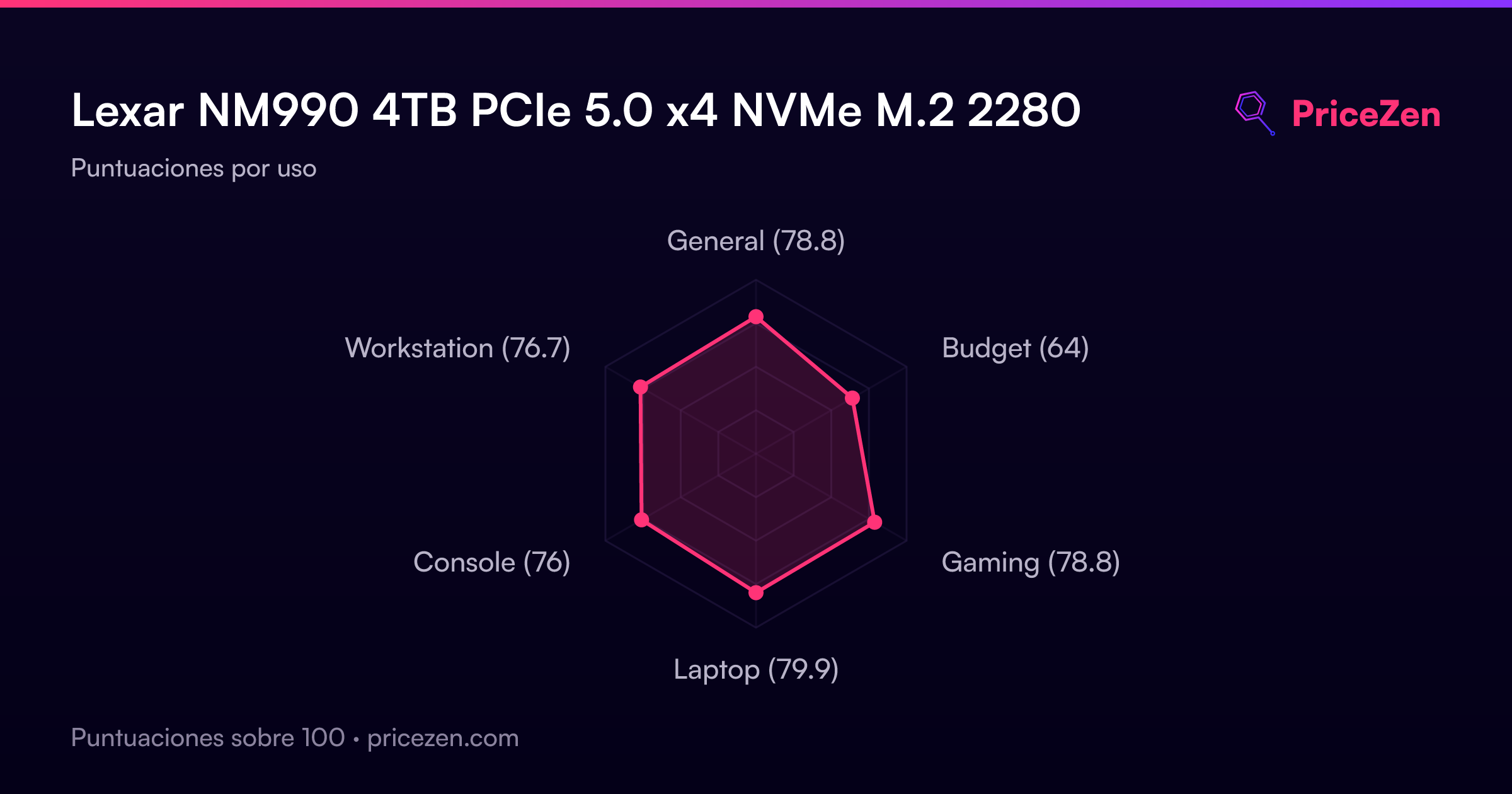
- General80.2
- Budget66.3
- Gaming79.8
- Laptop81.8
- Console77.2
- Portable20.9
- Workstation77.5