Acer Vero X27U F5bmiippruzx 27"
The 27-inch IPS panel delivers 2560x1440 resolution at 120Hz with a 1ms response time and FreeSync support, making motion smooth for gaming and productivity. Its 350 nits brightness and 99% sRGB coverage provide accurate colors, while the USB-C port adds modern connectivity flexibility. Best for office workers and professionals who need a sharp, responsive display for spreadsheets, documents, and occasional gaming.

No current retailer price


Snapshot
The 30-Second Version
The Acer Vero X27U is a 27-inch 1440p IPS monitor with a 120Hz refresh rate, 1ms response time, and USB-C connectivity. It's a solid all-rounder for productivity and light gaming, especially if you can find it at the lower end of its $140 to $650 price range. At higher prices, better options exist from LG, Dell, and ASUS.
Pros & Cons
Pros
- 1440p resolution on a 27-inch IPS panel looks sharp 91st
- 120Hz refresh rate with 1ms response time 88th
- USB-C connectivity plus dual HDMI and DisplayPort 76th
- Full ergonomic stand with height, tilt, swivel, and pivot 71st
- Built-in speakers and headphone jack
Cons
- HDR10 on an 8-bit panel is basically marketing
- Spec sheet confusion between 1440p and 1080p listings
- 200W power draw is high for a monitor this size
- Only 350 nits brightness, not great for bright rooms
- Price varies wildly from $140 to $650 depending on seller
What owners think
The Word on the Street
The proof
Performance
Let's talk numbers. The X27U runs a 2560 x 1440 IPS panel at 120Hz with a 1ms response time and FreeSync support. In our database, the performance score lands at the 70th percentile, which puts it solidly in the middle of the pack. That's not bad, but it's not going to blow anyone away either. For everyday productivity, 120Hz is smooth enough that scrolling and window dragging feel noticeably better than a standard 60Hz office monitor. And the 1ms response time means you won't see much ghosting in fast-moving content.
For gaming, the 120Hz refresh rate is a nice step up from 60Hz, and FreeSync keeps things tear-free if you're running an AMD GPU. But this isn't a competitive gaming monitor. If you're into fast-paced shooters or racing games, you'll probably want something with a higher refresh rate. The display score sits at the 89th percentile, which is genuinely strong for this category. The 350 nits brightness is decent for most indoor environments, though HDR10 support on an 8-bit panel without local dimming is more of a checkbox feature than a real HDR experience. Don't expect the sun to actually look bright in HDR content.
Specifications
Full Specifications
Display
| Size | 27" |
| Resolution | 2560x1440 (QHD) |
| Panel Type | IPS |
| Aspect Ratio | 16:9 |
| Curved | No |
| Curvature | 1000 |
| Screen Finish | matte |
Performance
| Refresh Rate | 120 Hz |
| Response Time | 1 |
| Adaptive Sync | FreeSync |
Color & HDR
| Brightness | 350 nits |
| Color Gamut | 99% sRGB |
| Color Depth | 8-bit |
| HDR | HDR10 |
| HDR Support | HDR10 |
Connectivity
| HDMI Ports | 2 |
| DisplayPort | 1 |
| USB-C | 1 |
| Speakers | Yes |
| Headphone Jack | Yes |
Ergonomics
| Height Adjustable | Yes |
| Tilt | Yes |
| Swivel | Yes |
| Pivot | Yes |
| VESA Mount | 100x100 |
Features
| Webcam | No |
| Touchscreen | No |
| PIP/PBP | No |
| Power | 200 |
| Weight | 11.0 kg / 24.3 lbs |
vs Competition
Stacked against the competition, the X27U has a tough fight. The LG UltraGear 27G810A-B is a direct rival in the 27-inch gaming space, and LG's UltraGear line has a reputation for solid panels and better gaming features. The ASUS ROG Strix XG27JCG brings more gaming-focused specs to the table, likely with higher refresh rates and better response times. If you're serious about gaming, those two are probably better picks.
On the productivity side, the Dell S2725QC offers 4K resolution, which gives you sharper text and more screen real estate for work. The MSI MAG 271QPX QD-OLED is in a completely different league with its OLED panel, though it costs significantly more. The HP OMEN 27qs G2 is another solid alternative that often undercuts Acer on price. The X27U's main advantage is its combination of 1440p resolution, 120Hz refresh rate, and USB-C connectivity at a potentially low price. But if you're paying anywhere near the top of that price range, the competitors start looking a lot more attractive.
| Spec | Acer Vero X27U F5bmiippruzx 27" | MSI MAG 271QP QD-OLED X28 27" | LG UltraGear 27G810A-B 27" | ASUS ROG Strix XG27JCG 27" | Dell S2725QC 27" | HP OMEN 27qs G2 27" |
|---|---|---|---|---|---|---|
| Screen Size | 27 | 27 | 27 | 27 | 27 | 27 |
| Resolution | 2560 x 1440 | 2560 x 1440 | 3840 x 2160 | 5120 x 2880 | 3840 x 2160 | 2560 x 1440 |
| Panel Type | IPS | QD-OLED | IPS | IPS | IPS | IPS |
| Refresh Rate | 120 | 280 | 180 | 330 | 120 | 280 |
| Response Time Ms | 1 | 0.029999999329447746 | 1 | 0.30000001192092896 | 8 | 1 |
| Adaptive Sync | FreeSync | FreeSync Premium Pro | FreeSync Premium | FreeSync Premium Pro | FreeSync Premium | G-Sync Compatible |
| Hdr | HDR10 | DisplayHDR True Black 400 | HDR400 | HDR600 | HDR | HDR400 |
| Compare | Compare | Compare | Compare | Compare |
| Product | Color | Portability | Display | Performance | Connectivity | Social Proof |
|---|---|---|---|---|---|---|
| Acer Vero X27U F5bmiippruzx 27" | 75.9 | 71.3 | 67 | 69.9 | 87.6 | 26.9 |
| MSI MAG 271QP QD-OLED X28 27" Compare | 80.1 | 57.5 | 73.5 | 99.2 | 81.2 | 92 |
| LG UltraGear 27G810A-B 27" Compare | 93.8 | 68 | 87.1 | 81.8 | 98.2 | 67.2 |
| ASUS ROG Strix XG27JCG 27" Compare | 90.1 | 68 | 99.5 | 95.6 | 81.2 | 84 |
| Dell S2725QC 27" Compare | 71.9 | 76.6 | 87.1 | 44.2 | 87.6 | 96.8 |
| HP OMEN 27qs G2 27" Compare | 71.4 | 81.4 | 67 | 89.5 | 96.9 | 98.9 |
Price
Value & Pricing
Here's where things get tricky. The Acer Vero X27U is listed anywhere from $140 to $650 in the US across six different listings. That's a $510 spread, which is frankly ridiculous for a monitor in this class. At the low end, around $140, this is an absolute steal for a 1440p 120Hz IPS panel with USB-C and a full ergonomic stand. At the high end, near $650, you're paying way too much when you could get a 4K monitor or a proper high-refresh gaming display for similar money. If you're shopping for this monitor, do yourself a favor and hunt for the lower-priced listings. The value proposition changes completely depending on which store you buy from.
Price history
Read more
Overview
The Acer Vero X27U F5bmiippruzx sits in that weird middle ground of the monitor world. It's a 27-inch 1440p IPS panel with a 120Hz refresh rate, which on paper sounds like a solid all-rounder for both work and play. But the spec sheet is a bit of a mess, and the pricing is all over the place depending on where you look. We've seen it listed anywhere from $140 to $650 in the US, which is a massive spread for what is essentially a mid-range productivity display with some gaming chops.
If you're searching for a 27-inch monitor that can handle office work during the day and some light gaming at night, this one technically checks those boxes. The 2560 x 1440 resolution gives you decent screen real estate for spreadsheets and browser tabs, while the 120Hz panel and 1ms response time mean it won't embarrass itself in a casual match. But there are some oddities in the listed specs that make us scratch our heads, like the description mentioning Full HD 1080p at 75Hz while the headline specs say 1440p at 120Hz. We'll get into that.
For the price, you're getting a monitor with height adjust, tilt, swivel, and pivot, plus USB-C connectivity and built-in speakers. That's a pretty complete ergonomic and connectivity package. The question is whether the actual panel quality and performance justify the cost, especially when there are some seriously strong competitors in this space.
Common Questions
Q: Is the Acer Vero X27U good for gaming?
It's decent for casual gaming thanks to the 120Hz refresh rate, 1ms response time, and FreeSync support. But serious competitive gamers will want something with a higher refresh rate.
Q: Does the Acer Vero X27U support USB-C charging?
The X27U includes a USB-C port for connectivity, which is handy for connecting laptops. However, the spec sheet doesn't list power delivery wattage, so don't count on it charging a laptop at full speed.
Q: Is the Acer Vero X27U 4K or 1440p?
The X27U is a 1440p (2560 x 1440) monitor. Some listings confusingly mention 1080p specs, but the actual panel is 1440p at 120Hz.
Q: How does the Acer Vero X27U compare to the LG UltraGear 27G810A-B?
The LG UltraGear 27G810A-B is more gaming-focused with better gaming features and a stronger reputation for panel quality. The X27U is more of a hybrid productivity and casual gaming monitor, though it can be cheaper if you find a good deal.
Who Should Skip This
Skip the X27U if you're a competitive gamer who needs 144Hz or higher refresh rates, or if you want real HDR performance. The 8-bit panel with HDR10 support won't deliver the contrast and brightness that HDR content really needs. If you do color-critical work, the 99% sRGB coverage is fine for web and office use, but you'll want something with wider color gamut coverage like DCI-P3 for photo or video editing. And if you're paying more than $300 for this monitor, just get a Dell S2725QC for 4K productivity or an LG UltraGear for better gaming instead.
Verdict
Should you buy the Acer Vero X27U? If you can find it at the lower end of that $140 to $650 price range, absolutely. At $140 to $250, this is a fantastic deal for a 27-inch 1440p monitor with 120Hz, USB-C, and a full ergonomic stand. It'll handle office work beautifully and give you a smooth gaming experience on the side. The color accuracy is solid for an IPS panel, and the connectivity options are genuinely useful if you want to hook up a laptop via USB-C.
But if you're looking at listings near $400 or above, stop and reconsider. At that price, you're competing with 4K monitors, higher-refresh gaming displays, and even entry-level OLED options. The X27U is a good monitor, but it's not a premium one. The confusing spec sheet doesn't help either. Just make sure you're actually getting the 1440p 120Hz version and not some 1080p variant that snuck into the listing.
Usage Scores
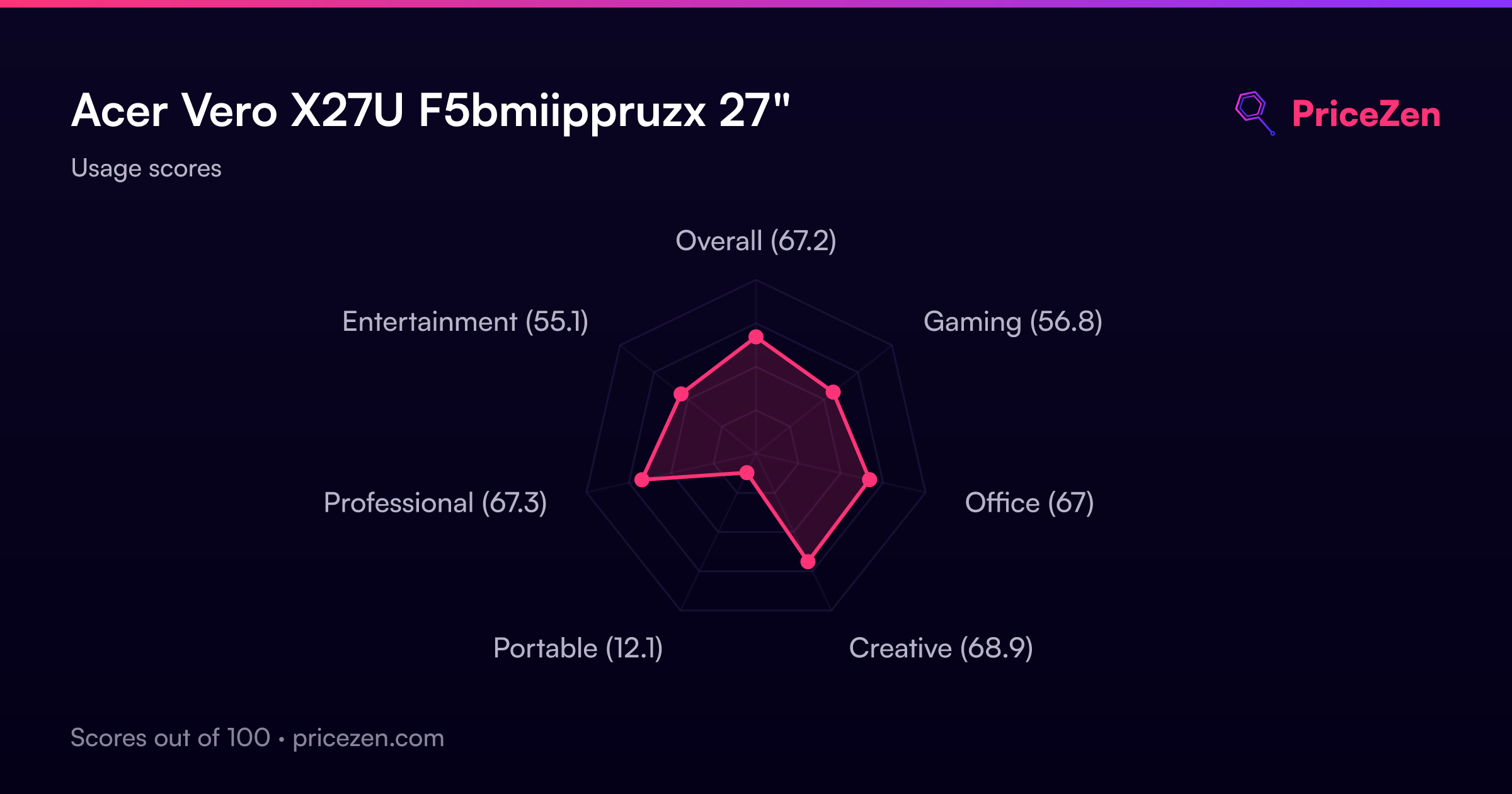
- Overall67.2
- Gaming56.8
- Office67
- Creative68.9
- Portable12.1
- Professional67.3
- Entertainment55.1