HP Z2 Mini G1i 2025, Core Ultra 7 265K, 32GB, 1TB SSD, RTX A1000, Black

Mini PC with dedicated graphics verified Nov 29
81/100 overall score
- CPU
- Intel Core Ultra 7 265K
- RAM
- 32 GB
- Storage
- 1 TB
- GPU
- NVIDIA RTX A1000
- Form factor
- mini
- Psu
- 280 W
- OS
- Windows 11 Pro
Compare prices at 3 stores
Cheapest first. New, refurbished and bundled offers are kept apart, so you compare like with like.
| Store | Sold by | Colour and condition | Price | vs lowest | Last checked | Link |
|---|---|---|---|---|---|---|
| New4 offersSingle unit | ||||||
| Not checked in the last 7 days, so these prices may have changed | ||||||
| Best Buy | Marketplace seller | Black | $3,720.23 | Oct 19 | Go to store | |
| Best Buy | Marketplace seller | Black | $3,801.04 | Oct 19 | Go to store | |
| B&H Photo | B&H Photo | Not listed | Price not confirmed | Not known | Go to store | |
| Out of stock when last checked | ||||||
| Amazon | Not known | Black | No price | Out of stock | Yesterday | Go to store |
 Source: PriceZen, checked Nov 28, 2026
A price counts as current when we checked it in the last 7 days. “Marketplace seller” means a third-party seller on that store, not the store itself.
Price history
Checked that dayNot checked that day, still on offer
Source: PriceZen, checked Nov 3, 2026




Snapshot
The 30-Second Version
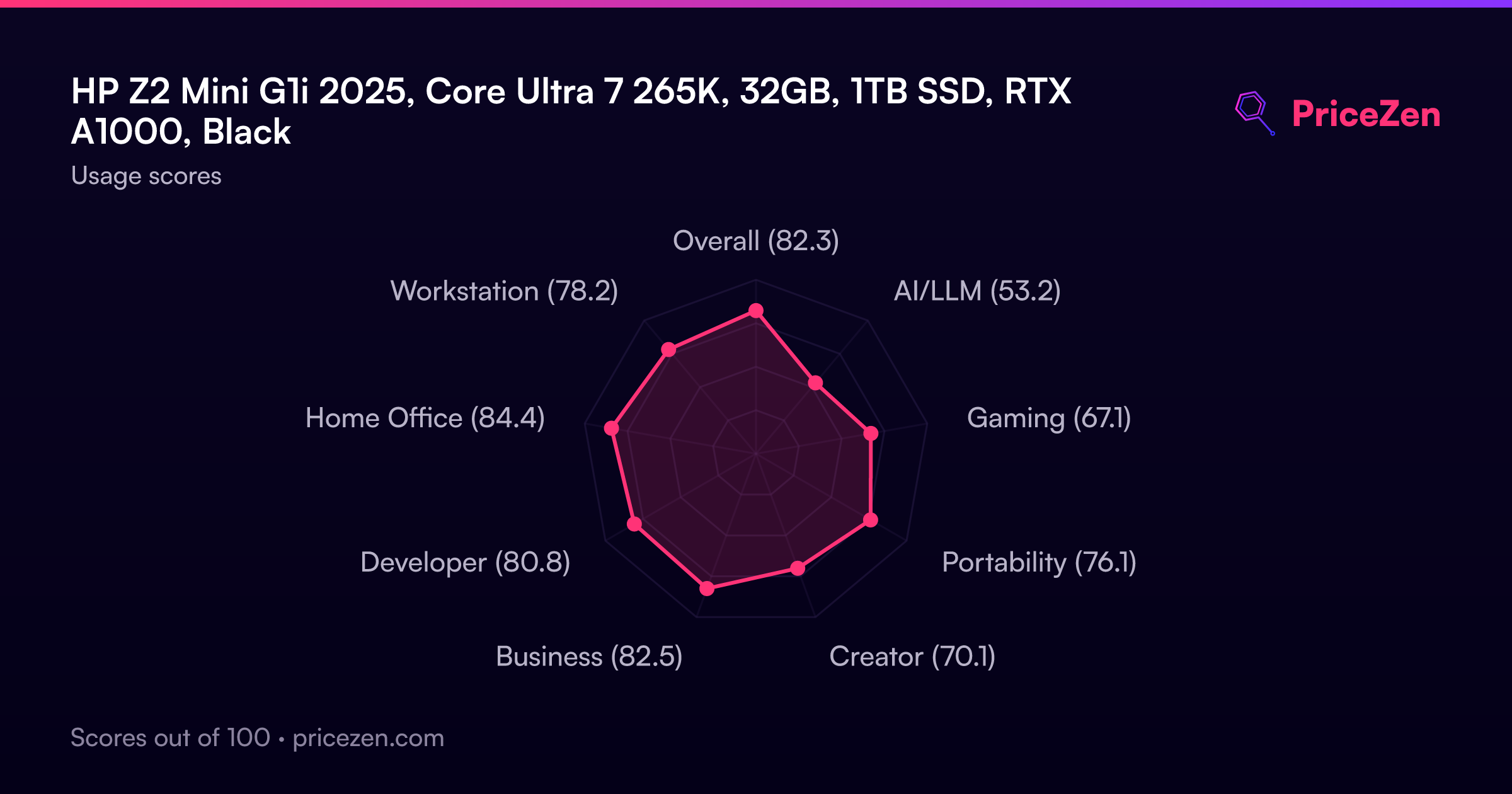
The HP Z2 Mini G1i crams a 20-core Core Ultra 7 265K (97th percentile) and 32GB of 6400 MT/s DDR5 into a 5.51kg mini chassis, and our model scores it 82.2/100 overall. The catch is the RTX A1000: 8GB of VRAM and a middle-of-the-pack GPU ranking, with AI/LLM work scoring just 53.2/100. Prices run USD 3,496 at B&H to USD 3,720 at Best Buy. Great compact CPU-first workstation, poor pick if graphics or local AI is your main job.
Pros & Cons
Pros
- Core Ultra 7 265K with 20 cores ranks in the 97th percentile, near the top of the category 97th
- 32GB of DDR5 at 6400 MT/s, a 90th percentile memory config 90th
- Strong port selection selection (81st percentile): 2x 20Gbps USB-C, 4x USB-A, 4 Mini DisplayPort, Wi-Fi 7 81st
- Workstation-grade W880 chipset and Windows 11 Pro in a 5.51kg mini chassis 70th
- Scores 84.4/100 for home office and 82.5/100 for business in our model
Cons
- RTX A1000 is only middle of the pack (69th percentile) for a machine sold on ray tracing
- 8GB of VRAM caps local AI work, reflected in the 53.2/100 AI/LLM score
- 1TB SSD is merely adequate at the 69th percentile for a workstation at this price
- 280W PSU limits how much headroom the 20-core CPU and GPU can share
- USD 3,496 at the cheapest store is a lot for a mid-tier GPU
The proof
Performance
Let's start with the headline number. A 97th percentile CPU ranking means the Core Ultra 7 265K outruns nearly every other machine we track in this category, and with 20 cores you're not just getting quick single-app responsiveness, you're getting parallel throughput. In practice that's the difference between a render or a compile finishing while you grab coffee versus finishing while you make lunch. Pair that with 32GB of DDR5 at 6400 MT/s, which ranks in the 90th percentile, and you've got enough headroom to keep a heavy CAD session, a browser with far too many tabs, and a couple of VMs open without the system starting to swap. The 1TB NVMe PCIe SSD is fine rather than special, landing at the 69th percentile, so it'll load projects quickly but it's not a standout in a category where big fast drives are common.
The GPU is where you need to be honest with yourself. The RTX A1000's 8GB of VRAM and 69th percentile ranking mean it's competent for professional viewport work and light ray tracing, but it's not the card you buy for heavy GPU rendering or large scenes. Our weakest-area score for this machine is AI and LLM work at 53.2/100, and that tracks: 8GB of VRAM is a hard ceiling on how large a model you can hold locally, and no amount of CPU horsepower fixes that. Connectivity, on the other hand, is a genuine strength at the 81st percentile, well above average. You get 2 USB-C ports at 20Gbps, 4 USB 3.2 Gen 2 Type-A ports, 4 Mini DisplayPort outputs, Gigabit Ethernet, Wi-Fi 7 and Bluetooth 5.4. Four display outputs on a box this size is the kind of thing multi-monitor traders and engineers actually care about. Reliability sits at the 70th percentile, which is respectable but not exceptional.
Specifications
Full Specifications
Processor
| CPU | Intel Core Ultra 7 265K |
| Cores | 20 |
| Frequency | 3.9 GHz |
| L3 Cache | 30 MB |
Graphics
| GPU | NVIDIA RTX A1000 |
| Type | Discrete |
| VRAM | 8 GB |
| VRAM Type | GDDR6 |
Memory & Storage
| RAM | 32 GB |
| RAM Generation | DDR5 |
| Storage | 1 TB |
| Storage Type | NVMe SSD |
Build
| Form Factor | mini |
| PSU | 280 |
| Weight | 5.5 kg / 12.1 lbs |
Connectivity
| USB-C Ports | 2 |
| USB Ports | 6 |
| HDMI | 1x HDMI |
| DisplayPort | 2x DisplayPort |
| Wi-Fi | Wi-Fi 7 |
| Bluetooth | Bluetooth 5.4 |
| Ethernet | Gigabit Ethernet |
System
| OS | Windows 11 Pro |
vs Competition
The Apple Mac Studio M5 Max is the obvious cross-shop if your work is creative and you're platform-agnostic. The Z2 Mini's argument against it is the 20-core Core Ultra 7 265K in the 97th percentile, discrete NVIDIA graphics with 8GB of VRAM, Windows 11 Pro, and four Mini DisplayPort outputs plus Wi-Fi 7 and 20Gbps USB-C. If your toolchain is Windows-only CAD or engineering software, that settles it before benchmarks even enter the conversation. If it isn't, the Mac Studio is worth a serious look given how middling the A1000 ranks here.
Then there's the tower crowd: the Lenovo T Series Towers Legion Tower 5a Gen 10, the ASUS ROG GM700 and the MSI Aegis ZS2 A9NVP-1407US. We only have names for these, so we'll argue from the HP's own numbers: its GPU sits at the 69th percentile and its AI/LLM score is 53.2/100, which is exactly where full-size towers with bigger graphics cards and bigger power budgets tend to pull away. The HP wins on footprint at 5.51kg and on port count in the 81st percentile. The Dell Desktop ECT1250 is the more conventional office alternative, and against it the HP's 97th percentile CPU and 90th percentile memory are the reason to spend up, if your workloads actually use those cores.
| Spec | HP Z2 Mini G1i | Apple Mac Studio M5 Max | Lenovo T Series Towers Legion Tower 5a Gen 10 | Dell Desktop ECT1250 | ASUS ROG GM700 | CLX SET TGMSETRTU5204BM |
|---|---|---|---|---|---|---|
| CPU | Intel Core Ultra 7 265K | Apple M5 Max | AMD Ryzen 7 7800X3D | Intel Core Ultra 7 265 | AMD Ryzen 7 9800X3D | Intel Core i9 14900KF |
| RAM (GB) | 32 | 48 | 32 | 32 | 32 | 64 |
| Storage (GB) | 1024 | 1024 | 4096 | 2048 | 2048 | 8192 |
| GPU | NVIDIA RTX A1000 | Apple (40-Core) | NVIDIA GeForce RTX 5070 Ti | Intel UHD Graphics | NVIDIA GeForce RTX 5070 Ti | NVIDIA GeForce RTX 5070 |
| Form Factor | mini | mini | mid-tower | sff | mid-tower | mid-tower |
| Psu W | 280 | 480 | 850 | 180 | 850 | 850 |
| OS | Windows 11 Pro | macOS | Windows 11 Home | Windows 11 Home | Windows 11 Home | Windows 11 Home |
| Compare | Compare | Compare | Compare | Compare |
| Product | CPU | GPU | RAM | Ports | Storage | Reliability |
|---|---|---|---|---|---|---|
| HP Z2 Mini G1i | 96.7 | 68.8 | 90.3 | 80.6 | 68.6 | 70.2 |
| Apple Mac Studio M5 Max Compare | 95.7 | 85 | 95 | 89.1 | 68.6 | 99.3 |
| Lenovo T Series Towers Legion Tower 5a Gen 10 Compare | 73.2 | 94.6 | 78 | 88.5 | 98.1 | 70.2 |
| Dell Desktop ECT1250 Compare | 88 | 60.1 | 81.6 | 75.1 | 82.5 | 70.2 |
| ASUS ROG GM700 Compare | 80.3 | 94.6 | 81.6 | 96.1 | 90 | 37.7 |
| CLX SET TGMSETRTU5204BM Compare | 94.8 | 90.7 | 96.5 | 84.5 | 99.2 | 11.7 |
Price
Value & Pricing
We track this across three US listings and the spread runs from USD 3,496 to USD 3,801. Right now B&H Photo has it at USD 3,496 and Best Buy at USD 3,720, so there's USD 224 between the two, which is real money for identical hardware. Best Buy advertises a Price Match Guarantee, so if you want their pickup or return process it's worth trying to get them to meet the lower number rather than paying the gap out of politeness.
At roughly USD 3,500 you're paying a premium for density and for the workstation platform, not for raw graphics throughput. The CPU and RAM are genuinely near the top of the category, and the W880 chipset plus Windows 11 Pro are the sort of thing you pay for when this machine is a business asset rather than a toy. But the 69th percentile GPU and 69th percentile storage mean a chunk of that price is going into the form factor. If desk space isn't your bottleneck, that's a hard sell.
Read more
Overview
There's a specific kind of person who wants workstation muscle but doesn't want a tower eating their desk, and HP built the Z2 Mini G1i for exactly that person. It's a mini PC with an Intel Core Ultra 7 265K, 20 cores at 3.9GHz, sitting on an Intel W880 workstation chipset, paired with 32GB of DDR5 running at 6400 MT/s, a 1TB NVMe PCIe SSD and an NVIDIA RTX A1000 with 8GB of GDDR6. Windows 11 Pro comes preinstalled, and there's a USB keyboard and mouse in the box. The whole thing weighs 5.51kg, which is heavy for something this small, but that mass is doing thermal work: a 280W power supply feeding a 20-core K-series chip needs somewhere to dump heat.
Our scoring model puts it at 84.4/100 for home office use and 82.5/100 for business, with an overall score of 82.2/100. That's a strong showing, and the shape of those numbers tells you what this machine is: a serious productivity and design box that happens to fit behind a monitor. If your day is CAD, 3D viewports, big spreadsheets, compiling code, or running a stack of virtual machines, the spec sheet lines up nicely. The CPU sits in the 97th percentile against everything else in its category, which is basically top of the charts, and the memory config lands in the 90th.
The interesting tension is that HP markets this thing for real-time ray tracing and 3D design, and the graphics card is the part of the build that doesn't quite match the ambition. The RTX A1000 is a professional entry-level card, and our GPU ranking has it at the 69th percentile, solidly middle of the pack. So you get a genuinely elite processor bolted to a modest GPU, inside a chassis you can hide. That trade-off defines who should buy this and who should keep scrolling.
Common Questions
Q: Can the RTX A1000 handle 3D design and ray tracing like HP claims?
For viewport work and lighter ray-traced scenes, yes, it's a professional card with 8GB of GDDR6 and drivers aimed at that kind of software. But our GPU ranking puts it at the 69th percentile, so it's middle of the pack rather than a rendering powerhouse. If your scenes are large or your renders are GPU-bound, the 8GB VRAM limit will bite before the 20-core CPU does.
Q: Is this good for running local AI models?
Not really, and the numbers say so plainly: AI/LLM is this machine's weakest area at 53.2/100. Local model size is gated by GPU memory, and 8GB of VRAM is a tight ceiling regardless of how fast the Core Ultra 7 265K is. You can run small models, but if local AI is the reason you're shopping, prioritize VRAM over core count.
Q: How many monitors can I run, and what cables do I need?
There are 4 Mini DisplayPort outputs, which is why connectivity ranks in the 81st percentile, well above average for the category. Note they're Mini DisplayPort, so budget for the right adapters if your monitors take full-size DisplayPort or HDMI. You also get 2 USB-C ports at 20Gbps and 4 USB 3.2 Gen 2 Type-A ports for peripherals.
Q: Can I upgrade the RAM and storage later?
HP positions the Z2 Mini G1i as upgradeable and expandable as your demands change, and it ships with 32GB of DDR5 at 6400 MT/s plus a 1TB M.2 NVMe PCIe SSD. Storage is the more obvious upgrade path since 1TB sits at only the 69th percentile in our rankings and large project files eat it fast. Check the specific configuration's accessible slots before you commit, since mini chassis designs vary.
Who Should Skip This
Skip this if your work is GPU-first. Heavy 3D rendering, complex ray-traced scenes, video effects and local LLM experimentation all lean on graphics memory and throughput, and the RTX A1000 lands at the 69th percentile with 8GB of VRAM. That's reflected in the 53.2/100 AI/LLM score, the lowest number in this machine's profile. At USD 3,496 you'd be better served putting that money into a full-size tower with a stronger card, so cross-shop the ASUS ROG GM700, the MSI Aegis ZS2 A9NVP-1407US or the Lenovo Legion Tower 5a Gen 10 if you have the desk space.
Also skip it if you're a general home user who liked the idea of a small PC. The 20-core CPU and W880 workstation platform are wasted on browsing, streaming and office documents, and the Dell Desktop ECT1250 is the more sensible direction for that kind of workload. And if you're deep in creative work without a Windows dependency, the Apple Mac Studio M5 Max deserves a look before you spend this much on a machine whose graphics are its weakest link.
Verdict
If you're an engineer, architect or developer who needs a compact machine for CPU-heavy work and multi-monitor output, this is a good buy. The 84.4/100 home office and 82.5/100 business scores aren't accidental: 20 cores, 32GB of fast DDR5, four display outputs and Wi-Fi 7 in a 5.51kg box is a genuinely useful combination, and the W880 platform with Windows 11 Pro fits managed business environments. Buy it from B&H at USD 3,496 rather than paying USD 3,720 elsewhere unless the service difference matters to you.
If you're buying primarily for GPU work, hold off. The RTX A1000's 69th percentile ranking and 8GB VRAM ceiling mean you're spending workstation money on a graphics tier that doesn't match, and the 53.2/100 AI score makes that explicit. For 3D rendering, heavy ray tracing or local models, put your budget toward a machine where the GPU leads instead of trails. And if you just want a small quiet desktop for email and browsing, this is wildly more computer than you need.
Usage Scores
- Overall81.3
- AI/LLM53.2
- Gaming67
- Portability76
- Creator70.1
- Business82.3
- Developer80.7
- Home Office84.3
- Workstation78.2