BenQ MA Series MA270U 27" Gray 2024

Retina-grade color, matte glare control verified Nov 19
87/100 overall score 4.5 average from 495 owner ratings
- Screen
- 27"
- Resolution
- 3840 x 2160
- Panel
- IPS
- Refresh
- 60 Hz
- Response time
- 5 ms
- HDR
- HDR10
Compare prices at 1 store
Cheapest first. New, refurbished and bundled offers are kept apart, so you compare like with like.
| Store | Sold by | Colour and condition | Price | vs lowest | Last checked | Link |
|---|---|---|---|---|---|---|
| New1 offerSingle unit | ||||||
| Not checked in the last 7 days, so these prices may have changed | ||||||
| Amazon | Not known | Not listed | MX$15,656.87 | Nov 3 | Go to store | |
 Source: PriceZen, checked Nov 3, 2026
A price counts as current when we checked it in the last 7 days. “Marketplace seller” means a third-party seller on that store, not the store itself.
Price history
Checked that dayNot checked that day, still on offer
Source: PriceZen, checked Nov 3, 2026










Snapshot
The 30-Second Version
The BenQ MA270U is a 27-inch 4K monitor that feels like a native extension of your MacBook, with spot-on P3 color, single-cable USB-C power, and keyboard control integration. It scores in the top 3% for connectivity and top 7% for color in our database, making it a productivity champ. Now priced around $411, it's an even better buy for Apple diehards, but gamers and HDR enthusiasts should look elsewhere.
Pros & Cons
Pros
- Gorgeous 4K sharpness and P3 color that matches MacBooks right out of the box. 98th
- Single-cable USB-C delivers 90W charging and a built-in hub, slashing desk clutter. 96th
- Brightness and volume control through your Mac keyboard is genuinely convenient. 92nd
- Fully adjustable stand with height, tilt, swivel, and pivot for all-day comfort. 91st
Cons
- 60Hz panel feels dated if you're used to a high-refresh screen or do any gaming.
- 400 nits peak brightness is just okay; HDR content lacks punch.
- Heavier than most 27-inch monitors at over 18 pounds with the stand.
- No built-in KVM switch, so you'll need a workaround for dual-PC setups.
What owners think
The Word on the Street
- Owner sentiment is strong at 92/100 in our analysis. Buyers keep coming back to the vibrant 4K picture and how well it works with a MacBook straight out of the box.
- A few owners mention the monitor is heavy and the stand's footprint takes up more desk space than expected.
- Some users wish the brightness was a bit higher for well-lit rooms, though it's fine for typical indoor use.
How owner sentiment changed over time
ExclusiveBased on when customers actually wrote their reviews - so you can see whether early praise held up.
Owners are as happy as early on: 95% lately, 100% in Oct 2024 – Sep 2025
Across all 495 store ratings: 4.5★. Most owners rate without writing a review. The chart counts the 32 written reviews with stars and their own date.
Show the numbers
| Period | Reviews | Happy | Mixed | Unhappy | Happy share |
|---|---|---|---|---|---|
| Oct 2024 – Sep 2025 | 11 | 11 | 0 | 0 | 100% |
| Oct 2025 – Apr 2026 | 21 | 20 | 1 | 0 | 95% |
- Jan – Mar 202611 of 12 happy
Buyers praised the monitor's image quality, color accuracy, and Mac integration. Reliability concerns with Mac integration software were noted.
- Excellent image quality, color, and sharpness, matching Apple displays.
- Mac integration software is unreliable, with update loops and forced uninstalls.
- Easy setup, good connectivity, and sturdy build.
- Gloss screen improves clarity but adds reflections from speakers.
- Oct – Dec 20258 of 8 happy
Buyers praised seamless Apple integration, color accuracy, and sharp 4K display. One unit arrived damaged, but the replacement was perfect.
- Excellent compatibility and integration with Apple devices, including Mac, iPad, and iPhone.
- High color accuracy, sharp 4K resolution, and vibrant display quality praised by video editors.
- Easy setup, simple controls, and useful software (Display Pilot 2) enable keyboard brightness control.
- One review reported a damaged display on arrival, resolved via return and replacement.
- Jul – Sep 20253 of 3 happy
Reviewers praise seamless MacBook integration via USB-C, gorgeous 4K display quality, and exceptional packaging; minor concerns are absent.
- Seamless USB-C integration with MacBook: 4K resolution, charging, and crisp text.
- Gorgeous 4K panel with vibrant colors and sharpness, ideal for photo editing and multitasking.
- Sleek design, sturdy adjustable stand, and effective non-glare screen for long work hours.
- Exceptional recyclable packaging that provides great protection during shipping.
Each column joins calendar quarters until it holds at least 10 reviews with stars and their own date. Happy = 4-5★, mixed = 3★, unhappy = 1-2★. Period summaries are in English.
The proof
Performance
With a 60Hz refresh and 5ms response time, the MA270U lands in the 22nd percentile for raw performance in our database, which is no surprise, this is a sharp-eyed productivity panel, not a gaming monitor. But look past the number and the picture quality is genuinely excellent. The 4K resolution on a 27-inch canvas means text is razor-sharp, and the 95% P3 coverage paired with 99% sRGB and 10-bit color depth delivers rich, accurate hues that hold up well in side-by-side edits with an iMac or MacBook. 400 nits of brightness is decent for SDR work and does an okay job with HDR10 content, though it can't hold a candle to OLED or mini-LED panels for true high dynamic range. If your workflow is spreadsheets, code, or color grading, the smooth, vibrant image is a clear win. Only the HDR purists and competitive gamers will feel let down.
Specifications
Full Specifications
Display
| Size | 27" |
| Resolution | 3840x2160 (4K UHD) |
| Panel Type | IPS |
| Aspect Ratio | 16:9 |
| Curved | No |
| Screen Finish | matte |
Performance
| Refresh Rate | 60 Hz |
| Response Time | 5 |
Color & HDR
| Brightness | 400 nits |
| Color Gamut | 99% sRGB, 95% P3 |
| Color Depth | 10-bit |
| HDR | HDR10 |
| HDR Support | HDR10 |
Connectivity
| HDMI Ports | 2 |
| DisplayPort | 0 |
| USB-C | 2 |
| Thunderbolt | N/A |
| Speakers | Yes |
| Headphone Jack | Yes |
Ergonomics
| Height Adjustable | Yes |
| Tilt | Yes |
| Swivel | Yes |
| Pivot | Yes |
| VESA Mount | 100x100 |
Features
| Webcam | No |
| Touchscreen | No |
| PIP/PBP | No |
| Power | 40 |
| Weight | 8.2 kg / 18.1 lbs |
vs Competition
The MA270U sits in a weird spot because most of the monitors it lands next to in our ranking chase gaming specs. The ASUS ROG Strix XG27UCDMG is a 27-inch panel aimed squarely at fast-paced play, and the MSI MAG 271QPX QD-OLED E2 and Samsung Odyssey G60SD go the same route at the same size. The Alienware AW-Series AW3425DW stretches to 34 inches for wide-screen multitasking, while the LG UltraGear 32GX850A-B pushes up to 32 inches. None of them are built around what the BenQ does: 95% P3 coverage tuned to match a MacBook out of the box, plus a single USB-C cable that carries video, data, and 90W of charging. That's why it ranks in the top 3% for connectivity and top 7% for color in our database. If you're platform-agnostic and want speed or sheer screen area, those panels make a stronger case. If your desk starts with a MacBook, the BenQ's convenience and color accuracy are hard to give up.
| Spec | BenQ MA Series MA270U 27" | Gigabyte AORUS FO32U2 32" | Acer Nitro UM.CX2AA.S01 34" | LG UltraGear 39" | ASUS HealthCare HA3281A 31.5" | MSI MAG 274URFW 27" |
|---|---|---|---|---|---|---|
| Screen Size | 27 | 32 | 34 | 39 | 31.5 | 27 |
| Resolution | 3840 x 2160 | 3840 x 2160 | 3440 x 1440 | 3440 x 1440 | 3840 x 2160 | 3840 x 2160 |
| Panel Type | IPS | OLED | VA | OLED | OLED | IPS |
| Refresh Rate | 60 | 240 | 165 | 240 | 60 | 160 |
| Response Time Ms | 5 | 0.03 | 1 | 0.03 | 0.1 | 0.5 |
| Adaptive Sync | - | FreeSync Premium Pro | FreeSync Premium | FreeSync Premium Pro | - | FreeSync Premium |
| Hdr | HDR10 | DisplayHDR True Black 400 | HDR400 | DisplayHDR True Black 400 | - | HDR |
| Compare | Compare | Compare | Compare | Compare |
| Product | Color | Portability | Display | Feature | User Sentiment | Ergonomic | Performance | Connectivity | Social Proof |
|---|---|---|---|---|---|---|---|---|---|
| BenQ MA Series MA270U 27" | 92.2 | 83.9 | 87 | 70 | 95.7 | 90.8 | 22.3 | 97.8 | 83.9 |
| Gigabyte AORUS FO32U2 32" Compare | 80 | 62.8 | 99 | 85 | 61.5 | 90.8 | 97.9 | 87.4 | 91.9 |
| Acer Nitro UM.CX2AA.S01 34" Compare | 84.7 | 20.7 | 76 | 90.8 | 76.6 | 66.9 | 77 | 83.8 | 83.9 |
| LG UltraGear 39" Compare | 63.3 | 49.3 | 84 | 96.3 | 0 | 66.9 | 97.9 | 81 | 0 |
| ASUS HealthCare HA3281A 31.5" Compare | 47.9 | 57.3 | 97.7 | 43.1 | 0 | 90.8 | 93.9 | 90.9 | 0 |
| MSI MAG 274URFW 27" Compare | 94.5 | 57.3 | 87 | 85 | 0 | 90.8 | 90.8 | 81 | 51.3 |
Price
Value & Pricing
List prices across vendors swing wildly from $411 to an absurd $135,234, likely due to outlier third-party sellers and refurbished stock. The realistic new price from Newegg sits at the lower end, around $411, which is a sharp deal for a color-calibrated, Mac-optimized hub monitor. If you catch a refurb unit even cheaper, it's a steal. You're mostly paying for the deep macOS integration and out-of-the-box P3 accuracy. Without that, a standard 4K IPS monitor can be had for less, but for the Apple faithful who value a single-cable desk and zero fiddling, it's money well spent.
Read more
Overview
The BenQ MA270U is built for one thing: making your MacBook feel right at home on a big screen. It's a 27-inch 4K IPS panel with an especially tight focus on Apple's P3 color gamut, and it's factory-tuned to mimic the look of your MacBook's built-in display. That means right out of the box, photos, videos, and UI elements match what you see on your laptop, which is a huge time-saver for creative pros. The monitor also integrates directly with macOS: you can adjust brightness and volume using your Mac's keyboard, eliminating the need to fumble with clunky on-screen menus.
Connectivity is another strong suit. A single USB-C cable carries 4K video, data, and up to 90W of power to your MacBook, while the second USB-C port dishes out 15W for charging an iPad or iPhone. You also get two HDMI ports and a Thunderbolt connection, so you've got plenty of room for a second laptop or streaming stick. The stand is fully adjustable with height, tilt, swivel, and pivot, and there's a 100x100mm VESA mount if you'd rather use your own arm. At 18 pounds it's not light, but it feels reassuringly sturdy on a desk.
Common Questions
Q: Does the MA270U have speakers?
Yes, it has built-in speakers, but they're basic and fine for system sounds. For music or video, you'll want dedicated desktop speakers or headphones.
Q: How much power does the monitor draw?
Under normal office use it pulls around 40W, and it can spike up to 220W at maximum brightness and load.
Q: Can I attach a monitor arm instead of using the stand?
Absolutely. It supports the standard 100x100mm VESA mount pattern, so almost any third-party arm will work.
Who Should Skip This
Skip the MA270U if you're primarily a gamer or need a high-refresh panel for fast-paced titles, 60Hz and 5ms just won't cut it. Also, if you don't own a Mac and have no use for the Apple-specific color tuning or integrated keyboard controls, you can find equally sharp 4K monitors for less money that skip those Mac-centric perks.
Verdict
If your desk revolves around a MacBook Pro or Air and you want a no-fuss 4K monitor that plays perfectly with Apple's color and control shortcuts, the BenQ MA270U is an easy recommendation. It's tailor-made for photographers, video editors, and office workers who crave sharp text and less cable mess. The 60Hz ceiling and modest HDR performance won't bother you one bit in that world, and the recent price drop makes it an even sweeter buy.
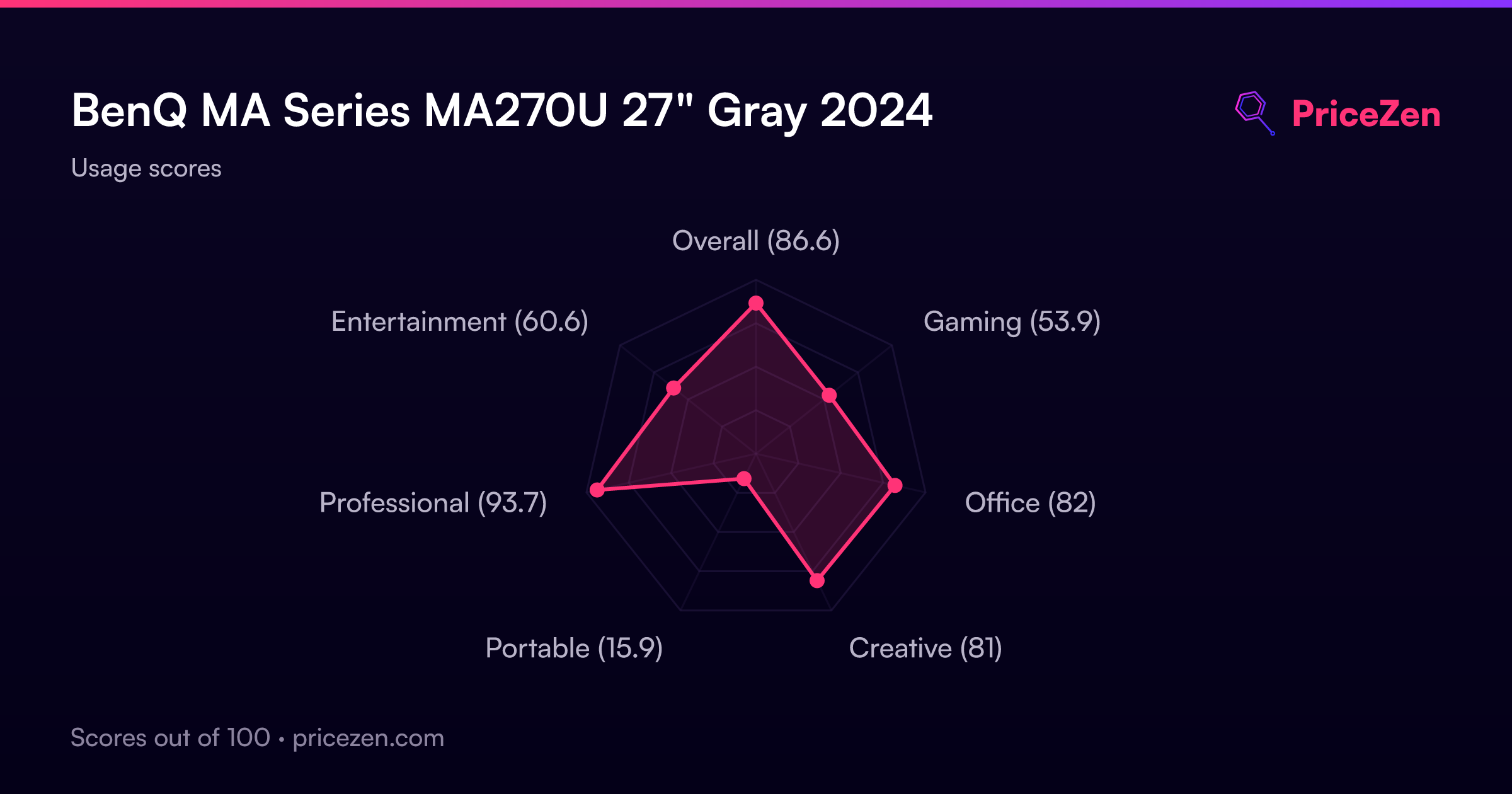
Usage Scores
- Overall86.5
- Gaming53.9
- Office82
- Creative81
- Portable15.9
- Professional93.7
- Entertainment60.6