Lenovo IdeaPad Slim 3 Chromebook 14" 82XJ0000US 2023, MediaTek Kompanio 520, 4GB, 64GB eMMC, Abyss Blue

数秒で起動、アップデートも自動 11月28日に確認済み
18/100 総合スコア 4.6 オーナー評価5,612件の平均
- CPU
- MediaTek Kompanio 520/528 (MT8186/MT8186T)
- RAM
- 4 GB
- Storage
- 64 GB
- Screen
- 14" 1920x1080
- GPU
- ARM MediaTek Integrated Graphics
- OS
- ChromeOS
- Weight
- 1.3 kg
- Battery
- 47 Wh


概要
The 30-Second Version
The IdeaPad Slim 3 Chromebook is a lightweight, long-lasting laptop that nails the basics. The screen is sharp, the build is solid, and the Google integration is seamless. Just know the 4GB RAM and 64GB storage are tight, and the CPU is one of the weakest we've seen. If you can grab it under $200, it's a great deal for students and casual users.
Pros & Cons
長所
- Boots in under 10 seconds and feels responsive for everyday tasks 93rd
- 14-inch Full HD IPS touchscreen with 100% sRGB coverage looks sharp 92nd
- Lightweight at 1.30kg, easy to toss in a bag 87th
- Long battery life, users report all-day use without hunting for an outlet 82nd
- Seamless Google ecosystem integration, sign in and everything syncs
短所
- 4GB of RAM chokes when you open more than a few tabs
- 64GB eMMC storage is tiny, you'll live in the cloud whether you like it or not
- CPU ranks dead last in our database for this category
- Touchscreen needs precise taps, sloppy swipes get ignored
- No number pad, which annoys spreadsheet folks
オーナーの声
The Word on the Street
- Owners consistently praise the fast boot time and smooth everyday performance for web browsing and Google apps.
- Battery life gets a lot of love, with many users reporting all-day use without needing to charge.
- The touchscreen is a point of frustration for some, requiring deliberate taps rather than casual swipes.
- A few owners mention a charging issue cropping up after a couple years of use.
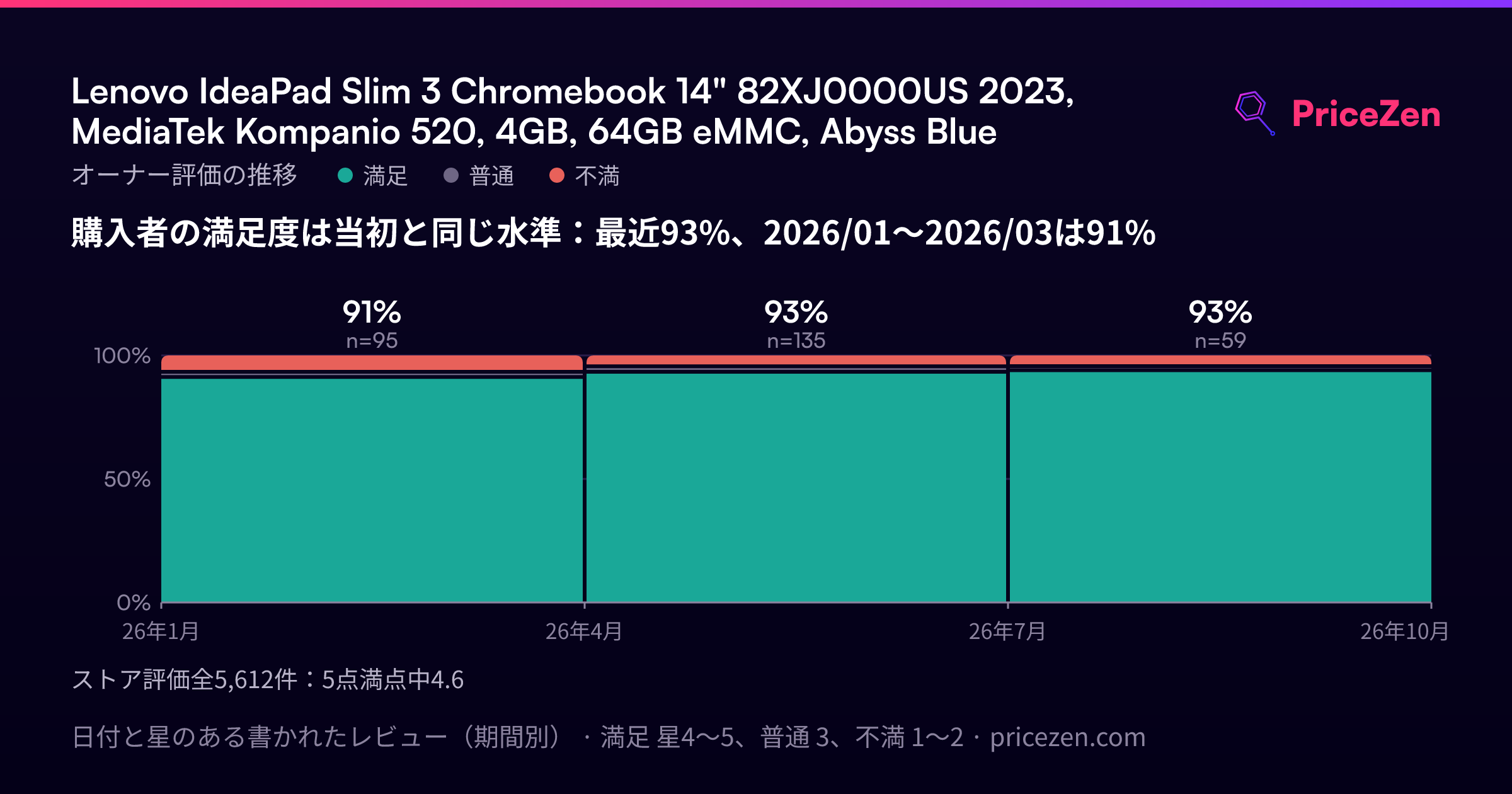
購入者の評価が時間とともにどう変化したか
独自顧客が実際にレビューを書いた時期に基づいています。発売当初の高評価が続いたかどうかがわかります。
購入者の満足度は当初と同じ水準:最近93%、2026/01~2026/03は91%
ストア評価全5,612件:4.6★。 多くの購入者はレビューを書かずに評価だけを付けています。 グラフは星と投稿日のある書かれたレビュー289件を数えています。
星のない書かれたレビュー4件は推移に含めていません。
数値を表示
| 期間 | レビュー | 満足 | 普通 | 不満 | 満足の割合 |
|---|---|---|---|---|---|
| 2026/01~2026/03 | 95 | 86 | 2 | 7 | 91% |
| 2026/04~2026/06 | 135 | 125 | 3 | 7 | 93% |
| 2026/07~2026/09 | 59 | 55 | 1 | 3 | 93% |
各列は、星と投稿日のあるレビューが10件以上になるまで四半期をまとめています。満足 = 4〜5★、普通 = 3★、不満 = 1〜2★。
実証データ
Performance
The Kompanio 520 is an 8-core ARM chip clocked at 2.0GHz, and it handles ChromeOS basics without much drama. Boot times are under 10 seconds, and everyday tasks like Gmail, Docs, and YouTube feel snappy enough. The Mali-G52 GPU is surprisingly capable for integrated graphics, but don't get excited. This is not a gaming machine. Our gaming score for this thing is 8.7 out of 100, which is about as close to zero as you can get without being a calculator. The 4GB of RAM means you'll feel the squeeze if you open more than a handful of tabs, and the 64GB eMMC storage fills up fast. ChromeOS is efficient, but it can't work miracles.
Specifications
Full Specifications
Processor
| CPU | MediaTek Kompanio 520/528 (MT8186/MT8186T) |
| Cores | 8 |
| Frequency | 2.0 GHz |
Graphics
| GPU | MediaTek Integrated Graphics |
| Type | Integrated |
| VRAM Type | GDDR6 |
Memory & Storage
| RAM | 4 GB |
| RAM Generation | LPDDR4X |
| Storage | 64 GB |
| Storage Type | eMMC |
Display
| Size | 14" |
| Resolution | 1920x1080 (Full HD) |
| Panel | IPS |
| Refresh Rate | 60 Hz |
| Brightness | 300 nits |
| Color Gamut | 100% sRGB |
Connectivity
| USB-C Ports | 1 |
| USB Ports | 1 |
| Thunderbolt | 0 |
| HDMI | 0 |
| Wi-Fi | Wi-Fi 6 |
| Bluetooth | ✓ |
Physical
| Weight | 1.3 kg / 2.9 lbs |
| Battery | 47 Wh |
| OS | ChromeOS |
vs Competition
Stacked against the Apple MacBook Pro GSRF MWP42LL/A, this thing is not even in the same conversation. The MacBook Pro is a premium machine with serious horsepower, and the IdeaPad Slim 3 is a budget Chromebook. That's fine, they're for different people. The Dell Latitude 5320 is a better comparison for business users who need Windows and more ports. The ASUS Vivobook X1404VAP offers more traditional laptop flexibility with Windows and upgradeable storage. The HP EliteBook 845 G8 is a business tank with better build quality and performance. Where the IdeaPad wins is simplicity and price. If you live in Google's world and want something cheap and light, none of those competitors touch it on value.
| Spec | Lenovo IdeaPad Slim 3 Chromebook 14" 82XJ0000US | Apple MacBook Pro 14.2" M4 Pro | ASUS ROG Zephyrus 14" GA403WW-G14.R95080 | HP OMEN Transcend | Samsung Galaxy Book5 Pro 14" NP944XHA-KG3US | Dell Premium 14.5" LDA14250-7667SLV-PUS |
|---|---|---|---|---|---|---|
| CPU | MediaTek Kompanio 520/528 (MT8186/MT8186T) | Apple M4 Pro | AMD Ryzen AI 9 HX 370 | Intel Core Ultra 9 285H | Intel Core Ultra 7 258V | Intel Core Ultra 7 255H |
| RAM (GB) | 4 | 48 | 32 | 32 | 32 | 32 |
| Storage (GB) | 64 | 4096 | 2048 | 1024 | 1024 | 1024 |
| Screen | 14" 1920x1080 | 14.2" 3024x1964 | 14" 2880x1800 | 14" 2880x1800 | 14" 2880x1800 | 14.5" 3200x2000 |
| GPU | ARM MediaTek Integrated Graphics | Apple (16-Core) | NVIDIA GeForce RTX 5080 | NVIDIA GeForce RTX 5070 | Intel Arc Graphics 140V | Intel Arc Graphics |
| OS | ChromeOS | macOS | Windows 11 Home | Windows 11 Home | Windows 11 Pro | Windows 11 Home |
| Weight (kg) | 1.3 | 1.6 | 1.6 | 1.6 | 1.2 | 1.7 |
| Battery (Wh) | 47 | 72 | - | 71 | 63 | 62 |
| Compare | Compare | Compare | Compare | Compare |
| 製品 | CPU | GPU | RAM | ポート | 画面 | 携帯性 | ストレージ | User Sentiment | 信頼性 | ユーザー評価 | Affordability |
|---|---|---|---|---|---|---|---|---|---|---|---|
| Lenovo IdeaPad Slim 3 Chromebook 14" 82XJ0000US | 10.1 | 6.6 | 3.9 | 42.8 | 50.4 | 86.5 | 3.7 | 81.5 | 82 | 93.2 | 91.9 |
| Apple MacBook Pro 14.2" M4 Pro Compare | 92.4 | 78.9 | 90.6 | 73.8 | 99.1 | 68.9 | 98.4 | 90.9 | 98.2 | 99.7 | 4.7 |
| ASUS ROG Zephyrus 14" GA403WW-G14.R95080 Compare | 91.2 | 98.3 | 90.8 | 89.4 | 96 | 73.6 | 89.7 | 99.1 | 60.6 | 95.6 | 6.2 |
| HP OMEN Transcend Compare | 90.1 | 93.5 | 89.7 | 89.4 | 96 | 72.2 | 65.4 | 81.5 | 33.7 | 93.2 | 9 |
| Samsung Galaxy Book5 Pro 14" NP944XHA-KG3US Compare | 65.8 | 69.6 | 79.5 | 83.5 | 90.3 | 89.4 | 79.3 | 0 | 82 | 95.6 | 21.4 |
| Dell Premium 14.5" LDA14250-7667SLV-PUS Compare | 87 | 69.6 | 89 | 66.7 | 96.8 | 61.3 | 65.4 | 90.9 | 33.7 | 95.6 | 14.9 |
価格
Value & Pricing
Pricing is all over the place. We're seeing this Chromebook listed anywhere from $147 to $399 across US vendors, a $252 spread. At the low end, it's a steal for a student or casual user. At the high end, you're getting fleeced. Best Buy has the most competitive listing right now, so check there first. For under $200, this is a solid secondary machine or a first laptop for a kid. Push past $300 and you should start looking at something with more RAM and storage.
詳細情報
Overview
The Lenovo IdeaPad Slim 3 Chromebook is a budget-friendly 14-inch touchscreen laptop that leans hard into the Google ecosystem. It's thin, light, and boots in seconds, which is exactly what most people want from a Chromebook. The MediaTek Kompanio 520 chip is not a powerhouse, but for web browsing, docs, and streaming, it gets the job done.
Our database shows this thing is a weird mix. The GPU ranks in the 98th percentile for its class, but the CPU sits at the very bottom. That tells you everything: fine for light tasks, terrible for anything demanding. The 4GB of RAM and 64GB of eMMC storage are both in the 4th percentile, which is rough even for a Chromebook.
Common Questions
Q: Can this Chromebook run Android apps?
Yes, it has full Google Play Store access, so you can install Android apps like Minecraft, Adobe Express, and Microsoft 365. Just keep in mind the 4GB of RAM means heavy apps will run slowly.
Q: Is 64GB of storage enough?
For most Chromebook users, yes, because ChromeOS is designed around cloud storage. You get Google Drive integration built in, and the 3-month Google One AI Premium trial includes 2TB of cloud storage. But if you want to store lots of files locally, you'll run out of space quickly.
Q: How is the battery life?
Lenovo claims up to 13.5 hours, and real-world users report getting through a full day of classes or work without needing to plug in. Heavy streaming or brightness cranked up will drain it faster.
Who Should Skip This
If you need to run Windows or macOS software, this is not your machine. If you're a tab hoarder who keeps 20+ tabs open, the 4GB of RAM will make you miserable. If you want to play games beyond browser titles or light Android games, look elsewhere. And if you need local storage for photos, videos, or large files, the 64GB eMMC drive is a dealbreaker. Power users, creative professionals, and gamers should all steer clear.
Verdict
This is a Chromebook for people who want a Chromebook. Students, casual users, and anyone who lives in Gmail and Google Docs will be happy. The battery life is genuinely good, the screen is bright and clear, and the build quality feels more solid than the price suggests. Just don't expect to do anything heavy. No video editing, no serious gaming, no running a dozen tabs while streaming music and editing photos. For the right person at the right price, this is a great little machine.
Usage Scores
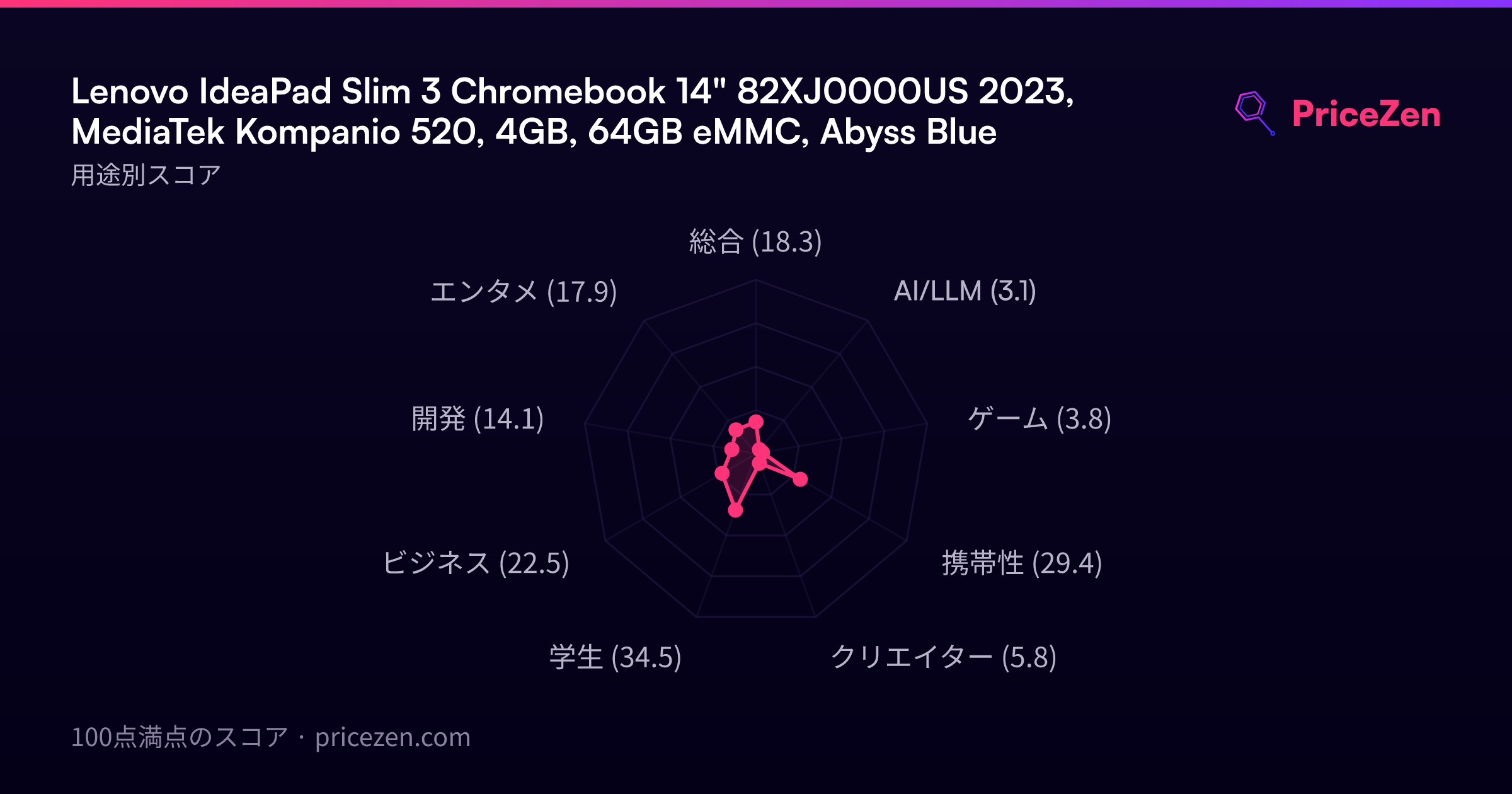
- 総合18.3
- AI/LLM3.1
- ゲーム3.8
- 携帯性29.4
- クリエイター5.8
- 学生34.5
- ビジネス22.5
- 開発14.1
- エンタメ17.9