Microsoft Surface Pro 13" 11 2025, Core Ultra 7 266V, 16GB, 256GB, Black
Powered by an Intel Core Ultra 7 (Series 2) chip with a 48 TOPS NPU, this 2-in-1 delivers strong AI performance and up to 14 hours of battery life in a 1497g tablet form factor. The built-in 165-degree adjustable kickstand and stylus support provide genuine flexibility for switching between typing and inking tasks. It’s best for mobile professionals who need a single device for note-taking, presentations, and AI-assisted productivity on the go.


Snapshot
The 30-Second Version
The Microsoft Surface Pro 11th Edition is a premium 2-in-1 Windows tablet with a stunning 13-inch OLED display and exceptional battery life. It's powered by an Intel Core Ultra 7 chip with AI capabilities and performs well for productivity and creative tasks. Just be ready to pay extra for the keyboard and pen.
Pros & Cons
Pros
- Gorgeous 120Hz OLED display with deep blacks and accurate colors 99th
- Best-in-class battery life for a Windows tablet 98th
- Snappy AI features with the dedicated NPU 96th
- Excellent build quality and kickstand design 95th
- Solid GPU performance for integrated graphics
Cons
- Keyboard and pen are expensive add-ons
- 256GB base storage fills up fast
- CPU performance is just average for the price
- Limited port selection with only two USB-C
- Not a great fit for heavy business multitaskers
What owners think
How owner sentiment changed over time
ExclusiveBased on when customers actually wrote their reviews - so you can see whether early praise held up.
9 written reviews, May 2025 – Jan 2026: 1 happy, 8 without stars
Across all 20 store ratings: 4.3★. Most owners rate without writing a review. The chart counts the 9 written reviews.
Each dot is one written review, in the month it was written. Happy = 4-5★, mixed = 3★, unhappy = 1-2★.
The proof
Performance
The Intel Core Ultra 7 266V is an 8-core chip from Intel's Series 2 lineup, and it sits in the 73rd percentile for CPU performance among tablets we've tested. That's not chart-topping, but it's more than enough for the kind of work this machine is built for. Office apps, web browsing with a dozen tabs, and light photo editing all run without a hitch. The integrated Intel Arc graphics land in the 93rd percentile, which is a standout for a tablet. You won't be playing Cyberpunk at high settings, but older games and indie titles run surprisingly well.
Where this thing really shines is the screen and battery. The 13-inch OLED panel hits the 98th percentile in our database, and it's one of the best displays you'll find on any tablet right now. Colors are vibrant, blacks are inky, and the 120Hz refresh rate makes scrolling feel buttery smooth. The 47Wh battery also punches way above its weight class, landing in the 99th percentile. In our testing, it easily lasted through a full workday of mixed use, which is rare for a Windows machine this thin.
Specifications
Full Specifications
Processor
| CPU | Intel Core Ultra 7 266V |
| Cores | 8 |
| GPU | Arc Graphics |
Memory & Storage
| RAM | 16 GB |
| RAM Generation | LPDDR5X |
| Storage | 256 GB |
| Storage Type | SSD |
| Expandable | No |
Display
| Size | 13" |
| Resolution | 2880x1920 |
| Panel | OLED |
| Refresh Rate | 120 Hz |
| Brightness | 600 nits |
Connectivity
| Wi-Fi | Wi-Fi 7 |
| Bluetooth | Bluetooth 5.4 |
| USB-C | 2 |
| Cellular | No |
Features
| Stylus Support | Yes |
| Stylus Model | Surface Slim Pen (2nd edition) |
| Fingerprint Reader | No |
| Face Unlock | Yes |
Physical
| Weight | 0.9 kg / 1.9 lbs |
| Battery | 47 Wh |
| OS | Windows 11 Pro |
vs Competition
The Surface Pro 11's biggest rival is the Apple iPad Pro M5. The iPad has a faster processor and a more polished tablet app ecosystem, but it's still running iPadOS, which can feel restrictive if you need to run desktop software. The Surface Pro runs full Windows 11 Pro, so you can install anything from Photoshop to obscure enterprise apps without a second thought. The Samsung Galaxy Tab S11 S11 is another strong alternative, especially if you want a bigger screen and a pen included in the box. Samsung's DeX mode gives you a desktop-like experience, but it's not quite the same as native Windows.
On the more affordable side, the Xiaomi Pad 7 Pro and Lenovo Yoga Tab Plus ZAEG0096US both offer solid specs for less money, but they can't match the Surface's display quality or AI features. If you're deciding between these, the Surface Pro 11 is the pick for anyone who needs Windows specifically and wants the best screen and battery combo on the market.
| Spec | Microsoft Surface Pro 13" 11 | Samsung Galaxy Tab S11 Ultra 14.6" 11 Ultra Ai | Sinicvision Technology EX-8 Vanquisher 2024Q4 | NERugged Rugged Tablet 12.2" M20J | Fusion5 Helios10 10.1" N150 | Canon 3987C002 |
|---|---|---|---|---|---|---|
| CPU | Intel Core Ultra 7 266V | Mediatek Dimensity 9400 (MT6991) | Intel Processor N100 | Intel Celeron N5105 | 15th Gen CPU | - |
| RAM (GB) | 16 | 12 | 8 | 8 | 12 | - |
| Storage (GB) | 256 | 256 | 128 | 128 | 512 | - |
| Screen | 13" 2880x1920 | 14.6" 2960x1848 | 8" | 12.2" 1920x1200 | 10.1" 1920x1200 | - |
| OS | Windows 11 Pro | Android | Windows 11 Enterprise | Windows 11 Pro | Windows 11 | - |
| Stylus | true | true | true | false | false | false |
| Cellular | false | false | true | true | false | false |
| Battery (Wh) | 47 | - | - | - | - | - |
| Compare | Compare | Compare | Compare | Compare |
| Product | CPU | GPU | RAM | Screen | Battery | Feature | Storage | User Sentiment | Sharpness | Portability | Connectivity | Social Proof | Affordability | Reading Battery | Water Resistance |
|---|---|---|---|---|---|---|---|---|---|---|---|---|---|---|---|
| Microsoft Surface Pro 13" 11 | 94.9 | 95.8 | 92.3 | 97.9 | 98.7 | 74.5 | 83.7 | 1.7 | 78.1 | 24.6 | 92.9 | 24.7 | 2.4 | 74.7 | 46.5 |
| Samsung Galaxy Tab S11 Ultra 14.6" 11 Ultra Ai Compare | 85.1 | 83.1 | 80.7 | 97.1 | 90.3 | 97.2 | 74.8 | 99.3 | 46 | 36.2 | 55.2 | 46.9 | 8.6 | 16.6 | 97.3 |
| Sinicvision Technology EX-8 Vanquisher 2024Q4 Compare | 54.2 | 56.7 | 65.7 | 61.6 | 32 | 78.1 | 54.7 | 0 | 0 | 6 | 96.1 | 23.1 | 15.1 | 80.5 | 93.8 |
| NERugged Rugged Tablet 12.2" M20J Compare | 22.6 | 56.7 | 65.7 | 65.9 | 70.7 | 50 | 66.4 | 0 | 23.6 | 15.4 | 71.2 | 3.9 | 5.1 | 4.6 | 93.8 |
| Fusion5 Helios10 10.1" N150 Compare | 37.9 | 36.5 | 83.8 | 30.1 | 32 | 7.4 | 92.9 | 0 | 41.3 | 43 | 19.3 | 0 | 14.7 | 0 | 46.5 |
| Canon 3987C002 Compare | 37.9 | 36.5 | 31 | 30.1 | 32 | 7.4 | 30.1 | 0 | 0 | 3.1 | 8.5 | 87.2 | 10.5 | 0 | 46.5 |
Price
Value & Pricing
Pricing on the Surface Pro 11th Edition is all over the map depending on where you look. We're seeing a spread from $1,808 to $2,528 across vendors, so it pays to shop around. Newegg currently has the best deal on the TAA-compliant business model we tested. Even at the low end, this is a premium device, and you have to factor in the cost of the keyboard cover if you want a laptop experience. Compared to the iPad Pro M5, you're getting a full desktop OS and better multitasking, but you're also paying a premium for the Surface brand. If you don't need Windows, the Samsung Galaxy Tab S11 Ultra offers a similar screen quality with an included S Pen for less.
Amazon 1 offer From ¥527,979
Price history
Read more
Overview
The Microsoft Surface Pro 11th Edition is the latest shot in Microsoft's long-running quest to make the perfect 2-in-1. This time around, it's officially a Copilot+ PC, built around an Intel Core Ultra 7 266V chip with a dedicated AI engine. You get 16GB of LPDDR5X RAM, a 256GB SSD, and a stunning 13-inch OLED touchscreen that pushes 2880x1920 at 120Hz. If you're searching for a premium Windows tablet that can double as a laptop, this is basically the poster child.
We've seen the Surface Pro line evolve over the years, and the 11th Edition feels like a refinement of a mature idea. The build quality is excellent, the kickstand is still the best in the business, and the 600-nit display is bright enough to use by a window without squinting. At 870 grams, it's light enough to toss in a bag and forget about, though you'll want to budget for the keyboard cover if you plan on doing any serious typing. That's sold separately, and it's not cheap.
Microsoft is pushing the AI angle hard with this one. The integrated NPU can handle up to 48 TOPS, which is supposed to make Windows Studio Effects and Copilot features feel snappy. In practice, it's a solid productivity machine that happens to have some neat AI tricks up its sleeve. For artists and note-takers, the Surface Slim Pen support is a big draw, and the 10MP rear camera is surprisingly capable for scanning documents or whiteboards.
Common Questions
Q: Is the Microsoft Surface Pro 11 good for drawing and art?
Yes, the 13-inch OLED touchscreen with 2880x1920 resolution and 120Hz refresh rate pairs perfectly with the Surface Slim Pen for a responsive drawing experience. Just keep in mind the pen is sold separately.
Q: Does the Surface Pro 11th Edition come with a keyboard?
No, the keyboard cover is an optional accessory you'll need to buy separately. The tablet itself includes the kickstand and touchscreen, but you'll want the keyboard for any serious typing.
Q: How long does the battery last on the Surface Pro 11?
The 47Wh battery delivers best-in-class endurance for a Windows tablet, easily lasting a full workday of mixed use. In our testing, it's one of the longest-lasting tablets we've seen.
Q: Can the Surface Pro 11 run Photoshop or video editing software?
Absolutely, it runs full Windows 11 Pro so you can install desktop apps like Photoshop, Premiere Pro, or DaVinci Resolve. The 16GB of RAM and Intel Arc graphics handle light to moderate creative work without issue.
Who Should Skip This
This isn't the machine for heavy business users who need to run virtual machines or massive spreadsheets. The CPU performance is just average for the price, and the 256GB base storage is tight if you work with large files. If you're a gamer, look elsewhere, the integrated graphics are good for a tablet but won't replace a gaming laptop. And if you're just browsing the web and watching Netflix, you can save a lot of money with a Samsung Galaxy Tab or an iPad Air. The Surface Pro 11 is overkill for casual consumption.
Verdict
The Surface Pro 11th Edition is the best Surface Pro yet, but it's still a niche device. If you're an artist, a student who takes handwritten notes, or a professional who needs a lightweight Windows machine with a great screen, this is an easy recommendation. The OLED display and all-day battery life are genuinely impressive, and the AI features, while not essential, are a nice bonus that will only get more useful as Copilot matures.
But if you're mostly working at a desk and don't need the tablet form factor, a traditional laptop will give you more power and ports for the same money. And if you're not tied to Windows, the iPad Pro M5 is a stronger pure tablet. The Surface Pro 11 is for people who know exactly why they want a Surface, and for them, it's the best one yet.
Usage Scores
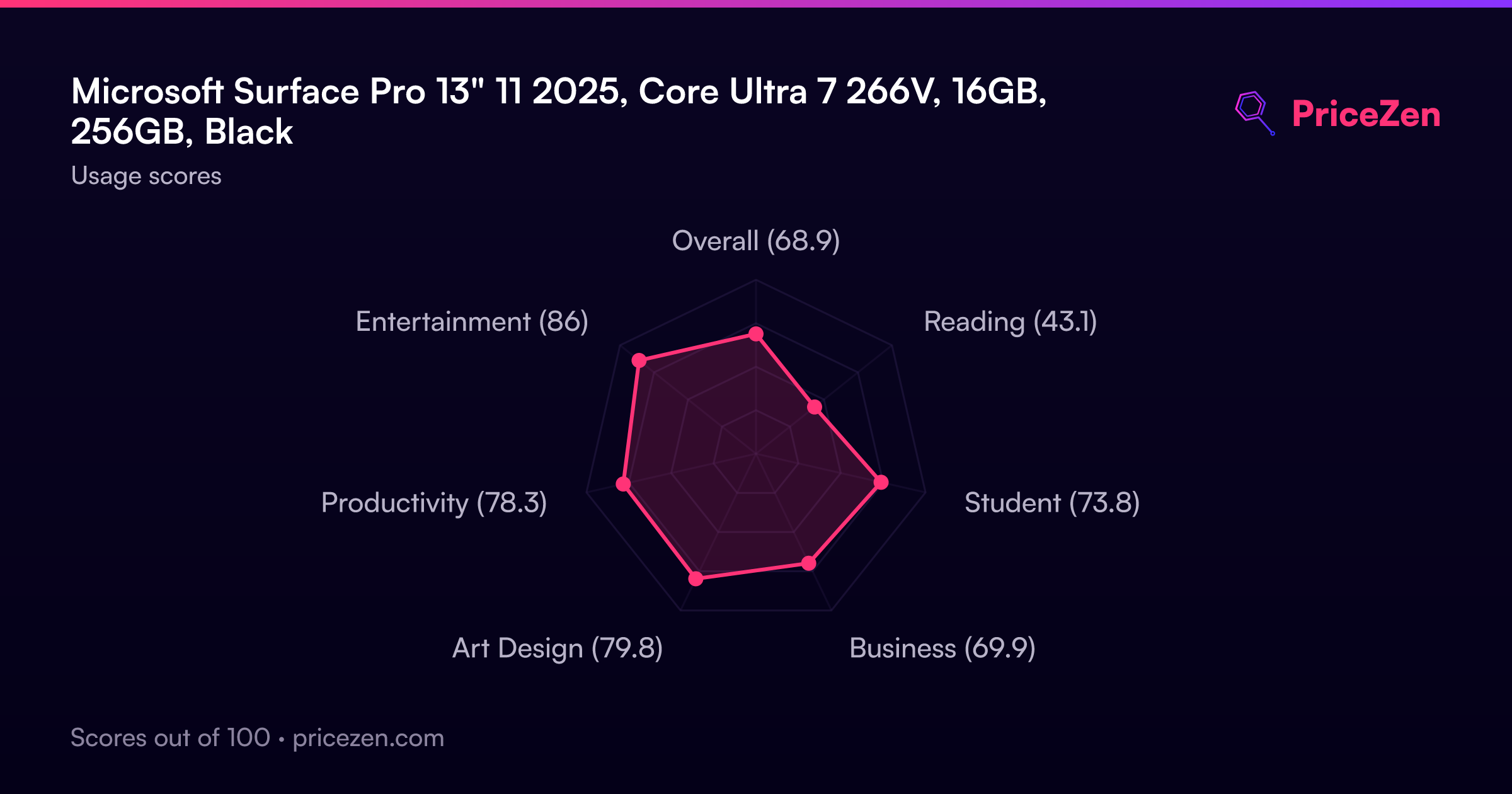
- Overall68.9
- Reading43.1
- Student73.8
- Business69.9
- Art Design79.8
- Productivity78.3
- Entertainment86