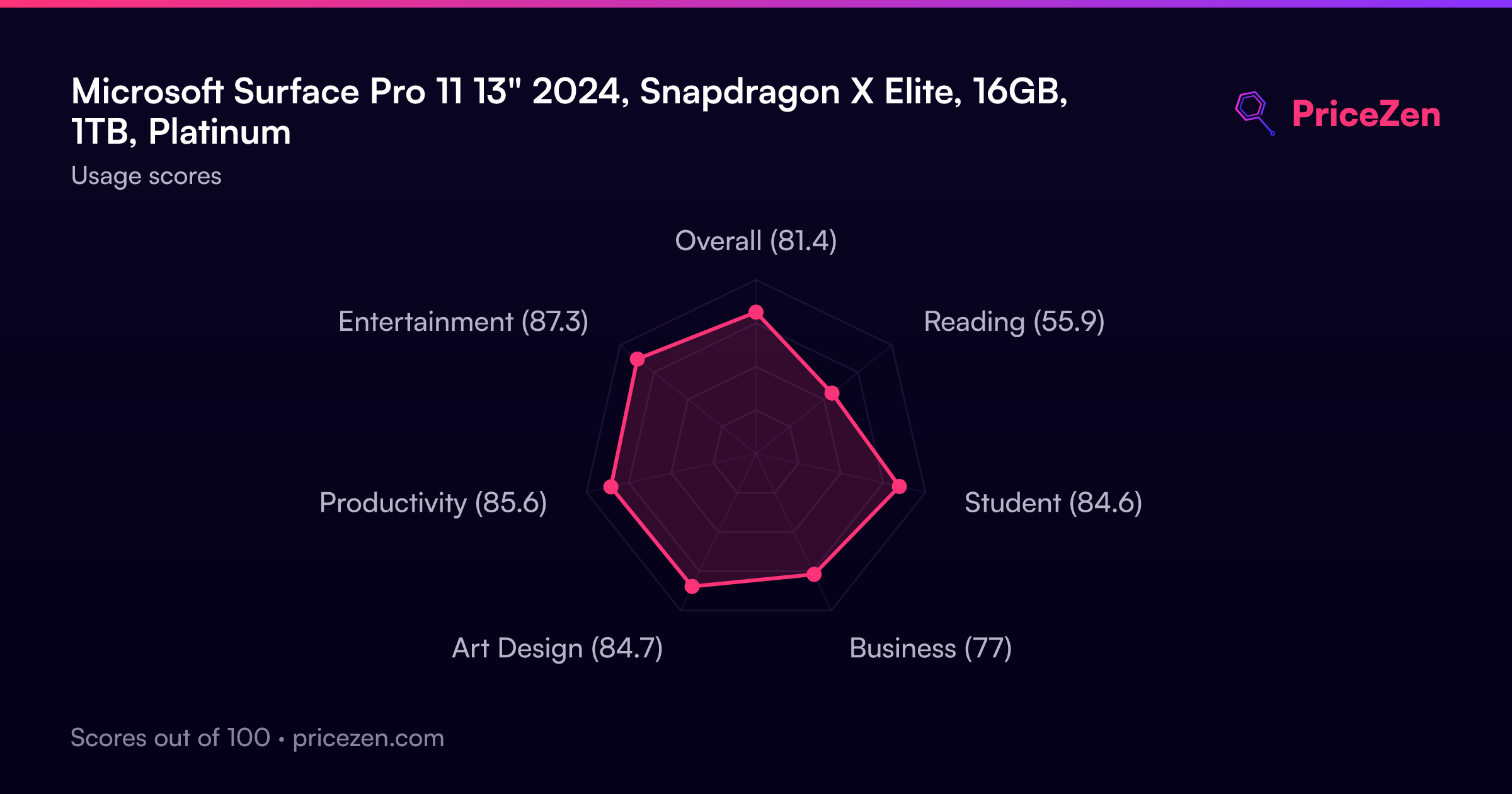
Microsoft Surface Pro 11 13" 2024, Snapdragon X Elite, 16GB, 1TB, Platinum
The Snapdragon X Elite 12-core chip delivers native AI processing at 45 TOPS, powering a vivid 13-inch 2880x1920 OLED 120Hz display with 900 nits peak brightness in a fanless 890g tablet. Its integrated 5G and Wi-Fi 7 connectivity, combined with the premium anodized aluminum build and Surface Slim Pen support, provide genuine versatility away from a desk. This device is best for mobile-first students and productivity users who need always-connected AI tools and a high-contrast screen for note-taking and document review.

No current retailer price


Snapshot
The 30-Second Version
Gorgeous hardware, best-in-class battery, and a processor that screams. But the ARM software compatibility is a mess, and too many units are blue-screening out of the box. Wait for the next generation.
Pros & Cons
Pros
- Snapdragon X Elite is one of the fastest mobile chips we've seen 100th
- OLED display is absolutely gorgeous, 120Hz and razor sharp 99th
- Battery life is best-in-class, 100th percentile in our database 98th
- Wi-Fi 7 and Thunderbolt support future-proof this thing 98th
Cons
- Blue screen errors during setup are way too common
- ARM processor means some Windows apps just won't run
- Keyboard not included, and the Alcantara cover is your only option
- User sentiment is dead last, 4th percentile. That's a red flag
What owners think
The Word on the Street
How owner sentiment changed over time
ExclusiveBased on when customers actually wrote their reviews - so you can see whether early praise held up.
Happy owners: 80% lately, 94% in Apr – Sep 2024
Too few reviews to call that a change.
Across all 2,940 store ratings: 4.6★. Most owners rate without writing a review. The chart counts the 162 written reviews with stars and their own date.
11 written reviews without stars are left out of the trend.
Show the numbers
| Period | Reviews | Happy | Mixed | Unhappy | Happy share |
|---|---|---|---|---|---|
| Apr – Sep 2024 | 16 | 15 | 0 | 1 | 94% |
| Oct – Dec 2024 | 20 | 20 | 0 | 0 | 100% |
| Jan – Mar 2025 | 17 | 16 | 1 | 0 | 94% |
| Apr – Jun 2025 | 21 | 19 | 0 | 2 | 90% |
| Jul – Sep 2025 | 24 | 23 | 1 | 0 | 96% |
| Oct – Dec 2025 | 18 | 16 | 0 | 2 | 89% |
| Jan – Mar 2026 | 31 | 25 | 0 | 6 | 81% |
| Apr – Aug 2026 | 15 | 12 | 1 | 2 | 80% |
- Jan – Mar 202625 of 31 happy · 3 without stars
Buyers praised portability and speed, but reported ARM compatibility issues, glitchy tablet mode, and slow performance despite fast processor.
- Portable size and weight ideal for travel and business use.
- Snapdragon ARM processor: some users face app incompatibility, others have no issues.
- Tablet mode glitch: on-screen keyboard fails to appear at sign-in, requiring workaround.
- Performance inconsistent: fast processor but slow loading, occasional screen jumps or kickouts.
- Oct – Dec 202516 of 18 happy · 2 without stars
Buyers praised the product's speed, sleek design, portability, and durability, with one noting excellent appearance and performance.
- Fast, sleek, portable, and durable design praised.
- Looks great and works great, according to one buyer.
- First-time customer had a positive experience and would return.
- Jul – Sep 202523 of 24 happy · 1 without stars
Buyers praised the Surface Pro 11's compact design and 2-in-1 versatility, but one reported repeated blue screens requiring repair, calling it a $1700 brick.
- Compact and portable, fits easily in a carry bag.
- Great 2-in-1 for writing, drawing, and casual use.
- Repeated blue screens during setup, sent for repair.
- Not compatible with some printers; buyer advises research.
- Apr – Jun 202519 of 21 happy · 3 without stars
Buyers praised the Surface Pro 11's performance, OLED display, and AI features, but one warned about Snapdragon software compatibility and another had a delivery issue.
- Excellent performance, OLED display, and AI features praised.
- Snapdragon processor may not run all Windows software; check compatibility.
- Delivery failure and poor customer service from Best Buy.
- Device syncs well with applications and works reliably.
- Oct – Dec 202420 of 20 happy · 1 without stars
Buyers praised the Surface Pro's performance, screen, battery life, and design, with minor ARM compatibility issues noted.
- Fast, efficient, and lightweight with brilliant screen and battery life.
- Great for work, school, and creative tasks; features work as expected.
- ARM chip compatibility limited; SQL Server unsupported, PostgreSQL works.
- High price is a drawback, though quality justifies cost.
Each column joins calendar quarters until it holds at least 10 reviews with stars and their own date. Happy = 4-5★, mixed = 3★, unhappy = 1-2★. Period summaries are in English.
The proof
Performance
The Snapdragon X Elite is a beast when it works. Our database puts the CPU at the 99th percentile, storage at 98th, and the GPU at 95th. That's top-of-the-charts territory. The OLED display is stunning too, 2880x1920 at 120Hz with 267 ppi. But here's the kicker: multiple owners report slower-than-expected performance in real-world use, and the touchscreen gets glitchy in tablet mode. The hardware is ready for prime time. The software compatibility layer is not.
Specifications
Full Specifications
Processor
| CPU | Qualcomm Snapdragon X Elite X1E-84-100 |
| Cores | 12 |
| GPU | Adreno |
Memory & Storage
| RAM | 16 GB |
| RAM Generation | LPDDR5X |
| Storage | 1 TB |
| Storage Type | SSD |
| Expandable | No |
Display
| Size | 13" |
| Resolution | 2880x1920 |
| Panel | OLED |
| Refresh Rate | 120 Hz |
| Brightness | 900 nits |
Connectivity
| Wi-Fi | Wi-Fi 7 |
| Bluetooth | Bluetooth 5.4 |
| USB-C | 2 |
| Cellular | No |
Features
| Stylus Support | Yes |
| Stylus Model | Surface Slim Pen |
| Fingerprint Reader | No |
| Face Unlock | Yes |
| IP Rating | IP68 |
Physical
| Weight | 0.9 kg / 2.0 lbs |
| Battery | 53 Wh |
| OS | Windows 11 Home |
vs Competition
The iPad Pro M5 is the obvious alternative if you want a tablet that just works. Apple's silicon doesn't have the ARM compatibility headaches, and the app ecosystem is miles ahead for creative work. The Lenovo Yoga Tab Plus is another solid option if you want Android flexibility without the Windows ARM drama. The Surface Pro 11 has the best raw specs of the bunch, but specs don't matter when you're staring at a blue screen during setup.
| Spec | Microsoft Surface Pro 11 13" | Samsung Galaxy Tab S11 Ultra 14.6" 11 Ultra Ai | BOOX Tab X C 13.3" | Lenovo Legion Tab 8.1" ZAEF0068US | Sinicvision Technology EX-8 Vanquisher 2024Q4 | reMarkable Paper Pro 11.8" RM83C-1001NW |
|---|---|---|---|---|---|---|
| CPU | Qualcomm Snapdragon X Elite X1E-84-100 | Mediatek Dimensity 9400 (MT6991) | Qualcomm | QTI SM8650 | Intel Processor N100 | 1.8 GHz quad-core Cortex-A53 |
| RAM (GB) | 16 | 12 | 6 | 12 | 8 | 4 |
| Storage (GB) | 1024 | 256 | 128 | 256 | 128 | 64 |
| Screen | 13" 2880x1920 | 14.6" 2960x1848 | 13.3" 3200x2400 | 8.1" 2560x1600 | 8" | 11.8" 2160x1620 |
| OS | Windows 11 Home | Android | Android 13 | Android 14 | Windows 11 Enterprise | Linux |
| Stylus | true | true | true | false | true | true |
| Cellular | false | false | false | false | true | false |
| Battery (Wh) | 53 | - | - | - | - | 18 |
| Compare | Compare | Compare | Compare | Compare |
| Product | CPU | GPU | RAM | Screen | Battery | Feature | Storage | User Sentiment | Sharpness | Eye Comfort | Portability | Connectivity | Social Proof | Affordability | Reading Battery | Water Resistance |
|---|---|---|---|---|---|---|---|---|---|---|---|---|---|---|---|---|
| Microsoft Surface Pro 11 13" | 98.4 | 96.5 | 92.3 | 99.1 | 99.6 | 74.5 | 97.7 | 40.8 | 78.1 | 48 | 21.8 | 92.9 | 91 | 4.7 | 86.9 | 97.3 |
| Samsung Galaxy Tab S11 Ultra 14.6" 11 Ultra Ai Compare | 85.1 | 83.1 | 80.7 | 97.1 | 90.3 | 97.2 | 74.8 | 99.3 | 46 | 48 | 36.2 | 55.2 | 46.9 | 8.6 | 16.6 | 97.3 |
| BOOX Tab X C 13.3" Compare | 86.3 | 84 | 50.9 | 96.5 | 60.4 | 42.8 | 66.4 | 9.2 | 94.4 | 99 | 44.1 | 62.5 | 40.1 | 13.9 | 99.9 | 46.5 |
| Lenovo Legion Tab 8.1" ZAEF0068US Compare | 84 | 82.1 | 83.8 | 85.8 | 32 | 28.1 | 83.7 | 0 | 99.5 | 48 | 7.5 | 62.5 | 22.3 | 12.9 | 0 | 46.5 |
| Sinicvision Technology EX-8 Vanquisher 2024Q4 Compare | 54.2 | 56.7 | 65.7 | 61.6 | 32 | 78.1 | 54.7 | 0 | 0 | 48 | 6 | 96.1 | 23.1 | 15.1 | 80.5 | 93.8 |
| reMarkable Paper Pro 11.8" RM83C-1001NW Compare | 37.9 | 36.5 | 31 | 72.9 | 91.6 | 42.8 | 30.1 | 0 | 44.8 | 99 | 0 | 83.2 | 75.1 | 13.6 | 99.8 | 46.5 |
Price
Value & Pricing
Pricing is all over the place. In the US you'll see anywhere from $1,599 to $2,336 across seven listings. That's a $737 spread for the same machine. Best Buy tends to have the most consistent pricing with their price match guarantee. In Japan the spread is even wilder, from ¥396,366 to ¥563,814. Shop around before you commit. But honestly, at these prices, the reliability issues make this a tough sell no matter where you buy.
Price history
Read more
Overview
The Surface Pro 11 is Microsoft betting big on ARM, and the hardware is genuinely impressive. Snapdragon X Elite, 16GB of RAM, a 1TB SSD, and that gorgeous 13-inch OLED screen all sound like a dream on paper. But here's the thing: the user sentiment score is sitting at a brutal 4th percentile. That's not a typo. People are hitting blue screens during setup and finding out their favorite apps just don't work on ARM. This is a device with best-in-class specs and a serious software hangover.
Common Questions
Q: Does the Surface Pro 11 come with a keyboard?
Nope. You'll need to buy the Surface Pro Keyboard separately, and your only option is the Alcantara fabric cover. It's a nice keyboard, but it's an extra $100+ on top of an already expensive tablet.
Q: Can I use a stylus with this device?
Yes. The Surface Slim Pen works great with it, and there are third-party options from other companies too. The pen support is actually one of the bright spots here, especially for artists and note-takers.
Q: Will all my Windows apps work on this?
Probably not. The Snapdragon X Elite is an ARM processor, which means some older Windows apps and drivers won't run natively. Microsoft has an emulation layer, but it's not perfect. Check your critical software before buying.
Who Should Skip This
If you need a device that just works out of the box, this isn't it. The blue screen reports and ARM compatibility issues are dealbreakers for anyone who can't afford downtime. Go get an iPad Pro M5 if you want a premium tablet experience without the software drama. Or grab a Lenovo Yoga Tab Plus if you want Android flexibility. The Surface Pro 11 is for early adopters who don't mind troubleshooting, and even then, it's a gamble.
Verdict
The Surface Pro 11 is a frustrating product. The hardware is genuinely excellent, the OLED screen is stunning, and the Snapdragon X Elite delivers when it's firing on all cylinders. But the user sentiment score of 4th percentile tells the real story. Too many people are hitting blue screens, finding their software won't run on ARM, and dealing with glitchy touchscreens. Microsoft is asking flagship money for a device that still feels like a beta test. Wait for the software to catch up, or buy an iPad Pro if you need something reliable today.
Usage Scores
- Overall81.4
- Reading55.9
- Student84.6
- Business77
- Art Design84.7
- Productivity85.6
- Entertainment87.3