Lenovo IdeaPad Slim 3 15ARP10, Ryzen 7 170, 16GB, 512GB SSD, Gray
The AMD Ryzen 7 170 8-core processor at 4.8GHz, paired with Radeon 680M graphics and 16GB DDR5 RAM, handles multitasking and creative workloads smoothly. The 15.3-inch 300-nit IPS touchscreen with anti-glare coating and TÜV Rheinland certification reduces eye strain, while MIL-STD-810H durability and a 50Wh battery support travel. Best for students and business users needing a durable, touch-enabled laptop for daily productivity and light editing, not for gaming.

No current retailer price











Snapshot
The 30-Second Version
A budget productivity champ with a surprisingly strong CPU, but the integrated graphics are a hard no for gamers. Great for students, useless for streamers.
Pros & Cons
Pros
- 8-core Ryzen 7 170 is a multitasking beast for the price 82nd
- Touchscreen display with anti-glare coating is genuinely useful 71st
- MIL-STD-810H durability means it can survive a backpack tumble
- 16GB DDR5 RAM keeps things smooth even with 30 tabs open
Cons
- Integrated Radeon 680M graphics are a gaming dead end
- 512GB SSD fills up fast if you store media locally
- 300 nits brightness is mediocre for outdoor use
- Only 9 reviews so far, so long-term reliability is still a question mark
What owners think
The Word on the Street
The proof
Performance
The Ryzen 7 170 surprised us. It's not top of the charts, but it's well above average for this price bracket. Eight cores and 16 threads chew through browser tabs, Office apps, and light photo editing without breaking a sweat. The 16GB of DDR5 helps keep things snappy. But that Radeon 680M is a weak spot. It's fine for video playback and casual games, but our gaming score of 16.3 out of 100 tells the real story. Don't expect to run Cyberpunk on this thing. The 512GB SSD is also on the smaller side, so you'll want an external drive if you hoard files.
Specifications
Full Specifications
Processor
| CPU | AMD Ryzen 7 170 |
| Cores | 8 |
| Frequency | 3.2 GHz |
| L3 Cache | 16 MB |
Graphics
| GPU | AMD Radeon Graphics |
| Type | Integrated |
| VRAM Type | Shared |
Memory & Storage
| RAM | 16 GB |
| RAM Generation | DDR5 |
| Storage | 512 GB |
| Storage Type | NVMe SSD |
Display
| Size | 15.3" |
| Resolution | 1920x1200 (Full HD) |
| Panel | IPS |
| Brightness | 300 nits |
Connectivity
| USB-C Ports | 1 |
| USB Ports | 3 |
| HDMI | 1x HDMI |
| Wi-Fi | Wi-Fi 6 |
| Bluetooth | ✓ |
Physical
| Weight | 1.6 kg / 3.6 lbs |
| Battery | 50 Wh |
| OS | Windows 11 Home |
vs Competition
The MacBook Air M4 is the obvious elephant in the room. It's faster, lighter, and has a better screen, but it costs significantly more and runs macOS. The HP OmniBook X Flip is a closer match on price and form factor, but its Snapdragon chip can have compatibility hiccups with older Windows apps. The ASUS ProArt PX13 is a creative powerhouse, but it's overkill and overpriced for someone who just needs a reliable daily driver. For pure budget productivity, the IdeaPad Slim 3 holds its own against all of them.
| Spec | Lenovo IdeaPad Slim 3 15ARP10 | Apple MacBook Pro 14.2" M4 Pro | ASUS ROG Zephyrus 14" GA403WW-G14.R95080 | HP OMEN Transcend | Samsung Galaxy Book5 Pro 14" NP944XHA-KG3US | Dell Premium 14.5" LDA14250-7667SLV-PUS |
|---|---|---|---|---|---|---|
| CPU | AMD Ryzen 7 170 | Apple M4 Pro | AMD Ryzen AI 9 HX 370 | Intel Core Ultra 9 285H | Intel Core Ultra 7 258V | Intel Core Ultra 7 255H |
| RAM (GB) | 16 | 48 | 32 | 32 | 32 | 32 |
| Storage (GB) | 512 | 4096 | 2048 | 1024 | 1024 | 1024 |
| Screen | 15.3" 1920x1200 | 14.2" 3024x1964 | 14" 2880x1800 | 14" 2880x1800 | 14" 2880x1800 | 14.5" 3200x2000 |
| GPU | AMD Radeon Graphics | Apple (16-Core) | NVIDIA GeForce RTX 5080 | NVIDIA GeForce RTX 5070 | Intel Arc Graphics 140V | Intel Arc Graphics |
| OS | Windows 11 Home | macOS | Windows 11 Home | Windows 11 Home | Windows 11 Pro | Windows 11 Home |
| Weight (kg) | 1.6 | 1.6 | 1.6 | 1.6 | 1.2 | 1.7 |
| Battery (Wh) | 50 | 72 | - | 71 | 63 | 62 |
| Compare | Compare | Compare | Compare | Compare |
| Product | CPU | GPU | RAM | Ports | Screen | Portability | Storage | Reliability | Social Proof | Affordability |
|---|---|---|---|---|---|---|---|---|---|---|
| Lenovo IdeaPad Slim 3 15ARP10 | 70.9 | 62 | 54.7 | 48.6 | 53.9 | 57.4 | 51 | 81.8 | 23.2 | 55 |
| Apple MacBook Pro 14.2" M4 Pro Compare | 92.4 | 78.9 | 90.6 | 73.9 | 99.1 | 68.8 | 98.4 | 98.1 | 99.7 | 4.4 |
| ASUS ROG Zephyrus 14" GA403WW-G14.R95080 Compare | 91.2 | 98.3 | 90.8 | 89.4 | 96 | 73.6 | 89.7 | 60.5 | 95.5 | 6 |
| HP OMEN Transcend Compare | 90.1 | 93.5 | 89.6 | 89.4 | 96 | 72.2 | 65.3 | 33.6 | 93 | 8.9 |
| Samsung Galaxy Book5 Pro 14" NP944XHA-KG3US Compare | 65.9 | 69.6 | 79.5 | 83.5 | 90.4 | 89.4 | 79.3 | 81.8 | 95.5 | 21 |
| Dell Premium 14.5" LDA14250-7667SLV-PUS Compare | 87 | 69.6 | 89 | 66.8 | 96.8 | 61.2 | 65.3 | 33.6 | 95.5 | 14.6 |
Price
Value & Pricing
At $789, this is a fair deal. You're getting a current-gen 8-core CPU, 16GB of RAM, and a touchscreen for less than most competitors charge for a base model. The included PC cooler is a nice touch, though it feels like a band-aid for thermals that probably don't need it. If you need raw CPU power for school or office work, this is worth it. If you want to game or edit video, save your money for something with a dedicated GPU.
Read more
Overview
The Lenovo IdeaPad Slim 3 15ARP10 is a workhorse in a budget suit. You're getting an 8-core Ryzen 7 170, 16GB of DDR5, and a touchscreen for under $800, which is a solid deal for students and office folks who need to multitask without their laptop sounding like a jet engine. The one thing to know? This is a productivity machine, not a gaming rig. The integrated Radeon 680M can handle spreadsheets and Netflix, but it'll choke on anything more demanding than Minesweeper.
Common Questions
Q: Can this laptop run games like Fortnite or Valorant?
Barely. The Radeon 680M can handle older or less demanding titles at low settings, but anything modern will struggle. This is not a gaming laptop.
Q: Is the touchscreen actually useful or just a gimmick?
It's genuinely handy for scrolling, zooming, and tapping through Windows 11. The anti-glare coating helps, but don't expect iPad-level responsiveness.
Q: How is the battery life with the 50Wh battery?
Expect around 6-8 hours of light use. The Ryzen 7 is efficient, but that battery is on the smaller side. Heavy multitasking will drain it faster.
Who Should Skip This
If you're looking for a gaming laptop or something that can handle video editing, this isn't it. Go get a machine with a dedicated GPU like an RTX 4050 or better. If you need a brighter screen for outdoor work, look at something with 400+ nits. And if you're already deep in the Apple ecosystem, just get the MacBook Air M4 and stop pretending you'll switch to Windows.
Verdict
Buy this if you need a dependable Windows laptop for school, office work, or general browsing and you don't want to spend over $800. The Ryzen 7 170 and 16GB of RAM will keep you productive for years. Skip it if you have any gaming or heavy creative ambitions. The integrated graphics are a hard ceiling.
Usage Scores
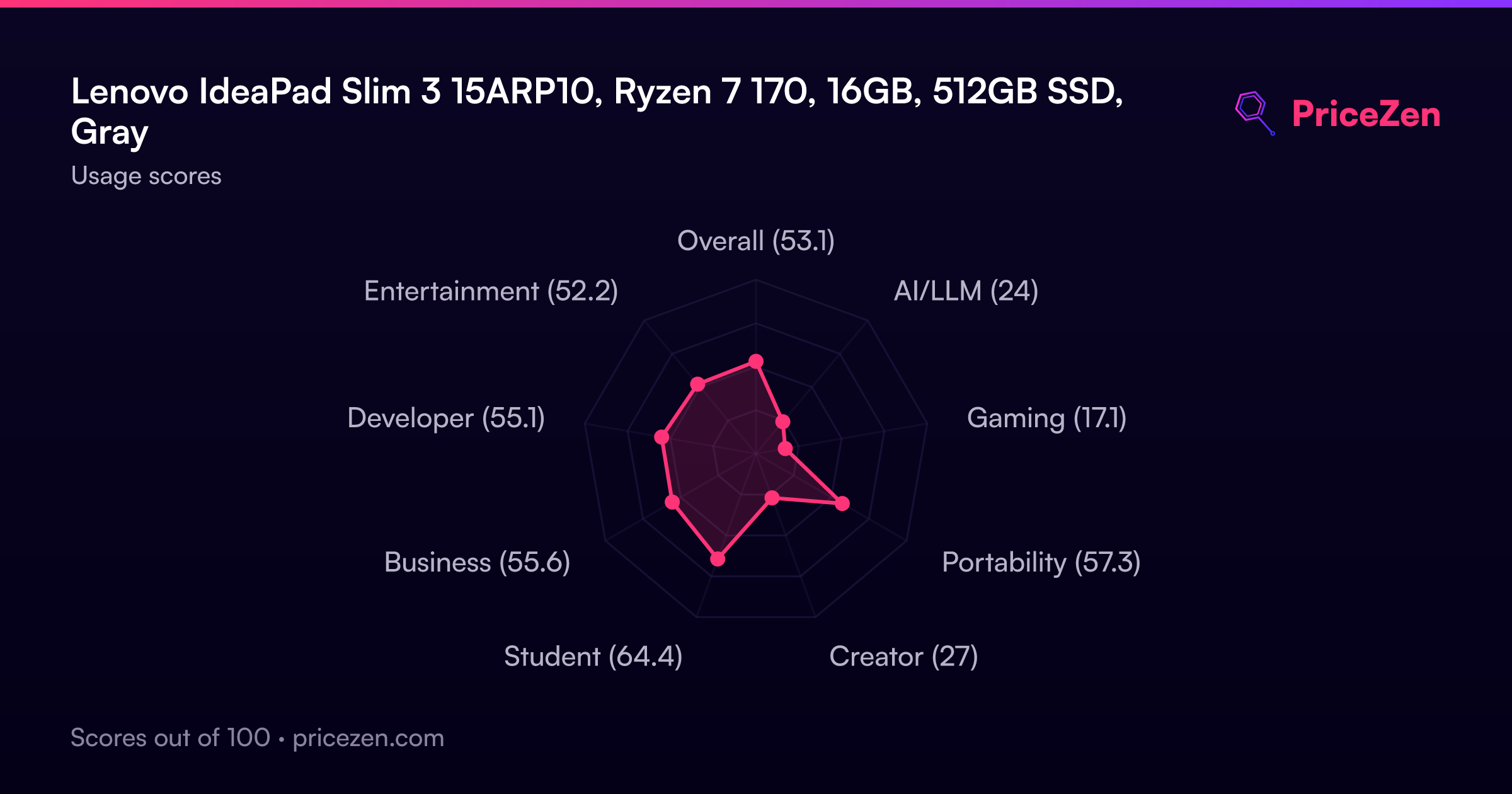
- Overall53.1
- AI/LLM24
- Gaming17.1
- Portability57.3
- Creator27
- Student64.4
- Business55.6
- Developer55.1
- Entertainment52.2