Lenovo ThinkPad X1 Carbon Gen 13 14" 2025, Core Ultra 5 235U, 16GB, 512GB SSD, Black
Weighing just 1.01kg, this laptop combines an Intel Core Ultra 5 235U processor with a 500-nit, 100% sRGB display for portable productivity. Its ultralight chassis doesn't sacrifice connectivity, packing Thunderbolt 4, HDMI 2.1, and USB-A ports alongside a customer-replaceable 57Wh battery. This machine is best for frequent business travelers who need a durable, AI-enhanced Windows 11 Pro device with full port selection and all-day endurance.

अभी किसी विक्रेता की मौजूदा कीमत नहीं है











एक नज़र में
The 30-Second Version
The X1 Carbon Gen 13 is a 1.01kg business ultrabook that nails portability and ports but asks a lot for mid-pack performance. The 500-nit 1920x1200 display and full-size connectivity are the standouts, while the Core Ultra 5 235U and integrated graphics keep it firmly in office-work territory. US prices span USD 1,671 to USD 1,999, with Amazon cheapest by a wide margin. Buy it for travel and typing, skip it for gaming or heavy creative work.
Pros & Cons
खूबियाँ
- 1.01kg, among the lightest 14-inch laptops we track 92nd
- Full port set for a thin chassis: Thunderbolt 4, 2x USB-C, 2x USB-A, HDMI 2.1 82nd
- 500-nit 1920x1200 IPS panel with 100% sRGB coverage 78th
- Customer-replaceable 57Wh battery for a longer service life 75th
- Business security stack: IR webcam with shutter, fingerprint reader, TPM, Windows 11 Pro
कमियाँ
- Poor value ranking, affordability sits in the bottom quarter of the category
- Core Ultra 5 235U is only mid-pack for CPU performance
- Integrated graphics, gaming score of 19.3/100
- 60Hz non-touch display, no high-refresh option on this config
- SSD slot only takes single-sided NVMe drives, limiting upgrade choices
मालिकों की राय
The Word on the Street
मालिकों की राय समय के साथ कैसे बदली
विशेषग्राहकों ने वास्तव में अपनी समीक्षाएँ कब लिखीं, इसके आधार पर - ताकि आप देख सकें कि शुरुआती तारीफ़ टिकी या नहीं।
प्रमाण
Performance
Let's be honest about the silicon. The Core Ultra 5 235U sits around the middle of the pack in our CPU rankings, and the integrated Intel graphics land in roughly the same spot. For the work this thing is aimed at, that's fine: 16GB of LPDDR5X is enough headroom for a heavy browser load alongside Office and a Teams call, and the U-series chip is built to sip power rather than win benchmark drag races. But if your day includes compiling large codebases, exporting video or crunching big datasets, you'll feel the ceiling. Our gaming score for it is 19.3/100, which is about as clear a "don't" as we can give.
The display and storage are where expectations need managing. The 1920x1200 panel is a strong one for office work, 500 nits and 100% sRGB means it's readable near a window and colours are trustworthy for everyday design work, and it ranks above average in our screen scoring. It's also 60Hz and non-touch, so no high-refresh smoothness here. Storage is exactly average in our rankings at 512GB, and there's a real gotcha owners have flagged: the slot only accepts single-sided NVMe drives, so a lot of cheap high-capacity upgrades simply won't fit. The 57Wh battery paired with a low-power CPU is a sensible combination for all-day unplugged work, and Lenovo ships a 65W adapter in the box.
Specifications
Full Specifications
Processor
| CPU | Intel Core Ultra 5 235U |
| Cores | 12 |
| Frequency | 2.0 GHz |
| L3 Cache | 12 MB |
Graphics
| GPU | Intel Graphics |
| Type | Integrated |
Memory & Storage
| RAM | 16 GB |
| RAM Generation | LPDDR5X |
| Storage | 512 GB |
| Storage Type | NVMe SSD |
Display
| Size | 14" |
| Resolution | 1920x1200 (Full HD) |
| Panel | IPS |
| Refresh Rate | 60 Hz |
| Brightness | 500 nits |
| Color Gamut | 100% sRGB |
Connectivity
| USB-C Ports | 2 |
| USB Ports | 2 |
| Thunderbolt | Thunderbolt 4 |
| HDMI | 1 x HDMI |
| Wi-Fi | Wi-Fi 6 |
| Bluetooth | Bluetooth 5.3 |
Physical
| Weight | 1.0 kg / 2.2 lbs |
| Battery | 57 Wh |
| OS | Windows 11 Pro |
vs Competition
The obvious cross-shop is the Samsung Galaxy Book5 Pro 14" NP944XHA-KG3US, another thin-and-light aimed at the same bag-carrying professional. Against it, the X1's argument is the port array (Thunderbolt 4 plus two USB-A and HDMI 2.1 without dongles), the replaceable battery and the Windows 11 Pro security stack. The Dell Premium 14.5" LDA14250-7667SLV-PUS is the other direct rival for the corporate crowd, and again the ThinkPad's pitch is weight and serviceability rather than spec-sheet dominance, since our CPU ranking for this chip is only middling.
Then there are the machines that beat it outright on speed. The Apple MacBook Pro 14.2" M4 Pro is the one to look at if you want serious compute in a similar footprint, and the ASUS ROG Zephyrus 14" GA403WW-G14.R95080 and HP OMEN Transcend 14-fb1023dx are the picks if you want to game after work, something this config's 19.3/100 gaming score rules out. The X1 doesn't try to win those fights. It wins on being the lightest thing in your bag that still has every port you need, and it loses whenever the workload gets heavy.
| Spec | Lenovo ThinkPad X1 Carbon Gen 13 14" | Apple MacBook Pro 14.2" M4 Pro | ASUS ROG Zephyrus 14" GA403WW-G14.R95080 | HP OMEN Transcend | Samsung Galaxy Book5 Pro 14" NP944XHA-KG3US | Dell Premium 14.5" LDA14250-7667SLV-PUS |
|---|---|---|---|---|---|---|
| CPU | Intel Core Ultra 5 235U | Apple M4 Pro | AMD Ryzen AI 9 HX 370 | Intel Core Ultra 9 285H | Intel Core Ultra 7 258V | Intel Core Ultra 7 255H |
| RAM (GB) | 16 | 48 | 32 | 32 | 32 | 32 |
| Storage (GB) | 512 | 4096 | 2048 | 1024 | 1024 | 1024 |
| Screen | 14" 1920x1200 | 14.2" 3024x1964 | 14" 2880x1800 | 14" 2880x1800 | 14" 2880x1800 | 14.5" 3200x2000 |
| GPU | Intel Graphics | Apple (16-Core) | NVIDIA GeForce RTX 5080 | NVIDIA GeForce RTX 5070 | Intel Arc Graphics 140V | Intel Arc Graphics |
| OS | Windows 11 Pro | macOS | Windows 11 Home | Windows 11 Home | Windows 11 Pro | Windows 11 Home |
| Weight (kg) | 1 | 1.6 | 1.6 | 1.6 | 1.2 | 1.7 |
| Battery (Wh) | 57 | 72 | - | 71 | 63 | 62 |
| Compare | Compare | Compare | Compare | Compare |
| उत्पाद | CPU | GPU | RAM | पोर्ट | स्क्रीन | पोर्टेबिलिटी | स्टोरेज | User Sentiment | विश्वसनीयता | Affordability |
|---|---|---|---|---|---|---|---|---|---|---|
| Lenovo ThinkPad X1 Carbon Gen 13 14" | 57.9 | 57 | 65.6 | 77.7 | 75 | 91.5 | 51.1 | 66.6 | 81.9 | 22.7 |
| Apple MacBook Pro 14.2" M4 Pro Compare | 92.4 | 78.9 | 90.6 | 73.8 | 99.1 | 68.9 | 98.4 | 90.8 | 98.2 | 4.7 |
| ASUS ROG Zephyrus 14" GA403WW-G14.R95080 Compare | 91.2 | 98.3 | 90.8 | 89.4 | 96 | 73.6 | 89.7 | 99.1 | 60.6 | 6.2 |
| HP OMEN Transcend Compare | 90.1 | 93.5 | 89.7 | 89.4 | 96 | 72.2 | 65.4 | 81.5 | 33.7 | 9 |
| Samsung Galaxy Book5 Pro 14" NP944XHA-KG3US Compare | 65.8 | 69.7 | 79.5 | 83.5 | 90.3 | 89.4 | 79.3 | 0 | 81.9 | 21.4 |
| Dell Premium 14.5" LDA14250-7667SLV-PUS Compare | 87 | 69.7 | 89 | 66.7 | 96.8 | 61.3 | 65.4 | 90.8 | 33.7 | 14.9 |
कीमत
Value & Pricing
Here's the uncomfortable part. This config ranks in the bottom quarter for affordability in our data, and the US listings run from USD 1,671 to USD 1,999, a USD 328 spread for the same machine. Amazon is cheapest right now at USD 1,671, Newegg sits at USD 1,959 and B&H Photo tops out at USD 1,999. If you're buying in the US, that's a no-brainer: buy from Amazon and pocket the difference. Canadian listings run CAD 2,669 to CAD 2,861, so the spread there is tighter but still worth checking before you click.
What are you paying for? Not benchmark wins. You're paying for 1.01kg, a proper port selection, enterprise security features and a chassis built around long-term service, including that replaceable battery. Some listings bundle 1-Year Lenovo Premier Support, which matters if downtime costs you money. If your priority is frames per second or cores per dollar, this is the wrong shelf entirely. If your priority is a laptop you carry every day for the next several years, the premium starts to make sense, but only at the USD 1,671 end.
और पढ़ें
Overview
The X1 Carbon has been the default "serious business laptop" answer for years, and Gen 13 keeps that going. This particular config is the Aura Edition with an Intel Core Ultra 5 235U (12 cores, 2.0GHz base), 16GB of LPDDR5X, a 512GB NVMe SSD and a 14-inch 1920x1200 IPS panel at 60Hz rated for 500 nits with full sRGB coverage. Windows 11 Pro comes standard, and the whole thing lands at 1.01kg. That weight is the headline: our ranking puts it in the top handful of laptops we track for portability, and owners keep bringing it up as the reason they bought it.
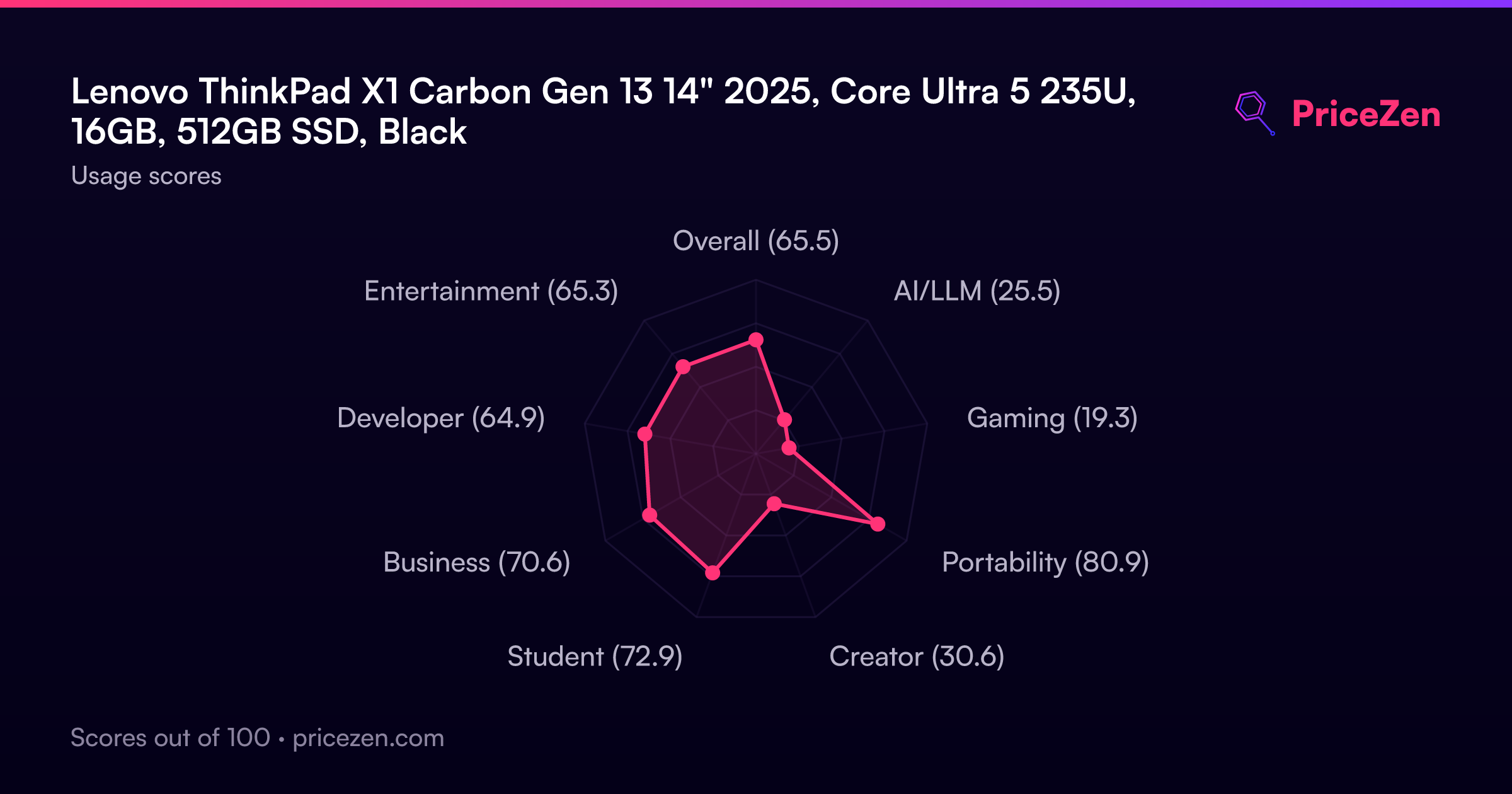
Who's this for? People who carry a laptop more than they push it. Consultants living out of a backpack, students hauling it between lectures, anyone whose workday is email, docs, spreadsheets, browser tabs and video calls. Our category scoring agrees: compact is its strongest use case at 80.9/100, with student (72.4) and business (70.6) close behind. The trade-off is baked into the chip choice. The Ultra 5 235U is a low-power part, so you get efficiency and quiet running rather than raw grunt, and the integrated Intel graphics mean this is not a machine for heavy 3D work.
What makes it interesting is that Lenovo didn't strip the ports to hit that weight. You get Thunderbolt 4, two USB-C, two USB-A, HDMI 2.1 and a headphone jack, which puts it well above average in our port rankings for something this thin. Add a backlit keyboard, an IR webcam with a privacy shutter, a fingerprint reader and TPM, plus a customer-replaceable battery, and it reads like a laptop designed to be kept for years rather than replaced every couple. Owners rate it 4.4/5 across 20 reviews, though that's a small sample and we treat it accordingly.
Common Questions
Q: Can I upgrade the SSD later?
Yes, but with a catch. Owners report the M.2 slot only accepts single-sided NVMe drives, so many high-capacity consumer SSDs won't physically fit. Check the drive's construction before buying an upgrade, and note the 16GB of LPDDR5X memory is soldered, so RAM is fixed at purchase.
Q: Is this good enough for gaming or video editing?
Not really. Our gaming score for it is 19.3/100, and the integrated Intel graphics plus mid-pack Core Ultra 5 235U are built for efficiency, not sustained heavy loads. Light photo work and casual titles are fine, but for editing or gaming you'd want one of the GPU-equipped 14-inch rivals instead.
Q: How bright is the screen, and is it touch?
This config is a non-touch 14-inch 1920x1200 IPS panel rated at 500 nits with 100% sRGB coverage, which puts it above average in our screen rankings and makes it usable outdoors or near windows. It runs at 60Hz, so don't expect high-refresh scrolling.
Q: Does it really weigh just over a kilo?
Yes, the spec sheet lists 1.01kg (about 2.22 lb), and it's one of the lightest machines in our entire laptop dataset. That portability is the main reason to pay the premium here, and it's the trait owners mention most.
Who Should Skip This
Gamers, video editors and anyone running heavy compiles should walk past this one. The integrated graphics and 19.3/100 gaming score tell the story, and the ASUS ROG Zephyrus 14" or HP OMEN Transcend 14-fb1023dx exist precisely for that crowd. Same goes if you want a high-refresh or touch display, since this panel is neither.
Budget-conscious students should also pause. The affordability ranking is a genuine weak spot, and at USD 1,671 even the cheapest listing asks you to pay for vPro, TPM and Premier Support options that coursework doesn't require. And if you're a Mac person eyeing the MacBook Pro 14.2" M4 Pro for its compute, nothing in this config's mid-pack CPU ranking will talk you out of it.
Verdict
If you live in airports, lecture halls or client offices, buy it. The 1.01kg weight, 500-nit screen, full-size ports and business-grade security add up to a genuinely good travel machine, and our compact score of 80.9/100 backs that up. Owner sentiment is solidly positive at 4.4/5, with the light weight and display quality coming up again and again. Just buy it from Amazon at USD 1,671 rather than paying USD 1,999 elsewhere for identical hardware.
If you're a power user, hold off. The mid-pack CPU and integrated graphics mean this config will bottleneck creative and development workloads, and the 60Hz panel won't excite anyone chasing smoothness. Students on a budget should also think hard: the affordability ranking is a weak spot, and you're paying a business-tax for features like vPro and TPM that a coursework laptop doesn't need. For everyone else, this is a well-built, slightly overpriced tool that does its narrow job very well.
Usage Scores
- कुल65.5
- AI/LLM25.5
- गेमिंग19.3
- पोर्टेबिलिटी80.9
- क्रिएटर30.6
- छात्र72.9
- बिज़नेस70.6
- डेवलपर64.9
- मनोरंजन65.3