ASUS Eye Care Monitor VY27UQ 27" Black 2024

Fine text and photos at 27 inches verified Nov 29
65/100 overall score 4.2 average from 44 owner ratings
- Screen
- 27"
- Resolution
- 3840 x 2160
- Panel
- IPS
- Refresh
- 60 Hz
- Response time
- 5 ms
- Adaptive sync
- Adaptive-Sync
- HDR
- HDR10
Compare prices at 1 store
Cheapest first. New, refurbished and bundled offers are kept apart, so you compare like with like.
| Store | Sold by | Colour and condition | Price | vs lowest | Last checked | Link |
|---|---|---|---|---|---|---|
| New1 offerSingle unit | ||||||
| Not checked in the last 7 days, so these prices may have changed | ||||||
| Amazon | Marketplace seller | Not listed | ₹57,309.00 | Nov 2 | Go to store | |
 Source: PriceZen, checked Nov 2, 2026
A price counts as current when we checked it in the last 7 days. “Marketplace seller” means a third-party seller on that store, not the store itself.
Price history
Checked that dayNot checked that day, still on offer
Source: PriceZen, checked Nov 2, 2026











Snapshot
The 30-Second Version
The ASUS VY27UQ is a 27-inch 4K IPS monitor with excellent color accuracy and genuinely useful eye comfort features. It's not for gamers, 60Hz and 5ms response time see to that. But for productivity and creative work at the right price, it's a comfortable, sharp upgrade.
Pros & Cons
Pros
- Sharp 4K IPS panel with 99% sRGB and 10-bit color 88th
- Eye Care Plus features are genuinely useful for long sessions 87th
- Adaptive-Sync keeps things smooth at 60Hz 70th
- Antibacterial bezel treatment is a nice touch for shared desks
Cons
- 60Hz refresh rate feels dated if you've used anything faster
- Stand only tilts, no height or swivel adjustment
- HDR10 support is more marketing than meaningful
- Built-in 2W speakers are basically a formality
The proof
Performance
The display and color scores both land in the 90th percentile, and that's where this monitor earns its keep. 350 nits of brightness is fine for most indoor rooms, and 99% sRGB with 10-bit color means photos and videos look accurate without calibration gymnastics. HDR10 is here, but don't expect OLED-level punch. It's more of a checkbox than a revelation. The 60Hz refresh rate and 5ms response time put performance in the 37th percentile, which is fine for documents and casual video but will feel sluggish if you're used to a 144Hz panel. Adaptive-Sync helps smooth things out, but this isn't built for fast-twitch gaming.
Specifications
Full Specifications
Display
| Size | 27" |
| Resolution | 3840x2160 (4K UHD) |
| Panel Type | IPS |
| Aspect Ratio | 16:9 |
| Curved | No |
| Screen Finish | matte |
Performance
| Refresh Rate | 60 Hz |
| Response Time | 5 |
| Adaptive Sync | Adaptive-Sync |
Color & HDR
| Brightness | 350 nits |
| Color Gamut | 99% sRGB |
| Color Depth | 10-bit |
| HDR | HDR10 |
| HDR Support | HDR10 |
Connectivity
| HDMI Ports | 2 |
| DisplayPort | 1 |
| Speakers | Yes |
| Headphone Jack | Yes |
Ergonomics
| Height Adjustable | No |
| Tilt | Yes |
| Swivel | No |
| Pivot | No |
| VESA Mount | 100x100 |
Features
| Touchscreen | No |
| PIP/PBP | No |
| Power | 23 |
| Weight | 5.1 kg / 11.2 lbs |
vs Competition
Stacked against the MSI MAG 271QPX QD-OLED E2, LG UltraGear 27GX790A-B, Samsung Odyssey OLED G6 G60SF, and Alienware AW2725D, the VY27UQ is playing a different game entirely. Those are high-refresh gaming monitors with OLED panels and price tags to match. The VY27UQ beats them on price and eye comfort features, but loses badly on speed and HDR quality. The Dell S2725QC is the closest real competitor here, another 27-inch 4K IPS productivity monitor. The ASUS edges it out on color accuracy and the Eye Care Plus extras, while the Dell often wins on connectivity and stand ergonomics. If you need 4K for work and don't care about 144Hz, the VY27UQ is the more comfortable choice.
| Spec | ASUS Eye Care Monitor VY27UQ 27" | LG UltraGear 39" | BenQ PD3220U 32" | Samsung Odyssey Ark 2nd Gen 55" | Gigabyte M Series M32U 31.5" | Dell UltraSharp U4320Q 27" |
|---|---|---|---|---|---|---|
| Screen Size | 27 | 39 | 32 | 55 | 31.5 | 27 |
| Resolution | 3840 x 2160 | 3440 x 1440 | 3840 x 2160 | 3840 x 2160 | 3840 x 2160 | 3840 x 2160 |
| Panel Type | IPS | OLED | IPS | Mini-LED | IPS | IPS |
| Refresh Rate | 60 | 240 | 60 | 165 | 144 | 60 |
| Response Time Ms | 5 | 0.03 | 5 | 1 | 1 | 5 |
| Adaptive Sync | Adaptive-Sync | FreeSync Premium Pro | - | FreeSync Premium Pro | FreeSync Premium Pro | - |
| Hdr | HDR10 | DisplayHDR True Black 400 | HDR10 | HDR10+ | HDR400 | HDR400 |
| Compare | Compare | Compare | Compare | Compare |
| Product | Color | Portability | Display | Feature | Ergonomic | Performance | Connectivity | Social Proof |
|---|---|---|---|---|---|---|---|---|
| ASUS Eye Care Monitor VY27UQ 27" | 88.2 | 43.3 | 87 | 70.1 | 47.1 | 35.7 | 62.1 | 46.8 |
| LG UltraGear 39" Compare | 63.3 | 49.3 | 84.1 | 96.3 | 66.8 | 97.9 | 81 | 0 |
| BenQ PD3220U 32" Compare | 88.5 | 81.3 | 95.1 | 85 | 90.7 | 22.3 | 96.9 | 0 |
| Samsung Odyssey Ark 2nd Gen 55" Compare | 98.4 | 20.7 | 91.5 | 96.3 | 29.9 | 77.1 | 81 | 75.1 |
| Gigabyte M Series M32U 31.5" Compare | 89.9 | 62.8 | 87 | 85 | 73.4 | 72.6 | 87.4 | 0 |
| Dell UltraSharp U4320Q 27" Compare | 91 | 82.7 | 87 | 85 | 90.7 | 22.3 | 96.9 | 0 |
Price
Value & Pricing
Pricing is all over the place depending on where you shop. In the US, you'll see it listed anywhere from USD 209 to USD 262 across six listings, and that USD 53 spread means it pays to shop around. The best US deal we found is at the lower end of that range, so don't just grab the first listing you see. In Europe, the gap is even wider, EUR 208 to EUR 306 across four countries, so a little patience can save you nearly EUR 100. At the low end, this is a lot of 4K IPS monitor for the money. At the high end, you're creeping into territory where faster panels start to look tempting.
Read more
Overview
The ASUS VY27UQ is a 27-inch 4K IPS monitor aimed at people who stare at screens all day and want their eyes to hate them a little less. You get a sharp 3840 x 2160 panel, 99% sRGB coverage, HDR10 support, and a bunch of Eye Care Plus features like a blue light filter, flicker-free backlight, and even a color augmentation mode for folks with color vision deficiency. It's not a gaming monitor, and it doesn't pretend to be. This is a workhorse for spreadsheets, photo editing, and long reading sessions.
At 60Hz with a 5ms response time, it's firmly in productivity territory. The stand only tilts, so you'll want a VESA arm if you're picky about height. But for the price, especially with that 4K IPS panel, it's a solid desk upgrade for anyone coming from 1080p.
Common Questions
Q: Is this monitor good for gaming?
It's fine for casual or story-driven games thanks to the 4K resolution and Adaptive-Sync, but the 60Hz refresh rate and 5ms response time will hold you back in fast-paced shooters or competitive titles.
Q: Does the stand adjust for height?
No, the included stand only tilts. If you need height or swivel adjustment, you'll want to mount it on a VESA 100x100 arm or pick up a third-party stand.
Q: How accurate is the color out of the box?
With 99% sRGB coverage and 10-bit color support, it's quite good for a monitor in this price range. Most people won't need to calibrate it for everyday photo editing or design work.
Who Should Skip This
Skip this if you're a competitive gamer or anyone who's already used to a 120Hz or higher refresh rate. Going back to 60Hz feels like wading through mud once you've seen smoother motion. Also skip it if you need a monitor with a fully adjustable stand out of the box, because tilt-only ergonomics get old fast.
Verdict
Buy this if you want a sharp, color-accurate 4K monitor for work, photo editing, or general use, and you don't want to spend a fortune. The Eye Care Plus features are legitimately helpful if you're at your desk for eight hours a day. Just know that 60Hz is the ceiling, and the stand is basic. Pair it with a VESA arm and you've got a clean, comfortable setup.
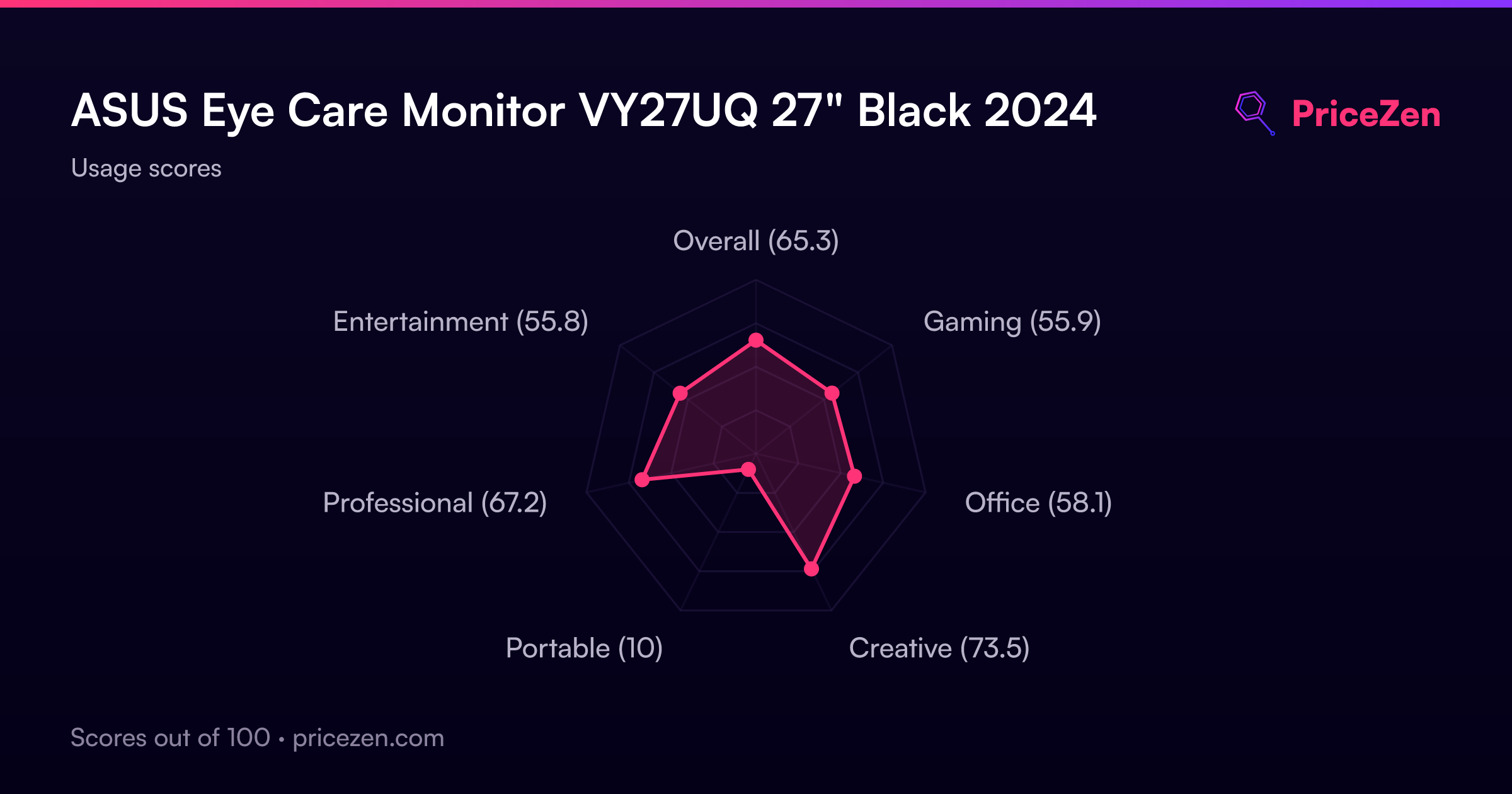
Usage Scores
- Overall65.3
- Gaming55.9
- Office58.1
- Creative73.5
- Portable10
- Professional67.2
- Entertainment55.8