LG UM340E 50UM340E0UZ 50"
Designed for 24/7 operation, this 50-inch 4K display provides a commercial-grade panel with a slim bezel and 250 nits of brightness for clear signage and presentations. Its standout value lies in centralized remote management via LG ConnectedCare DMS and the included bundle of surge protector, HDMI, and ethernet cables for immediate deployment. This TV is best for IT administrators needing a reliable, network-controlled display for classrooms, retail, or corporate communication across multiple rooms.

No current retailer price


Snapshot
The 30-Second Version
The LG UM340E is a 50-inch 4K commercial TV that struggles at both signage and entertainment. Its dim 250-nit panel and broken software make it a poor choice for almost any use case. Unless you find it for under $300 and only need a basic static display, you're better off with a budget TV from TCL or Roku.
Pros & Cons
Pros
- Large 50-inch 4K screen for a low entry price 79th
- Android 11 OS with access to the Play Store
- USB playback for images and video works reliably
- Built-in digital signage features for commercial use
- Three HDMI ports and Ethernet for flexible setup
Cons
- Extremely dim 250-nit panel, poor for bright rooms
- No scheduled power on/off, a basic signage need
- LG's management software is reportedly inaccessible
- Cannot be mounted vertically, limiting install options
- Third-party apps often fail to work correctly
What owners think
The Word on the Street
How owner sentiment changed over time
ExclusiveBased on when customers actually wrote their reviews - so you can see whether early praise held up.
3 written reviews, Mar – Sep 2025: 1 happy, 1 unhappy, 1 without stars
Across all 3 store ratings: 4.0★. The chart counts the 3 written reviews.
Each dot is one written review, in the month it was written. Happy = 4-5★, mixed = 3★, unhappy = 1-2★.
The proof
Performance
Picture quality is the biggest letdown here. At 250 nits, this panel is dim, sitting in the 2nd percentile for picture quality. That means it's one of the worst we've seen. In a room with any ambient light, the image looks washed out. The 68% NTSC color coverage is mediocre, so colors won't pop the way they do on even a budget TCL or Hisense. The 5000:1 contrast ratio from the VA panel is about average and helps a bit in dark scenes, but the low brightness cancels out most of that benefit. This is a display built for static signage in controlled lighting, not for watching movies, where it scores a dismal 19.7 out of 100.
For gaming, the 60Hz refresh rate and lack of any VRR or gaming features put it in the 19th percentile. Input lag isn't officially listed, but don't expect a responsive experience. The built-in 2.0 channel, 20W speakers are underwhelming too, landing in the 39th percentile. They'll get loud enough for a waiting room, but dialogue can sound thin and there's no bass to speak of. Connectivity is solid with three HDMI ports, USB, Wi-Fi, Bluetooth, and Ethernet, which is about average for this class.
Specifications
Full Specifications
Display
| Size | 50" |
| Resolution | 4K |
| Panel Type | LED |
| Backlight | Direct LED |
| Aspect Ratio | 16:9 |
| Curved | No |
| Screen Finish | glossy |
Picture Quality
| Brightness | 250 nits |
| Contrast Ratio | 5000:1 |
| Color Gamut | 68% NTSC |
HDR
| HDR Formats | None |
| Dolby Vision | No |
| HDR10+ | No |
| HLG | No |
Gaming
| Refresh Rate | 60 Hz |
| ALLM | No |
| Game Mode | No |
Smart TV
| Platform | Android TV |
| Screen Mirroring | Wi-Fi / Bluetooth |
Audio
| Speaker Config | 2 |
| Wattage | 20 |
| Dolby Atmos | No |
| eARC | No |
Connectivity
| HDMI Ports | 3 |
| USB Ports | 1 |
| Wi-Fi | ✓ |
| Bluetooth | Yes |
| Ethernet | Yes |
| Optical Audio | No |
| VESA Mount | 200x200 |
Power & Size
| Power | 100 |
| Energy Star | Yes |
| Annual Energy | 183 |
| Weight | 12.2 kg / 26.9 lbs |
vs Competition
Stacked against the TCL QM6K Series, the LG UM340E looks ancient. The TCL offers quantum dot color, mini-LED backlighting, and a peak brightness that's several times higher, all for a price that's not much more than the LG's typical street price. The Hisense U8 Series is in another league entirely, with 1500+ nits and full HDR support, while the LG sits in the 14th percentile for HDR. Even the Roku Plus Series, a budget-friendly option, delivers a brighter panel and a far smoother smart TV experience. The Sony BRAVIA 5 would be overkill to compare, but it highlights how far behind this LG is. The only reason to pick the UM340E over any of these is if you find it at a fire-sale price and only need a dumb display for a single static image.
| Spec | LG UM340E 50UM340E0UZ 50" | Sony BRAVIA 9 K85XR90 85" | Hisense U7 Series 65U75QG 64.5" | TCL QM8K Series 75QM8K 75" | Samsung The Frame Pro LS03HW 55" | Roku Plus Series 65R6C7 65" |
|---|---|---|---|---|---|---|
| Screen Size | 50 | 85 | 64.5 | 75 | 55 | 65 |
| Resolution | 3840x2160 | 3840x2160 | 3840x2160 | 3840x2160 | 3840x2160 | 3840x2160 |
| Panel Type | LED | Mini-LED | Mini-LED | Mini-LED | QD-Mini-LED | Mini-LED |
| Refresh Rate | 60 | 120 | 165 | 144 | 144 | 60 |
| Hdr | None | HDR10, HLG, Dolby Vision | Dolby Vision, HDR 10+, HDR 10, Hybrid Log-Gamma (HLG) | Dolby Vision, HDR 10, HDR 10+, Hybrid Log-Gamma (HLG) | HDR10+, HLG | Dolby Vision, HDR 10+, Hybrid Log-Gamma (HLG) |
| Smart Platform | Android TV | Google TV | Google TV | Google TV | Tizen | Roku TV |
| Dolby Vision | false | true | true | true | false | true |
| Dolby Atmos | false | true | true | true | true | true |
| Hdmi Version | - | 2.1 | 2.1 | 2.1 | 2.1 | 2.1 |
| Compare | Compare | Compare | Compare | Compare |
| Product | HDR | Audio | Smart | Gaming | Display | User Sentiment | Connectivity | Social Proof | Affordability | Picture Quality |
|---|---|---|---|---|---|---|---|---|---|---|
| LG UM340E 50UM340E0UZ 50" | 11.5 | 28.5 | 16.8 | 15.9 | 59.5 | 1.7 | 42.3 | 30 | 79.1 | 3.1 |
| Sony BRAVIA 9 K85XR90 85" Compare | 83.5 | 96.9 | 89 | 76.1 | 95 | 74.1 | 91.3 | 85.6 | 12.5 | 74.8 |
| Hisense U7 Series 65U75QG 64.5" Compare | 88.6 | 94.4 | 93.4 | 94.2 | 76.3 | 95 | 95.9 | 85.6 | 57.6 | 97 |
| TCL QM8K Series 75QM8K 75" Compare | 88.6 | 94.4 | 98.4 | 91.9 | 88.8 | 84.5 | 91.3 | 85.6 | 33.8 | 99.3 |
| Samsung The Frame Pro LS03HW 55" Compare | 78.8 | 90 | 78.1 | 91.9 | 81.6 | 0 | 99.7 | 93 | 37 | 74.8 |
| Roku Plus Series 65R6C7 65" Compare | 71 | 80.2 | 99.5 | 57.9 | 82.6 | 63.7 | 86.2 | 93 | 57.2 | 74.8 |
Price
Value & Pricing
Value is hard to judge when the price swings from $285 to over $20,000. At the low end, you're getting a 50-inch 4K Android TV for less than a decent computer monitor. But the headaches might not be worth the savings. For a few hundred more, a TCL QM6K or Roku Plus Series TV will give you a massively better picture, actual smart features that work, and none of the commercial signage baggage. If you absolutely need a dirt-cheap 50-inch display for a back office or a menu board that never changes, and you can snag it for under $300, it's a passable deal. Otherwise, skip it.
Read more
Overview
The LG UM340E 50UM340E0UZ is a 50-inch 4K display that sits in a weird spot. It's technically a commercial digital signage TV, not a regular living room set, though you'll find it listed alongside consumer TVs at retailers like Newegg. The spec sheet reads like a budget monitor stretched to TV size: a 4K VA panel, 250 nits of brightness, and a 5000:1 contrast ratio. It runs Android 11, which sounds promising, but the execution is where things get messy. If you're searching for a cheap 50-inch 4K TV for your conference room or a simple lobby display, this might catch your eye. Just know what you're getting into before you click buy.
Pricing is all over the place for this model, ranging from around $285 to over $20,000 depending on the vendor, which is frankly absurd. The lower end of that range is where this thing makes any sense at all. At $285, you're getting a big 4K screen with built-in smarts and a tuner. But the user experience and missing features tell a different story. This isn't a TV you'd want to use for movie nights or gaming, and the software headaches make it a tough sell even for basic signage.
We dug into the specs, benchmarks, and what few user reviews exist, and the picture isn't pretty. The LG UM340E scores a 32.7 out of 100 in our database, landing it near the bottom of the pack. It's built for a very specific, low-demand use case, and if you stray outside that lane, you'll hit a wall fast.
Common Questions
Q: Is the LG UM340E good for digital signage?
It's designed for digital signage but falls short in practice. It lacks scheduled power on/off and vertical mounting support, and the management software is reportedly inaccessible, making it frustrating for commercial use.
Q: Can I use the LG 50UM340E0UZ as a regular TV?
You can, but it's not a good experience. The 250-nit screen is very dim, the smart features are buggy, and picture quality scores in the 2nd percentile, so movies and shows will look washed out.
Q: Does the LG UM340E support vertical mounting?
No, users report that this model cannot be mounted vertically, which limits installation options for portrait-oriented signage.
Q: What is the brightness of the LG 50UM340E?
The LG 50UM340E has a brightness of 250 nits, which is very low and makes it unsuitable for rooms with ambient light.
Who Should Skip This
Skip this if you want a TV for movies, gaming, or any room with windows. The dim panel and poor picture quality will disappoint. Also skip it if you need reliable digital signage with scheduling or vertical mounting, it can't do either well. Instead, grab a TCL QM6K for a great all-around TV, or look at dedicated signage displays from Samsung or NEC if you need commercial features that actually work.
Verdict
No, you probably shouldn't buy the LG UM340E. It's a commercial display that fails at basic commercial tasks like scheduled power control and vertical mounting, and it's a terrible TV for anything else. The dim panel, broken software experience, and missing features make it frustrating to use. If you need a cheap digital signage screen and can live with its limitations, maybe, but only if the price is rock bottom. For everyone else, even a budget consumer TV will run circles around this thing. Spend a little more and get something that won't make you want to throw the remote through the screen.
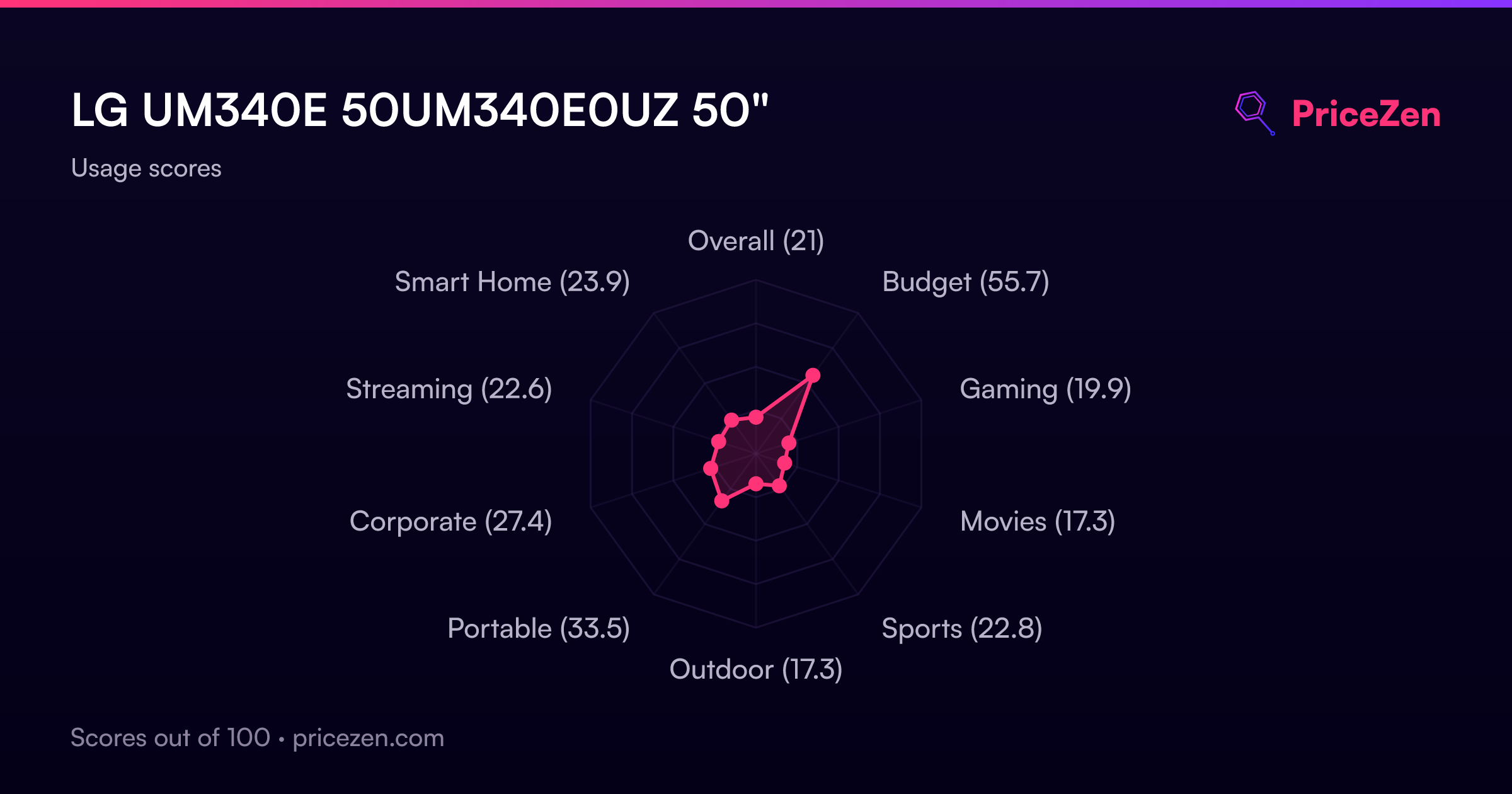
Usage Scores
- Overall21
- Budget55.7
- Gaming19.9
- Movies17.3
- Sports22.8
- Outdoor17.3
- Portable33.5
- Corporate27.4
- Streaming22.6
- Smart Home23.9