LG UltraFine 27UP850N-W.AUS 27" White 2022
The 27-inch IPS UHD panel delivers 3840 x 2160 resolution with 95% DCI-P3 color coverage and 400 nits brightness, plus AMD FreeSync for tear-free gaming. USB-C with 90W power delivery charges devices while transmitting 4K video, and the stand offers height, tilt, and pivot adjustments. Best for professionals and office workers who need accurate 4K color and single-cable connectivity for daily productivity and light creative work.

No current retailer price
Where we saw it before. Check the store for today's price.











Snapshot
The 30-Second Version
The LG UltraFine 27UP850N-W is a color-accurate 4K workhorse with a killer USB-C port that charges your laptop at 90W. Color and display quality rank in the 89th percentile, but performance sits at a mediocre 36th. Worth buying for productivity and creative work, not for gaming.
Pros & Cons
Pros
- Excellent color accuracy with 95% DCI-P3 and strong brightness 88th
- USB-C with 90W power delivery means one cable for everything 87th
- Fully adjustable stand with height, tilt, and pivot 86th
- PIP/PBP lets you run two sources side by side 85th
Cons
- 60Hz refresh rate feels sluggish for gaming
- Only 36th percentile for performance in our database
- Built-in speakers are serviceable but nothing special
- IPS glow is present, especially in dark scenes
What owners think
The Word on the Street
How owner sentiment changed over time
ExclusiveBased on when customers actually wrote their reviews - so you can see whether early praise held up.
12 written reviews, Jul 2021 – Feb 2026: 10 happy, 1 mixed, 1 unhappy
Across all 516 store ratings: 4.3★. Most owners rate without writing a review. The chart counts the 12 written reviews.
Each dot is one written review, in the month it was written. Happy = 4-5★, mixed = 3★, unhappy = 1-2★.
The proof
Performance
The panel itself is the star here. 400 nits of brightness, 95% DCI-P3 coverage, and a 1200:1 typical contrast ratio mean colors look rich and text stays sharp. The 4K resolution on a 27-inch screen gives you a pixel density that makes everything feel crisp. But the 60Hz refresh rate and 5ms response time are where this monitor shows its age. FreeSync helps smooth things out a bit, and Dynamic Action Sync reduces input lag, but this is a productivity display that can occasionally play games, not the other way around. The 44W power draw is also nice and efficient for an always-on office monitor.
Specifications
Full Specifications
Display
| Size | 27" |
| Resolution | 3840x2160 (4K UHD) |
| Panel Type | IPS |
| Aspect Ratio | 16:9 |
| Curved | No |
| Screen Finish | matte |
Performance
| Refresh Rate | 60 Hz |
| Response Time | 5 |
| Adaptive Sync | FreeSync |
Color & HDR
| Brightness | 400 nits |
| Color Gamut | 95% DCI-P3 |
| HDR | HDR400 |
| HDR Support | HDR400 |
Connectivity
| HDMI Ports | 2 |
| DisplayPort | 1 |
| USB-C | 1 |
| Speakers | Yes |
| Headphone Jack | Yes |
Ergonomics
| Height Adjustable | Yes |
| Tilt | Yes |
| Swivel | No |
| Pivot | Yes |
| VESA Mount | 100x100 |
Features
| Webcam | No |
| Touchscreen | No |
| PIP/PBP | Yes |
| Power | 44 |
| Weight | 5.9 kg / 13.0 lbs |
vs Competition
Stacked against the ASUS ROG Strix XG27UCDMG or the MSI MAG 271QPX QD-OLED E2, the LG gets absolutely smoked on refresh rate and response time. Those are 144Hz-plus gaming panels with OLED contrast. But they also cost significantly more and don't target the same buyer. The Alienware AW3425DW is an ultrawide, so it's a different form factor entirely. Where the LG wins is color accuracy per dollar and that 90W USB-C port, which most gaming monitors skimp on. The Gigabyte MO27U2 is probably the closest competitor, but again, it's a gaming-first panel. If you need one monitor for work and occasional casual gaming, the LG makes more sense than any of those.
| Spec | LG UltraFine 27UP850N-W.AUS 27" | Dell UltraSharp U4025QW 39.7" | Samsung Odyssey G80SH 32" | ASUS ROG Swift PG27UCDM 26.5" | MSI MPG 322URX QD-OLED 32" | Apple Studio Display XDR 27" |
|---|---|---|---|---|---|---|
| Screen Size | 27 | 39.7 | 32 | 26.5 | 32 | 27 |
| Resolution | 3840 x 2160 | 5120 x 2160 | 3840 x 2160 | 3840 x 2160 | 3840 x 2160 | 5120 x 2880 |
| Panel Type | IPS | IPS | QD-OLED | QD-OLED | QD-OLED | Mini-LED |
| Refresh Rate | 60 | 120 | 240 | 240 | 240 | 120 |
| Response Time Ms | 5 | 5 | 0.03 | 0.03 | 0.03 | - |
| Adaptive Sync | FreeSync | Adaptive-Sync | FreeSync Premium Pro | FreeSync Premium Pro | G-Sync Compatible | Adaptive-Sync |
| Hdr | HDR400 | HDR600 | HDR10+ | HDR10 | DisplayHDR True Black 400 | HDR |
| Compare | Compare | Compare | Compare | Compare |
| Product | Color | Portability | Display | Feature | Ergonomic | Performance | Connectivity | Social Proof |
|---|---|---|---|---|---|---|---|---|
| LG UltraFine 27UP850N-W.AUS 27" | 86.4 | 71.2 | 87 | 85 | 78.6 | 35.7 | 87.5 | 67.1 |
| Dell UltraSharp U4025QW 39.7" Compare | 97.9 | 76.5 | 98.6 | 96.3 | 90.8 | 56.1 | 99.3 | 96.8 |
| Samsung Odyssey G80SH 32" Compare | 94.4 | 49.4 | 99 | 70.1 | 90.8 | 97.9 | 81.1 | 96.8 |
| ASUS ROG Swift PG27UCDM 26.5" Compare | 97.1 | 57.4 | 97.1 | 85 | 90.8 | 97.9 | 81.1 | 67.1 |
| MSI MPG 322URX QD-OLED 32" Compare | 80 | 49.4 | 99 | 85 | 90.8 | 97.9 | 81.1 | 74.8 |
| Apple Studio Display XDR 27" Compare | 99.8 | 81.3 | 99.3 | 94.4 | 66.9 | 56.1 | 89.9 | 45.1 |
Price
Value & Pricing
At $398 USD, this monitor sits in a sweet spot for a color-accurate 4K panel with USB-C. You're not paying OLED money, but you're getting better color than most budget 4K displays. The CAD price of around $650 is less exciting, but that's the Canada tax for you. For a MacBook user who wants a single-cable docking solution and a sharp, color-true display, this is a solid deal. Just don't expect gaming monitor performance at this price.
Price history
Read more
Overview
The LG UltraFine 27UP850N-W is a 27-inch 4K IPS panel aimed squarely at people who want accurate color and a clean desk setup. It's not a gaming monitor, despite the FreeSync badge. It's a workhorse display with a USB-C port that pushes 90W of power, so one cable handles video, data, and laptop charging. That's the whole pitch, and for the right buyer, it lands.
Our database puts its color and display quality in the 89th percentile, which is genuinely impressive for this price bracket. The catch is performance. At 60Hz with a 36th percentile ranking, this thing is not built for fast-paced gaming. If you're editing photos, writing code, or staring at spreadsheets all day, you'll love it. If you're trying to hit 144Hz in Valorant, keep scrolling.
Common Questions
Q: Can this monitor charge my MacBook while connected?
Yes. The USB-C port delivers 90W of power, which is enough to charge most 13-inch and 14-inch MacBook Pro models at full speed while also handling video and data over the same cable.
Q: Is this monitor good for gaming?
It's fine for casual gaming. The 60Hz refresh rate and 5ms response time are not competitive by modern standards, but FreeSync helps reduce screen tearing and Dynamic Action Sync lowers input lag for a smoother experience than a standard 60Hz office monitor.
Q: Does the stand support portrait mode?
Yes. The stand includes height adjustment, tilt, and pivot, so you can rotate the display 90 degrees for portrait orientation. It also has a standard VESA 100x100 mount if you'd rather use a monitor arm.
Who Should Skip This
Competitive gamers should look elsewhere. If you need 144Hz or higher refresh rates for shooters or fast-paced esports titles, this monitor will feel like wading through molasses. The 60Hz cap and 36th percentile performance ranking mean you're leaving a lot on the table. Grab an ASUS ROG Strix or MSI QD-OLED instead. Also skip it if you're on a tight budget and don't need USB-C, since you can find cheaper 4K panels without the docking features.
Verdict
Buy this if you're a MacBook owner, a creative professional, or anyone who spends eight hours a day in front of a screen and wants accurate colors without breaking the bank. The USB-C single-cable setup is genuinely life-changing if you've been juggling dongles. Skip it if you're a gamer first, or if you need high refresh rates for anything competitive. This is a productivity tool that happens to have FreeSync, not a gaming monitor that happens to be good at work.
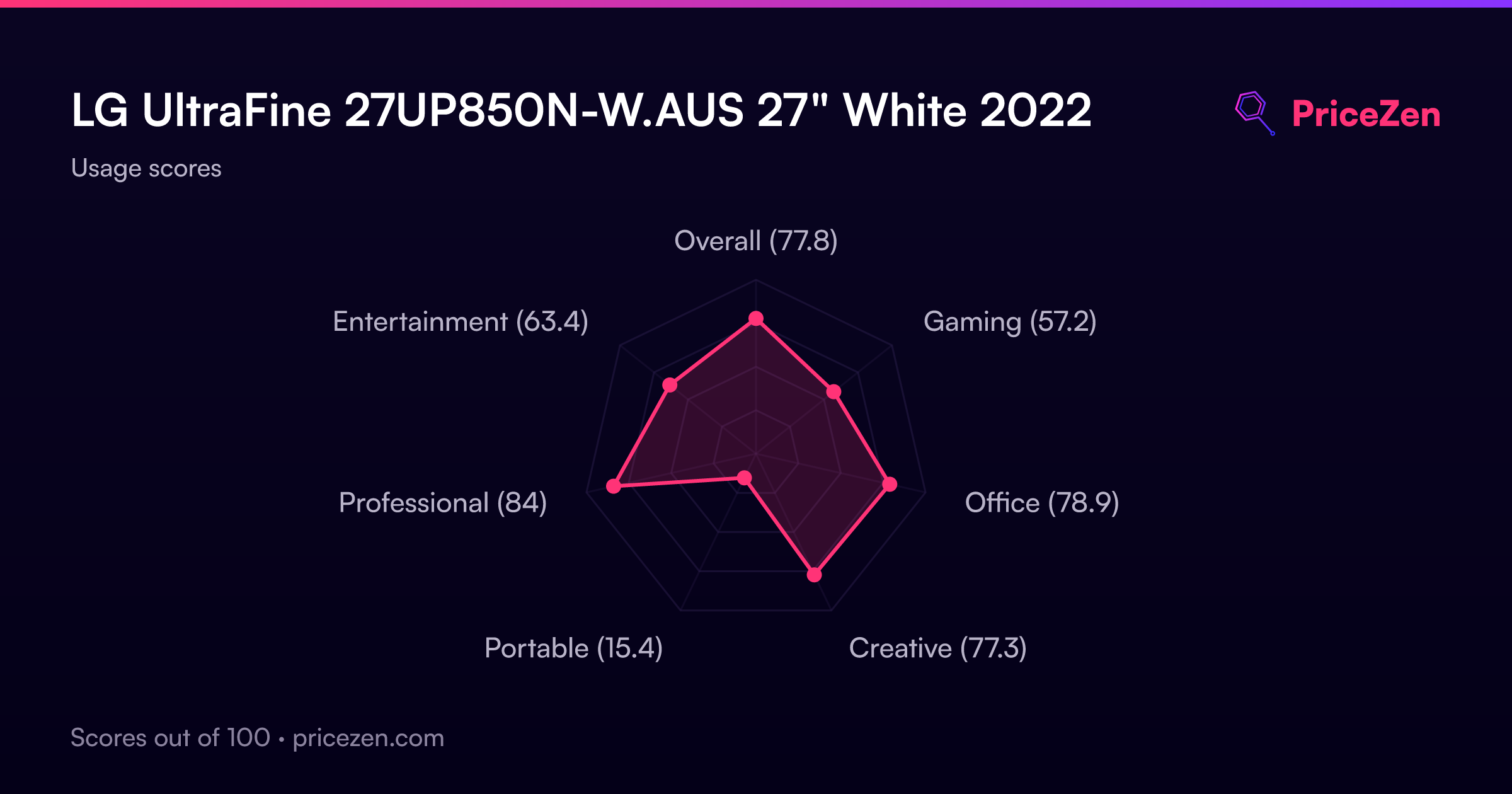
Usage Scores
- Overall75.4
- Gaming55.8
- Office76.4
- Creative73.7
- Portable14
- Professional80.6
- Entertainment61.6