MSI PRO DP180 14ANVP-1019US, Core i5-14400F, 16GB, 1TB SSD, RTX 5070, Black

2.5 Gb Ethernet for fast local transfers verified Nov 28
67/100 overall score
- CPU
- Intel Core i5-14400F
- RAM
- 16 GB
- Storage
- 1 TB
- GPU
- NVIDIA GeForce RTX 5070
- Form factor
- mid-tower
- Psu
- 500 W
- OS
- Windows 11 Home
Snapshot
The 30-Second Version
An office-looking tower with a genuinely fast RTX 5070 inside, scoring near the top on graphics but only 67.4 overall. The reliability ranking is the catch. Worth buying at Newegg's USD 1,767, not at USD 2,099.
Pros & Cons
Pros
- RTX 5070 12GB is a standout GPU at this price. 91st
- Port selection is well above average, with seven USB-A plus USB-C and Wi-Fi 6E. 79th
- 1TB NVMe SSD and Windows 11 Home ready out of the box. 69th
- TAA compliant, which matters for government and institutional buyers.
Cons
- Reliability ranks in the bottom quarter, below most of the category.
- 16GB of RAM is only about average and will pinch creators.
- 500W PSU is thin headroom for an RTX 5070.
- MSI admits parts may vary between units, so you don't know exactly what you'll get.
The proof
Performance
The RTX 5070 with 12GB of VRAM is one of the better graphics setups you can buy right now, and it carries this machine's gaming score of 68.5/100. The i5-14400F is fine, not exciting: 10 cores, 16 threads, 2.5GHz base and 4.7GHz turbo, landing in the upper half of our rankings. RAM is the soft spot at 16GB DDR5 (about average), which is adequate today but tight for heavy creative work, and the creator score of 65.5 reflects that. Storage sits mid-pack at 1TB. Ports are a genuine strength, well above average: seven USB-A, one USB-C, DisplayPort, HDMI 2.0b, Ethernet and Wi-Fi 6E. The 500W PSU is the spec that makes us raise an eyebrow next to a 5070. And MSI openly says component brands and configurations may vary, including the motherboard, GPU, PSU and RAM layout. That's a lottery you're buying into.
Specifications
Full Specifications
Processor
| CPU | Intel Core i5-14400F |
| Cores | 10 |
| Frequency | 2.5 GHz |
| L3 Cache | 20 MB |
Graphics
| GPU | NVIDIA GeForce RTX 5070 |
| Type | Discrete |
| VRAM | 12 GB |
| VRAM Type | GDDR7 |
Memory & Storage
| RAM | 16 GB |
| RAM Generation | DDR5 |
| Storage | 1 TB |
| Storage Type | NVMe SSD |
Build
| Form Factor | mid-tower |
| PSU | 500 |
| Weight | 7.6 kg / 16.7 lbs |
Connectivity
| USB-C Ports | 1 |
| USB Ports | 7 |
| HDMI | 1 x HDMI 2.0b |
| DisplayPort | 1 x DisplayPort 1.4 |
| Wi-Fi | Wi-Fi 6E |
| Bluetooth | Bluetooth 5.3 |
| Ethernet | 2.5Gbps + 1Gbps |
System
| OS | Windows 11 Home |
vs Competition
Against the Lenovo Legion Tower 5a Gen 10, HP OMEN GT16-0364 and ASUS ROG GM700, this MSI is the odd one out: those are built as gaming machines, while the PRO DP180 is a productivity tower with a fast GPU bolted in. If you want gaming-focused design, cross-shop those three. The Dell Desktop ECT1250 is the closer philosophical match if you need a plain office-style tower, though our data puts this MSI's graphics well ahead of the pack. And the Apple Mac Studio M5 Max is a different animal entirely, worth a look only if you're not tied to Windows or NVIDIA. Where this MSI wins on paper is ports and GPU; where it loses is reliability, where it trails most of the category.
| Spec | MSI PRO DP180 14ANVP-1019US | Apple Mac Studio M5 Max | Lenovo T Series Towers Legion Tower 5a Gen 10 | HP OMEN GT16-0364 | Dell Desktop ECT1250 | ASUS ROG GM700 |
|---|---|---|---|---|---|---|
| CPU | Intel Core i5-14400F | Apple M5 Max | AMD Ryzen 7 7800X3D | AMD Ryzen 7 8700F | Intel Core Ultra 7 265 | AMD Ryzen 7 9800X3D |
| RAM (GB) | 16 | 48 | 32 | 32 | 32 | 32 |
| Storage (GB) | 1024 | 1024 | 4096 | 1024 | 2048 | 2048 |
| GPU | NVIDIA GeForce RTX 5070 | Apple (40-Core) | NVIDIA GeForce RTX 5070 Ti | NVIDIA GeForce RTX 5070 | Intel UHD Graphics | NVIDIA GeForce RTX 5070 Ti |
| Form Factor | mid-tower | mini | mid-tower | mid-tower | sff | mid-tower |
| Psu W | 500 | 480 | 850 | 850 | 180 | 850 |
| OS | Windows 11 Home | macOS | Windows 11 Home | Windows 11 Home | Windows 11 Home | Windows 11 Home |
| Compare | Compare | Compare | Compare | Compare |
| Product | CPU | GPU | RAM | Ports | Storage | Reliability |
|---|---|---|---|---|---|---|
| MSI PRO DP180 14ANVP-1019US | 61.2 | 90.6 | 56.4 | 79.1 | 68.6 | 37.7 |
| Apple Mac Studio M5 Max Compare | 95.7 | 84.9 | 95 | 89.1 | 68.6 | 99.3 |
| Lenovo T Series Towers Legion Tower 5a Gen 10 Compare | 73.2 | 94.6 | 78 | 88.5 | 98.1 | 70.3 |
| HP OMEN GT16-0364 Compare | 69.3 | 90.6 | 87 | 97.9 | 53.2 | 70.3 |
| Dell Desktop ECT1250 Compare | 88 | 60 | 81.6 | 75 | 82.5 | 70.3 |
| ASUS ROG GM700 Compare | 80.3 | 94.6 | 81.6 | 96.1 | 90 | 37.7 |
Price
Value & Pricing
We track this one across two US listings and the spread is wide: USD 1,767 at Newegg versus USD 2,099 at Adorama. That's USD 332 for the same box, so buy from Newegg and don't think twice. At USD 1,767 the GPU alone justifies a lot of the cost. But our overall score of 67.4/100 says you're paying for one great component surrounded by average ones, and the sub-par reliability ranking makes the higher price genuinely hard to defend.
Read more
Overview
MSI took a business desktop and dropped an RTX 5070 into it. That's the whole pitch of the PRO DP180 14ANVP-1019US: a mid-tower with a 10-core Core i5-14400F, 16GB of DDR5, a 1TB NVMe SSD and Windows 11 Home, wrapped in a case that looks like it belongs in an accounting department.
The GPU is the star here, sitting near the top of our data. The rest of the build is solid but unremarkable, and the reliability score of 38 is the number we'd want explained before handing over USD 1,767.
Common Questions
Q: How big is this thing, and will it fit on a desk?
It's 12.72 inches tall, 6.61 wide and 14.53 deep, weighing 16.74 lbs. Compact isn't its thing, our data ranks it near the bottom there, so plan for floor space.
Q: Is 16GB of RAM enough, or should I plan an upgrade?
For gaming and general work it's fine, but it only ranks about average in our data and heavy creative projects will feel it. Budget for more DDR5 if you edit video or run big datasets.
Q: Can I trust the exact parts I'll receive?
Not entirely. MSI states component brands and configurations may vary, covering the motherboard, graphics card, PSU, storage and RAM layout, so the core specs are promised but the specific brands aren't.
Who Should Skip This
Skip it if you're a video editor or 3D artist who needs memory headroom, because 16GB and a mid-pack CPU will hold you back long before the 5070 does. Skip it too if reliability is your top priority, since it lands in the bottom quarter against the rest of the category. And if you want a small machine, this ain't it.
Verdict
Buy this if you need a Windows tower that looks professional, handles multi-monitor work, and still games well after hours. The 5070 and the port count make a real case, and TAA compliance opens doors for institutional buyers. Just go in knowing the CPU and RAM are middle of the pack and the reliability ranking is a weak spot. If you're a serious creator or a hardcore gamer, the competition is aimed more squarely at you.
Usage Scores
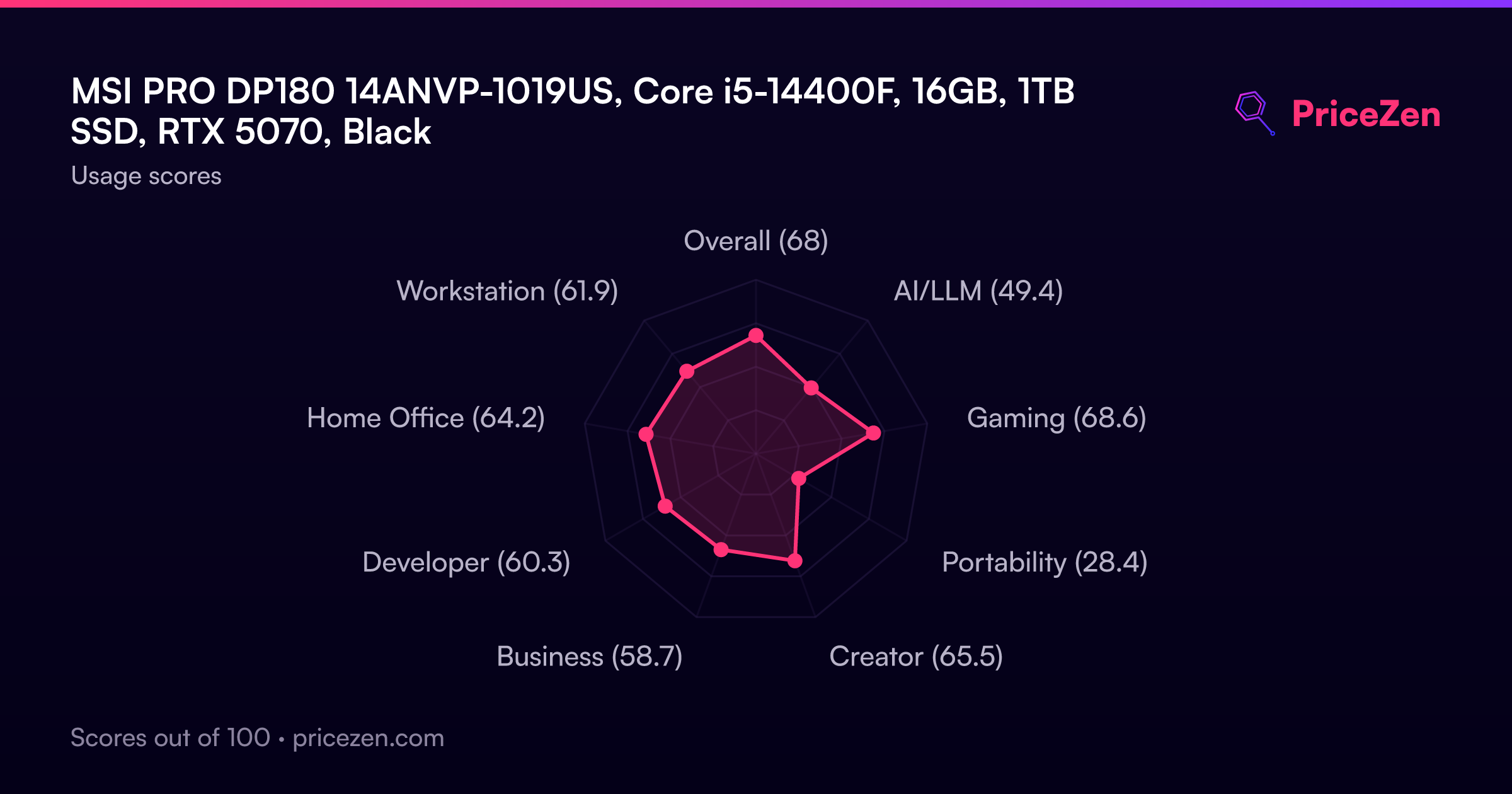
- Overall67.4
- AI/LLM49.3
- Gaming68.5
- Portability28.4
- Creator65.5
- Business58.7
- Developer60.3
- Home Office64.3
- Workstation61.9